
Kaddora Spam Shield Pro Plugin 🎀
User Documentation:📜
Kaddora Spam Shield Pro is an advanced WordPress anti-spam and security plugin that protects comments, forms, user registrations, and WooCommerce checkouts using risk scoring, bot detection, IP blocking, rate limiting, disposable email detection, threat analytics, and fraud prevention tools. Built with a modern OOP architecture, it helps keep your website secure, clean, and spam-free while providing detailed activity logs, reports, and centralized security controls.
Table of Contents
- 1. Overview
- 2. Requirements
- 3. Installation
- 4. Dashboard
- 5. Activity
- 6. Settings
- 7. Access Control
- 8. Workflow
- 9. Performance
- 10. Troubleshooting
- 11. FAQ
- 12. Support
- 13. Changelog
1. Overview
Kaddora Spam Shield Pro is a comprehensive WordPress security and anti-spam solution designed to protect websites from spam, bots, fraudulent registrations, malicious form submissions, and suspicious WooCommerce orders. The plugin combines multiple security layers, including honeypot protection, rate limiting, IP blocking, disposable email detection, user agent filtering, bot detection, and an intelligent risk-scoring engine to identify and stop threats before they impact your website.
Built with a modern object-oriented architecture, Kaddora Spam Shield Pro provides real-time threat monitoring, detailed activity logs, security analytics, fraud reports, and centralized protection controls through a clean and user-friendly admin dashboard. It supports popular contact forms, user registration systems, and WooCommerce stores while maintaining high performance and scalability.
Whether you run a blog, business website, membership platform, or eCommerce store, Kaddora Spam Shield Pro helps reduce spam, prevent abuse, improve security, and give administrators complete visibility into website threats and suspicious activities.
2. Requirements
- WordPress 6.0 or higher
- PHP 7.4 or higher
- MySQL 5.7+ or MariaDB equivalent
- Administrator access to configure plugin settings
- WooCommerce 6.0+ (required only for WooCommerce protection features)
- Modern web browser for accessing the admin dashboard and analytics reports
3. Installation
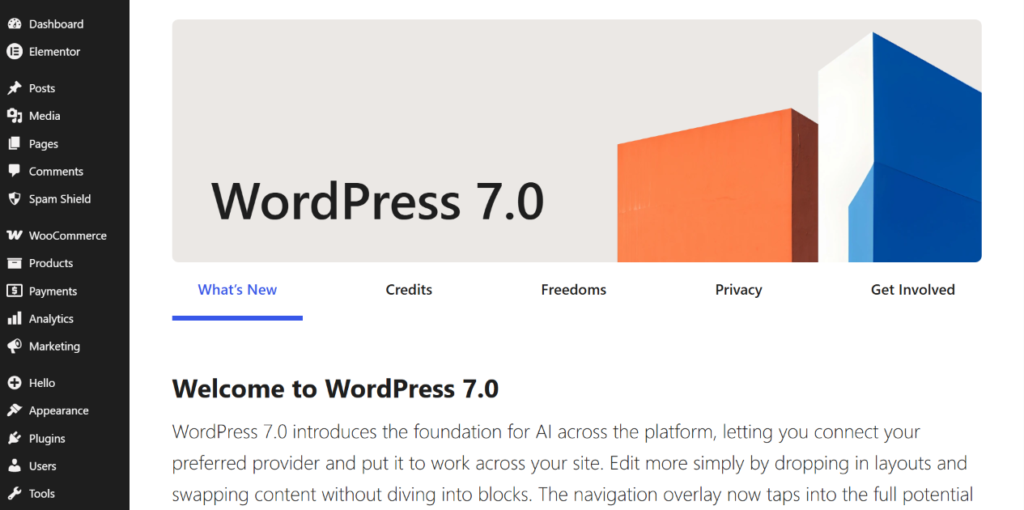
- Go to WordPress Dashboard
- Open Plugins → Add New
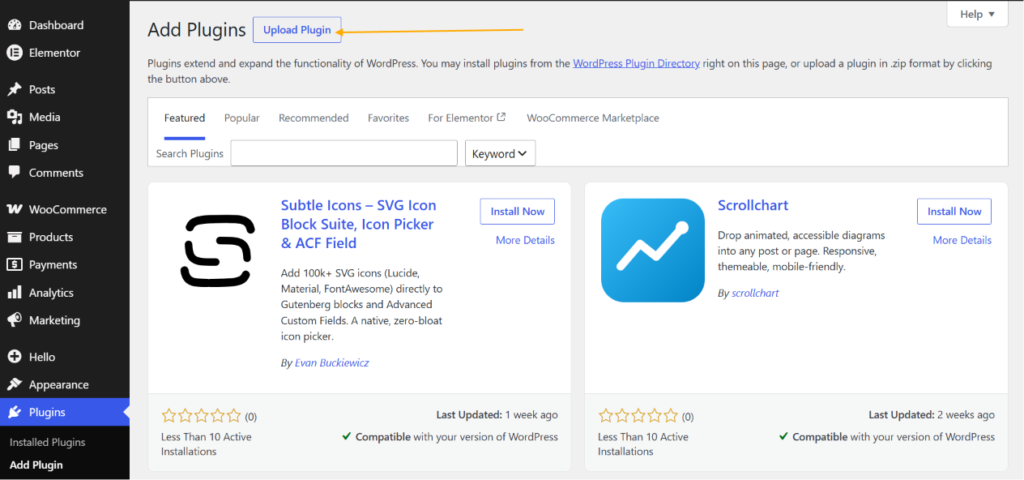
- Click Upload Plugin
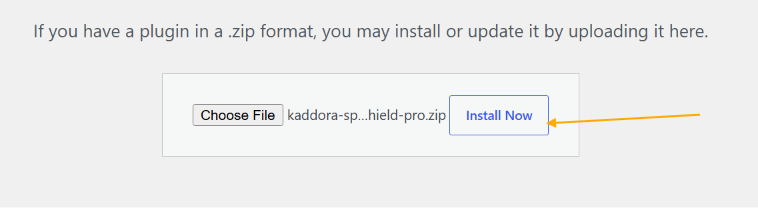
- Select ZIP file
- Click Install Now
- Activate Plugin

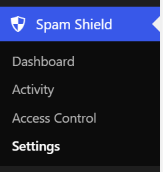
- Open plugin menu from sidebar
4. Dashboard
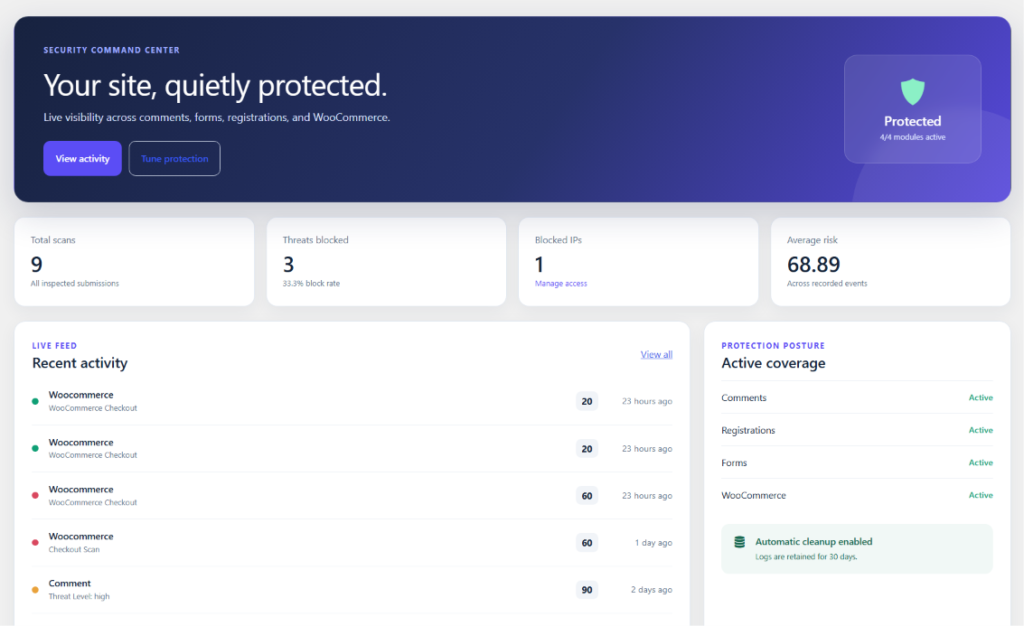
The Dashboard provides a centralized view of your website’s security status, spam protection activity, and threat monitoring. Administrators can quickly review total scanned requests, blocked threats, blocked IP addresses, average risk scores, and recent security events from a single screen. The dashboard also displays real-time activity logs, protection coverage status, WooCommerce security insights, and automated maintenance information, helping you monitor website security and identify suspicious behavior without navigating through multiple pages.
Dashboard Highlights:
- Security Command Center Overview
- Total Scanned Requests & Activities
- Blocked Threat Statistics
- Blocked IP Monitoring
- Average Risk Score Analysis
- Recent Security Activity Feed
- WooCommerce Protection Insights
- Protection Coverage Status
- Automated Cleanup Status
- Quick Access to Security Management Tools
5. Activity Center
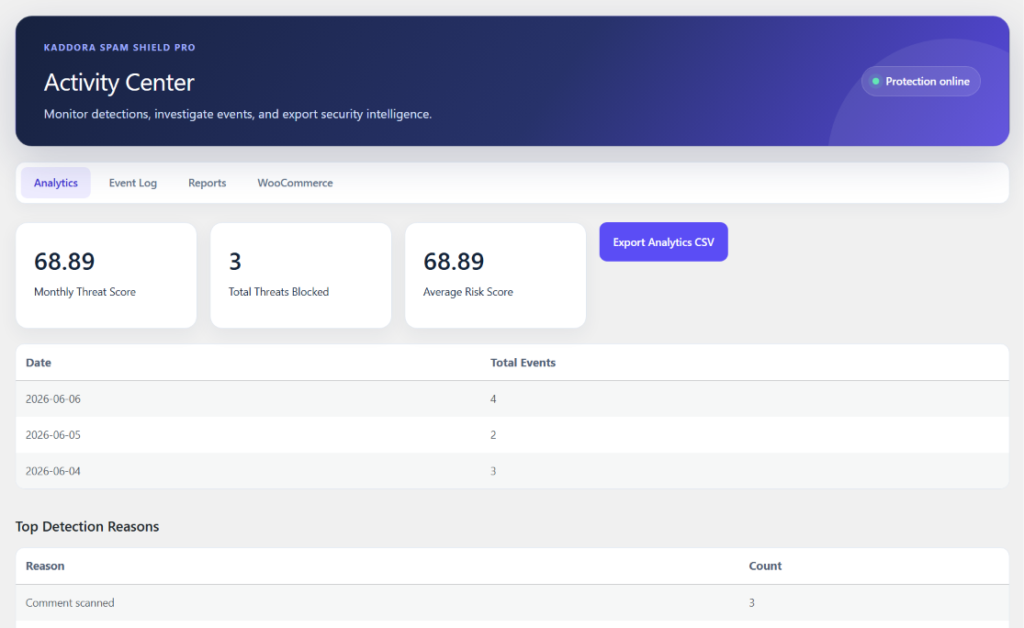
The Activity Center is the central hub for monitoring, analyzing, and managing all security-related events across your website. It provides detailed visibility into spam detections, blocked threats, WooCommerce security scans, user activities, and protection performance. With dedicated analytics, event logs, reports, and WooCommerce monitoring tabs, administrators can quickly investigate suspicious activity, review threat trends, and export security intelligence for further analysis.
Activity Center Highlights:
- Security Analytics Dashboard
- Event Logs & Activity Tracking
- Threat Detection Monitoring
- Detailed Security Reports
- WooCommerce Security Insights
- Monthly Threat Score Analysis
- Total Threats & Risk Statistics
- Top Detection Reasons
- Export Analytics & Reports
- Centralized Security Investigation Workspace
6. Settings
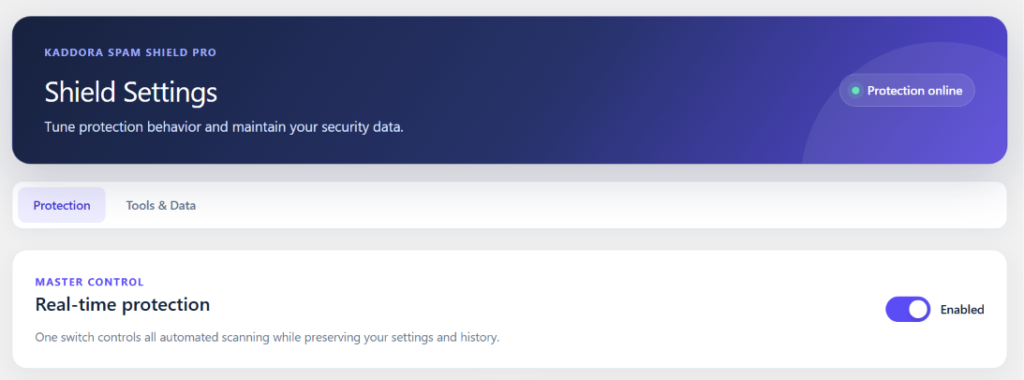
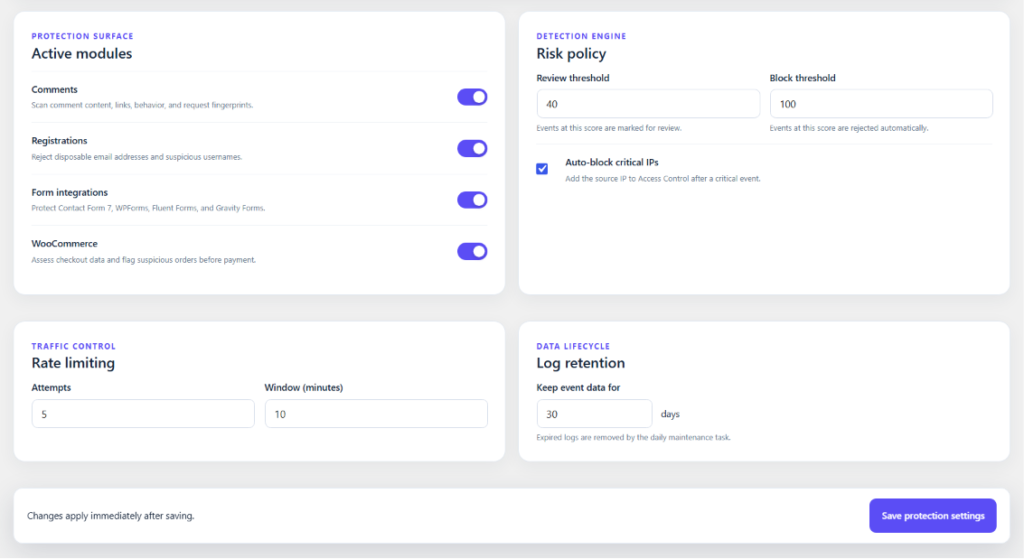
The Settings section gives administrators complete control over the plugin’s protection behavior, security policies, and data management preferences. From a single interface, you can enable or disable protection modules, configure risk thresholds, manage rate limiting rules, control automatic IP blocking, and define log retention periods. The settings panel is designed to provide flexible security controls while keeping configuration simple and easy to manage.
Settings Highlights:
- Master Protection Control Switch
- Enable or Disable Security Modules
- Comment Protection Settings
- Registration Protection Settings
- Form Protection Controls
- WooCommerce Protection Controls
- Risk Score & Detection Policies
- Review and Block Threshold Configuration
- Automatic Critical IP Blocking
- Rate Limiting Configuration
- Log Retention Management
- Import & Export Settings
- Security Data Management
- Centralized Protection Configuration
- Real-Time Security Control Panel
7. Access Control
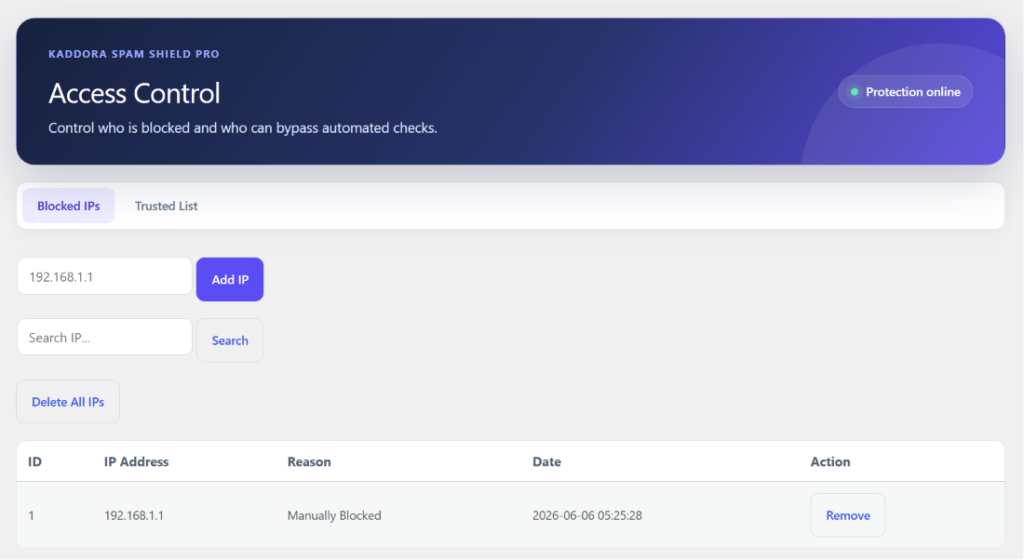
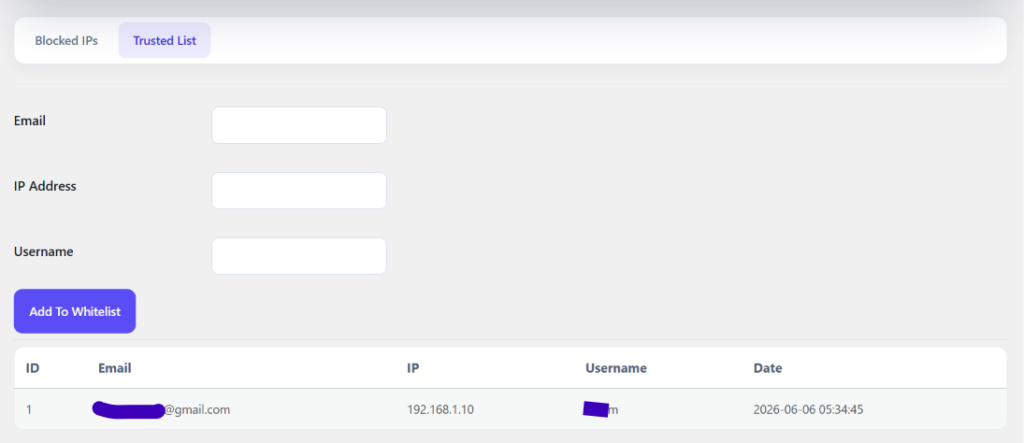
The Access Control section allows administrators to manage blocked IP addresses and trusted users from a centralized security interface. It provides complete control over who can access your website, who should be automatically blocked, and who can bypass security checks. This helps reduce spam, prevent abuse, and ensure legitimate visitors are not affected by automated protection rules.
Access Control Highlights:
- Block and Manage Suspicious IP Addresses
- Create and Maintain Trusted IP Lists
- Manual IP Blocking Controls
- Quick IP Search & Filtering
- Remove Individual or Multiple IPs
- Automatic Critical Threat Blocking
- Trusted Visitor Management
- Bypass Security Checks for Safe Users
- Centralized Access Management Dashboard
- Real-Time Protection Status Monitoring
Trusted List:
8. Workflow
Kaddora Spam Shield Pro follows a multi-layered security workflow that analyzes every comment, form submission, registration request, and WooCommerce checkout before it reaches your website. The plugin applies multiple protection checks, calculates a risk score, determines the threat level, and automatically takes action based on your configured security policies.
Workflow Process:
- User submits a comment, form, registration, or checkout request
- Protection modules validate the request in real time
- Honeypot, rate limiting, bot detection, and IP checks are performed
- User agent, disposable email, keyword, and link analysis are executed
- The Threat Detection Engine calculates a risk score
- The request is classified as Allowed, Review, or Blocked
- Critical threats can be automatically added to the blocked IP list
- Security events are logged with detailed reasons and risk scores
- Analytics and reports are updated automatically
- Administrators can review activity through the Dashboard and Activity Center
9. Performance
Kaddora Spam Shield Pro is built with performance and scalability in mind, ensuring strong security protection without negatively impacting website speed or user experience. The plugin uses optimized database queries, automated maintenance routines, efficient logging mechanisms, and lightweight detection processes to minimize server load while maintaining real-time threat detection.
Performance Highlights:
- Lightweight and Optimized Architecture
- Fast Risk Scoring Engine
- Optimized Database Queries
- Indexed Database Tables
- Automated Log Cleanup
- Configurable Log Retention Policies
- Efficient Rate Limiting System
- Minimal Frontend Impact
- AJAX-Powered Admin Dashboard
- Optimized WooCommerce Protection
- Scheduled Maintenance Tasks
- Scalable for High-Traffic Websites
- Reduced Memory and Resource Usage
- Performance-Focused Security Monitoring
- Built for Large WordPress and WooCommerce Stores
10. Troubleshooting
- Verify that WordPress and PHP meet the minimum requirements
- Ensure the plugin is activated successfully
- Check that all protection modules are enabled in Settings
- Confirm the Master Protection switch is turned on
- Review Activity Center logs for blocked events and errors
- Verify WooCommerce is active before using checkout protection features
- Ensure contact form plugins are installed and activated correctly
- Check IP whitelist settings if legitimate users are being blocked
- Review risk threshold configuration for false positives
- Confirm rate limiting settings are not too restrictive
- Verify scheduled maintenance tasks are running correctly
- Clear website, server, and browser caches after configuration changes
- Check file and folder permissions if settings cannot be saved
- Review the WordPress debug log for PHP errors or warnings
- Temporarily disable conflicting security or anti-spam plugins
- Re-save plugin settings after updating WordPress or WooCommerce
- Verify REST API access is not blocked by security plugins
- Ensure AJAX requests are not blocked by firewall rules
- Check database tables were created successfully during activation
- Contact support if issues persist after troubleshooting steps are completed
11. FAQ
Q: Does Kaddora Spam Shield Pro work with WooCommerce?
A: Yes, the plugin includes WooCommerce checkout protection, fraud detection, risk scoring, and suspicious order monitoring.
Q: Can I block specific IP addresses manually?
A: Yes, you can add, manage, search, and remove blocked IP addresses from the Access Control section.
Q: Does the plugin support popular contact form plugins?
A: Yes, it supports Contact Form 7, WPForms, Fluent Forms, and Gravity Forms.
Q: Will the plugin affect website performance?
A: No, the plugin is optimized with efficient queries, automated cleanup, and lightweight security checks to minimize performance impact.
Q: Can I export and import my plugin settings?
A: Yes, you can easily export your current configuration and import it on another website using the built-in settings management tools.
12. Support
- Dedicated Support Documentation Included
- Detailed Setup and Configuration Guides
- Regular Updates and Security Improvements
- Professional Assistance for Installation and Troubleshooting Issues
13. Changelog
- Version 1.0.0 – Initial Release
© Kaddora Tech