
Kaddora Security – Firewall, Malware Scanner, Login Security 🎀
User Documentation:📜
Kaddora Security is a comprehensive WordPress security and website protection plugin designed to help website owners secure, monitor, and maintain their WordPress installations from a single dashboard. The plugin combines advanced security scanning, firewall protection, malware detection, login security, and website hardening features to reduce common security risks and improve overall site protection. It includes multiple security scanners that analyze WordPress core settings, plugins, themes, file integrity, sensitive files, and suspicious PHP code patterns. The built-in firewall provides IP blocking, bot protection, and rate limiting to help defend against brute-force attacks, automated bots, and malicious traffic. Additional hardening features such as XML-RPC protection, REST API user endpoint restriction, author enumeration blocking, security headers, Content Security Policy (CSP), and strong password enforcement further strengthen website security. The plugin also supports scheduled security scans, email alerts, login activity tracking, session management, and file integrity monitoring, allowing administrators to detect and respond to security issues quickly.
Beyond security, Kaddora Security includes monitoring, reporting, and SEO management capabilities that help website owners maintain site health and visibility. The plugin provides a security dashboard with health scores, risk levels, issue summaries, scan history, and activity logs, giving administrators a clear overview of their website’s security posture. Automated reports, CSV exports, firewall logs, login logs, and quarantine records help with auditing and troubleshooting. The integrated SEO Toolkit offers essential optimization features such as meta descriptions, Open Graph tags, Twitter Cards, Schema JSON-LD markup, title templates, and robots.txt enhancements, ensuring that websites remain search-engine friendly while maintaining strong security standards. Built with a modular architecture, custom database tables, REST API integration, WP-Cron automation, and scalable security components, Kaddora Security Suite serves as an all-in-one WordPress security, monitoring, hardening, reporting, and website management solution suitable for personal websites, business sites, agencies, and professional WordPress environments.
Table of Contents
- 1. Overview
- 2. Requirements
- 3. Installation
- 4. Dashboard
- 5. Settings
- 6. SEO Toolkit
- 7. Reports
- 8. Firewall
- 9. Logs
- 10. Workflow
- 11. Performance
- 12. Troubleshooting
- 13. FAQ
- 14. Support
- 15. Changelog
1. Overview
Kaddora Security is an all-in-one WordPress security plugin designed to protect, monitor, and strengthen websites from a single dashboard. It combines malware scanning, firewall protection, login security, vulnerability detection, activity monitoring, and security hardening features to help reduce common security risks. The plugin also includes automated scans, email alerts, reporting tools, file integrity monitoring, and basic SEO enhancements, making it a comprehensive solution for maintaining website security, performance, and overall health.
Key Features
- Malware scanning and suspicious file detection
- Firewall protection with IP blocking and bot defense
- Login security, brute-force protection, and session management
- Security hardening, monitoring, and automated alerts
- Activity logs, reports, and built-in SEO toolkit support
2. Requirements
- WordPress 6.0 or higher
- PHP 8.0 or higher
- MySQL 5.7+ / MariaDB 10.3+
- Administrator access for security management and configuration
- Recommended: HTTPS-enabled website for maximum security protection
3. Installation
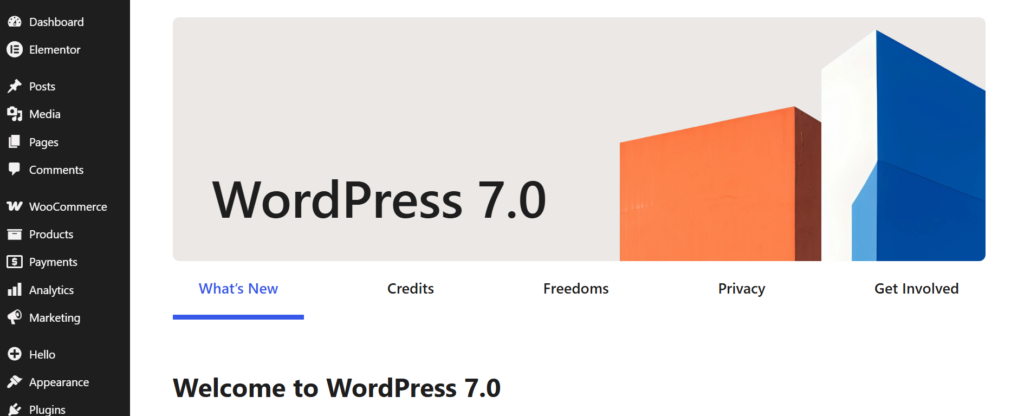
- Go to WordPress Dashboard
- Open Plugins → Add New
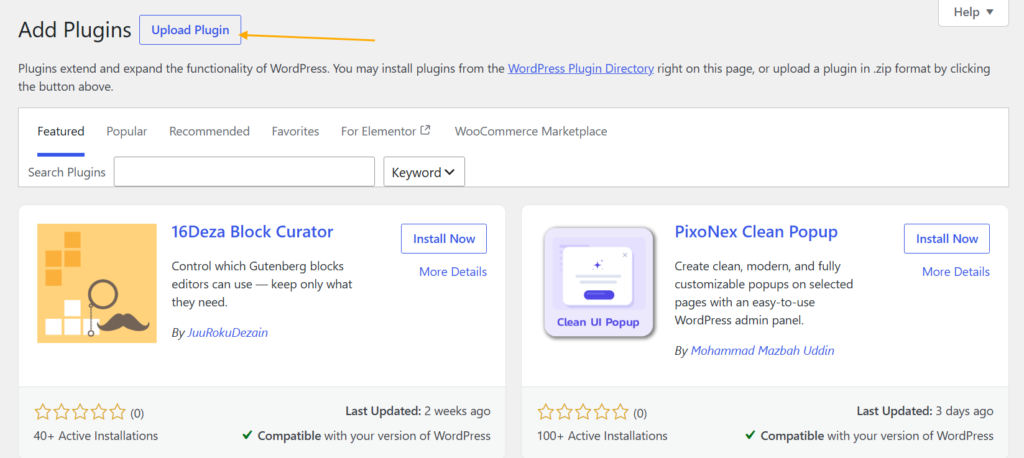
- Click Upload Plugin
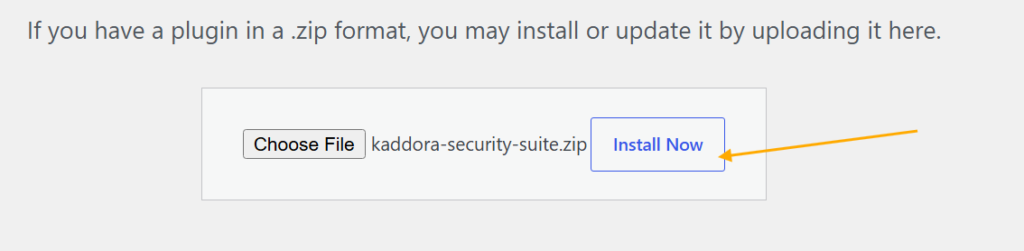
- Select ZIP file
- Click Install Now
- Activate Plugin

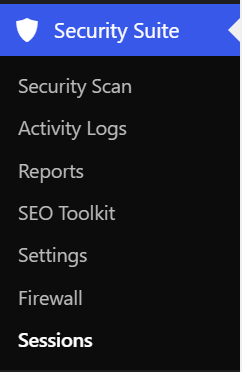
- Open plugin menu from sidebar
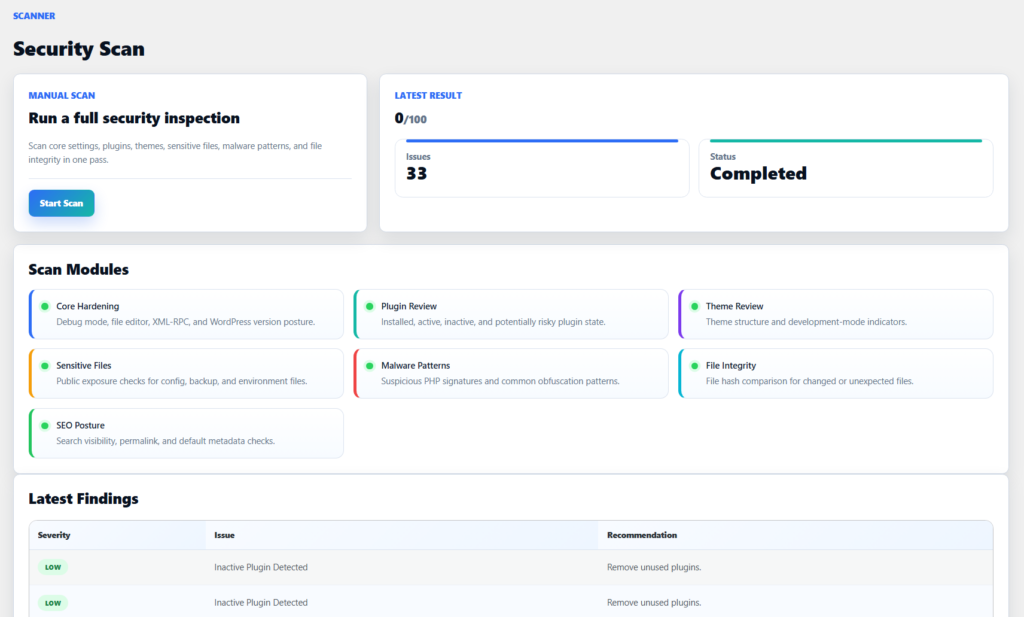
4. Dashboard Scanner
- View the overall security status of your WordPress website from a centralized dashboard.
- Run manual security scans to analyze core settings, plugins, themes, files, and SEO posture.
- Monitor the latest scan score, issue count, and scan completion status in real time.
- Review active security modules including Core Hardening, Plugin Review, Theme Review, Malware Detection, File Integrity, and Sensitive File Checks.
- Identify security findings with severity levels and recommended actions to improve website protection.
- Track website health, security posture, and potential risks through detailed scan results and monitoring insights.
5. Security Settings
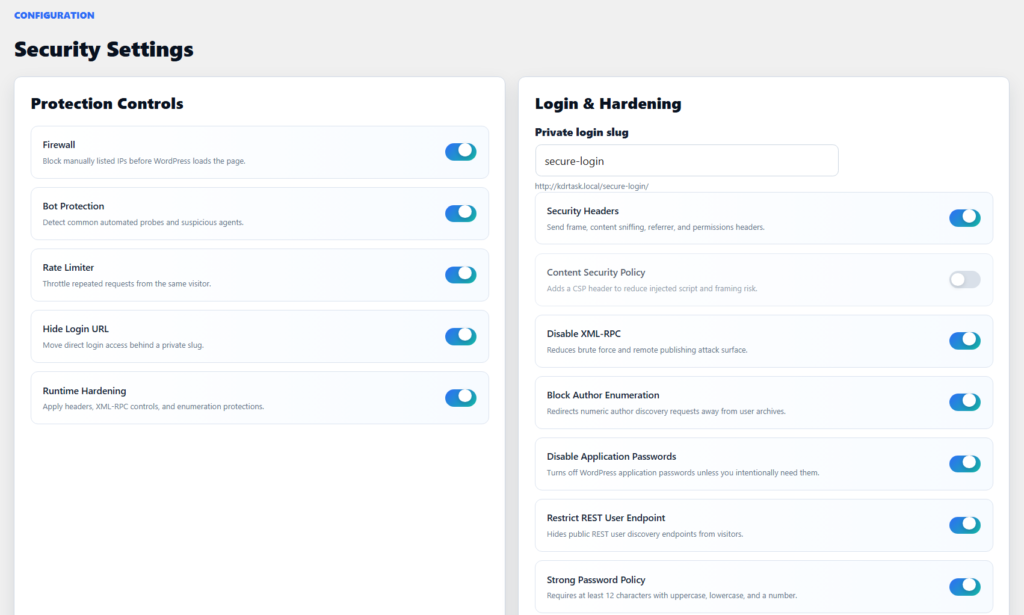
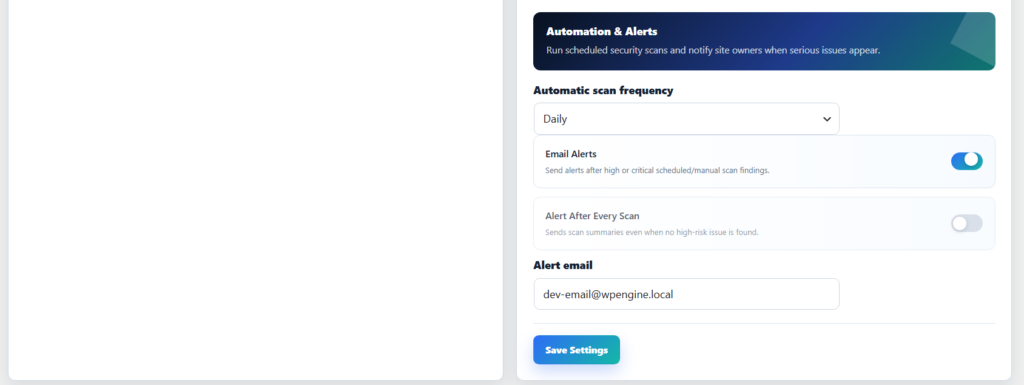
The Security Settings page allows administrators to configure and manage all protection modules from a centralized interface. It provides complete control over firewall protection, login security, website hardening, automated monitoring, and security alerts. Each module can be enabled or disabled individually, making it easy to customize security based on website requirements. The settings panel is divided into dedicated sections for Protection Controls, Login & Hardening, and Automation & Alerts, ensuring organized and efficient security management.
Key Features
- Configure core protection modules including Firewall, Bot Protection, Rate Limiting, Hide Login URL, and Runtime Hardening.
- Strengthen WordPress security with Security Headers, Content Security Policy (CSP), XML-RPC Protection, Author Enumeration Blocking, REST API User Protection, and Application Password Controls.
- Secure authentication using a private login slug and Strong Password Policy enforcement.
- Schedule automatic daily or weekly security scans to continuously monitor website security.
- Receive email notifications for high-risk findings and optional scan summary alerts after every scan.
- Manage alert recipients and security automation settings from a single dashboard.
6. SEO Toolkit
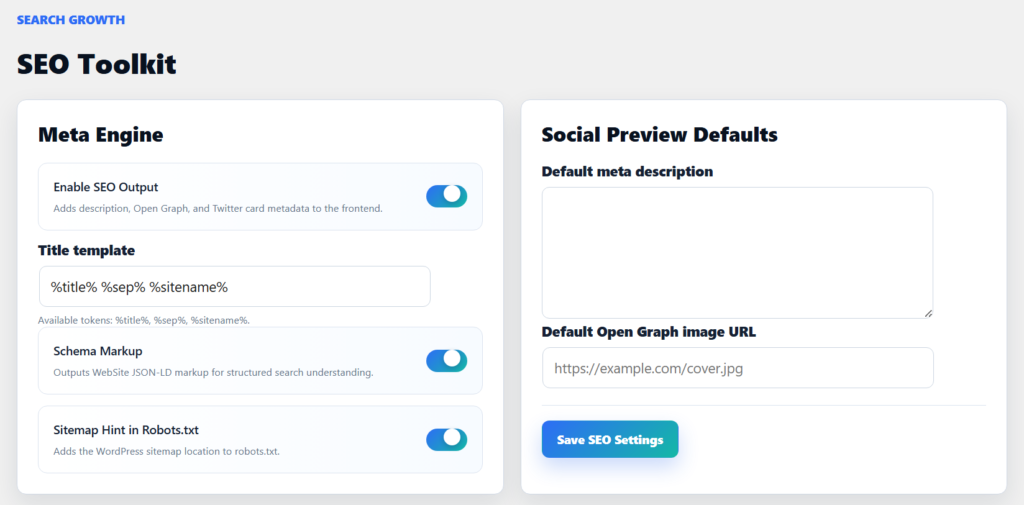
The SEO Toolkit page helps optimize your website’s search engine visibility and social media presence from a centralized dashboard. It provides essential SEO controls for managing metadata, social sharing previews, schema markup, and search engine indexing enhancements. Administrators can configure title templates, default meta descriptions, Open Graph settings, and structured data without relying on multiple SEO plugins. The toolkit is designed to improve search visibility, enhance social media previews, and maintain consistent SEO settings across the website.
Key Features
- Enable or disable SEO metadata output including meta descriptions, Open Graph tags, and Twitter Cards.
- Create custom title templates using dynamic placeholders for consistent page titles.
- Configure default meta descriptions for pages that do not have custom SEO content.
- Set a default Open Graph image to improve social media sharing previews.
- Enable Schema JSON-LD markup to help search engines better understand website content.
- Automatically add a sitemap reference to robots.txt for improved search engine discovery and indexing.
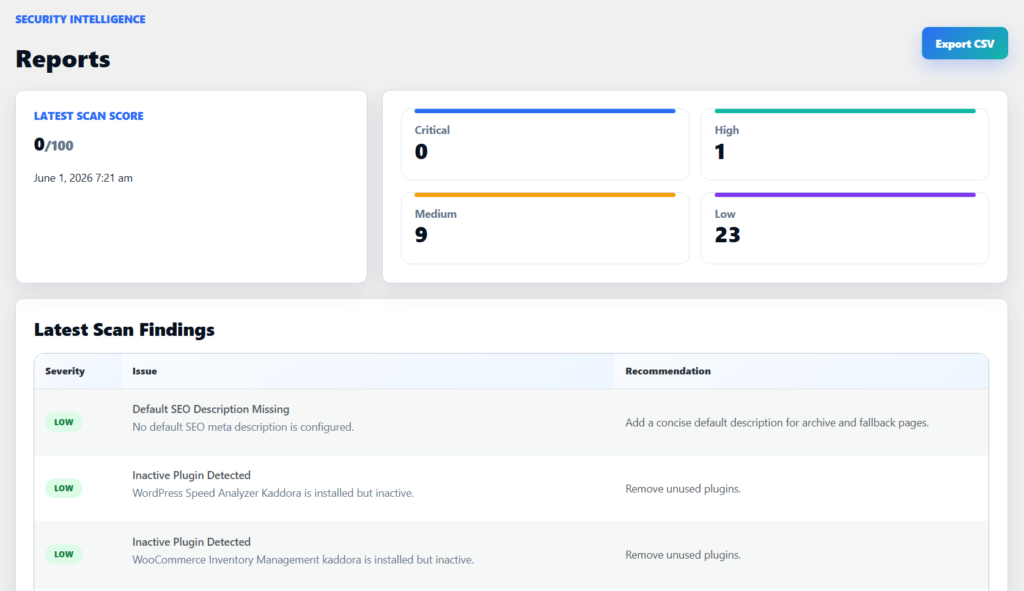
7. Reports
- View the latest security scan score and overall website security status.
- Monitor issue severity levels including Critical, High, Medium, and Low findings.
- Review detailed scan findings with issue descriptions and recommendations.
- Track security risks and identify areas that require attention.
- Export scan reports in CSV format for auditing and record keeping.
- Access historical security findings to monitor security improvements over time.
8. Firewall
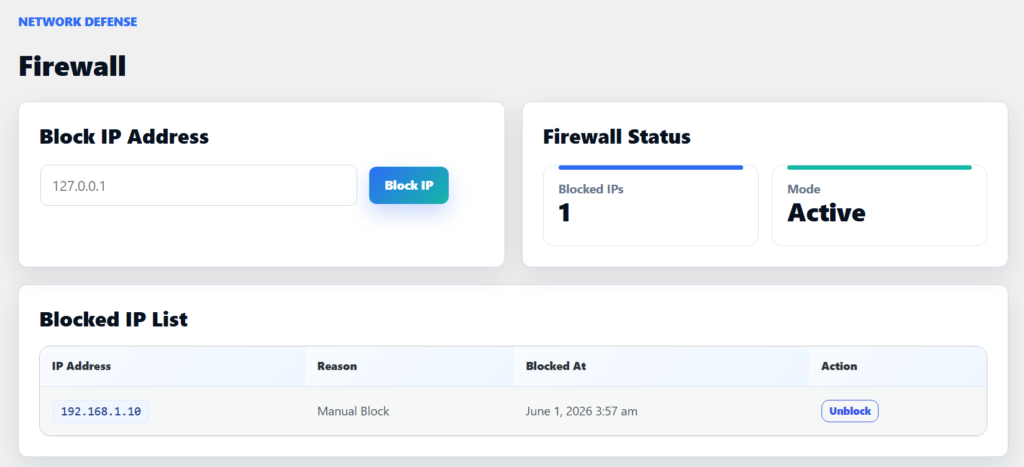
- Block suspicious or unwanted IP addresses manually from the admin dashboard.
- Maintain a centralized blocked IP database with reasons and timestamps.
- Monitor firewall status, protection mode, and total blocked IPs in real time.
- Unblock trusted IP addresses instantly whenever access needs to be restored.
- Prevent blocked visitors from accessing the website and protected resources.
- Strengthen website security by reducing malicious traffic and unauthorized access attempts.
9. Activity Logs
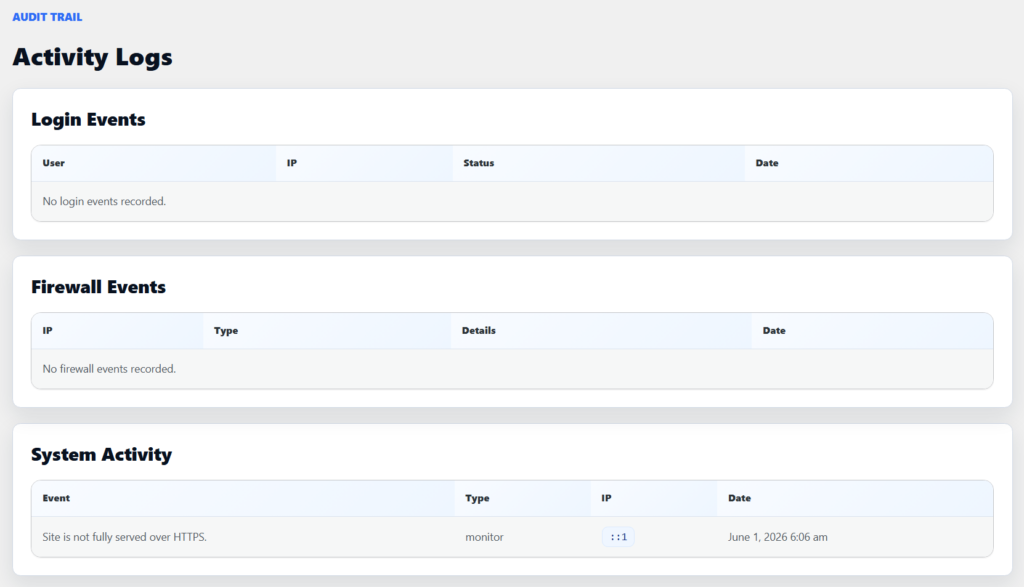
- Monitor login activity including successful and failed login attempts.
- Track firewall-related events such as blocked IPs, bot detection, and security actions.
- View system activity and security monitoring events from a centralized dashboard.
- Record event details including user, IP address, event type, status, and timestamp.
- Maintain an audit trail for security investigations and administrative reviews.
- Improve visibility into website security activities and potential threats over time.
10. Workflow
- Configure security settings and enable the required protection modules.
- Run a manual or scheduled security scan to analyze the website environment.
- Scan core files, plugins, themes, sensitive files, malware patterns, and file integrity.
- Generate a security score and identify critical, high, medium, and low-risk issues.
- Review findings, recommendations, activity logs, and firewall events from the dashboard.
- Apply security hardening measures such as XML-RPC protection, security headers, and login protection.
- Monitor login attempts, blocked IPs, suspicious activity, and system events in real time.
- Receive email alerts for high-risk findings and scheduled scan notifications.
- Export security reports and scan results for auditing, compliance, and record keeping.
- Continuously monitor, optimize, and strengthen website security through automated protection and ongoing assessments.
11. Performance
- Uses a modular architecture to load only required security components when needed.
- Supports scheduled background scans through WP-Cron to reduce manual workload.
- Stores scan results, logs, and security data efficiently using dedicated database tables.
- Performs file integrity monitoring using hash comparisons for fast change detection.
- Lightweight security checks help minimize impact on website speed and server resources.
- Optimized firewall and login protection modules operate with minimal performance overhead.
- Automated monitoring and alert systems run efficiently without interrupting normal website operations.
- Scalable design supports small business websites, blogs, eCommerce stores, and agency-managed sites.
- Security reports and activity logs are organized for quick retrieval and analysis.
- Designed to balance strong security protection with reliable website performance and stability.
12. Troubleshooting
Plugin not visible: Check activation
Events not showing: Check configuration
Dashboard empty: No data available
Time issues: Check time zone
13. FAQ
1. What does Kaddora Security do?
Kaddora Security helps protect WordPress websites with malware scanning, firewall protection, login security, activity monitoring, security hardening, and reporting tools.
2. Can I run a security scan manually?
Yes. You can start a full security scan at any time from the Security Scan page.
3. Does the plugin support automatic scans?
Yes. Security scans can be scheduled to run daily or weekly through the plugin settings.
4. What happens when suspicious files are detected?
Suspicious files are recorded in the security findings and quarantine log for further review and investigation.
5. Can the plugin block malicious visitors?
Yes. The built-in firewall can block IP addresses, detect suspicious bots, and help reduce unwanted traffic.
6. Does the plugin protect against brute-force login attacks?
Yes. It includes login protection features such as failed login tracking, strong password policies, and custom login URL support.
7. Can I receive security notifications by email?
Yes. The plugin can send email alerts for high-risk findings and scheduled scan results.
8. Does the plugin include SEO features?
Yes. The SEO Toolkit provides meta descriptions, Open Graph tags, Schema Markup, robots.txt enhancements, and social sharing settings.
14. Support
- WordPress Version
- Plugin Version
- PHP Version
- Security Scan Results
- Error Details and Logs
15. Changelog
- Version 1.0.0 – Initial Release
© Kaddora Tech