
Kaddora Performance Suite Pro 🎀
User Documentation:📜
Kaddora Performance Suite Pro is a premium WordPress performance optimization plugin designed to improve website speed, database efficiency, media delivery, frontend performance, and overall site health from a single centralized dashboard.
The goal of the project was to provide website owners with an all-in-one optimization toolkit instead of relying on multiple plugins for caching, database cleanup, media optimization, and performance monitoring.
Key Objectives
- Improve website loading speed
- Reduce unnecessary database bloat
- Optimize media delivery
- Enhance frontend performance
- Provide actionable performance insights
- Automate routine maintenance tasks
- Centralize optimization management in a single dashboard
📑 Table of Contents
1. Introduction 🎗️
Kaddora Performance Suite Pro is a premium WordPress performance optimization plugin designed to improve website speed, resource efficiency, database health, and overall user experience. The plugin combines multiple optimization tools into a single centralized dashboard, allowing administrators to monitor, optimize, and maintain website performance with ease.
Key Features
- Performance Dashboard
- Database Optimization
- Image Optimization
- Lazy Loading
- Frontend Performance Optimization
- Cache & Compression
- Performance Monitoring
- Activity Logs & Reports
- Import / Export Settings
- WooCommerce Optimization
2. Requirements & Compatibility ⚙️
Minimum Requirements
- WordPress 6.0 or higher
- PHP 8.0 or higher
- MySQL 5.7+ or MariaDB equivalent
- 128 MB PHP Memory Limit
- Modern Web Browser
Recommended Requirements
- WordPress 6.5+
- PHP 8.1+
- 256 MB PHP Memory Limit
- HTTPS Enabled
- Object Cache Enabled
Compatibility
- WordPress Multisite
- WooCommerce
- Elementor
- Gutenberg Editor
- Most Modern WordPress Themes
3.Plugin Installation 📌
- Go to the WordPress Dashboard -:
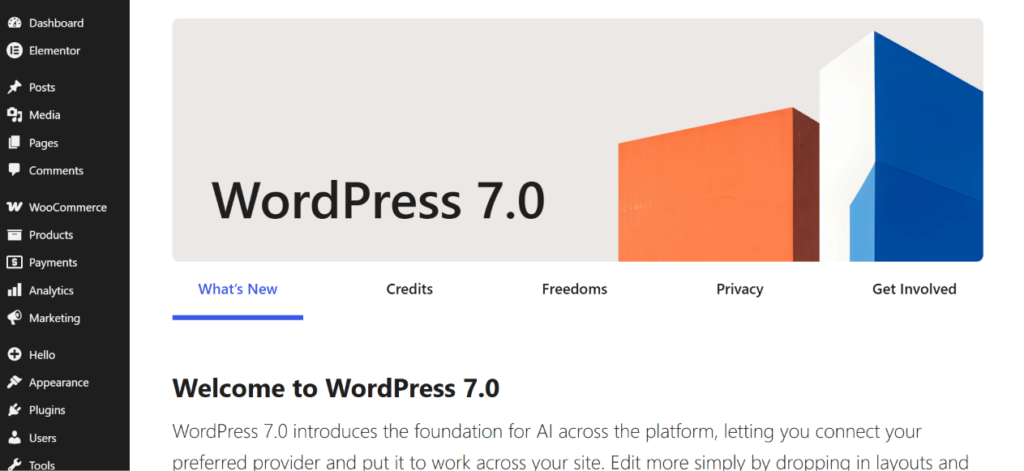
- Plugins → Add New →
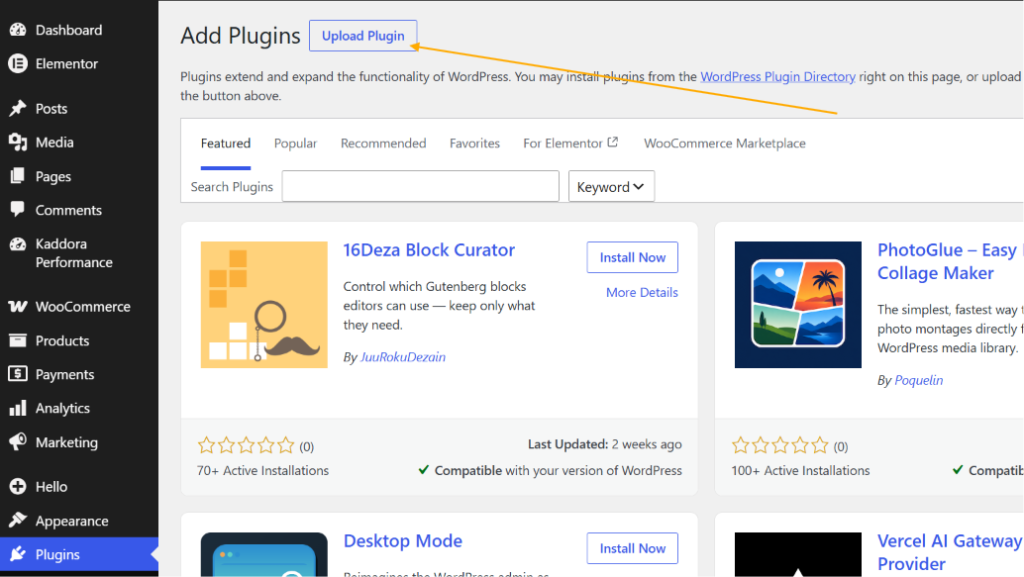
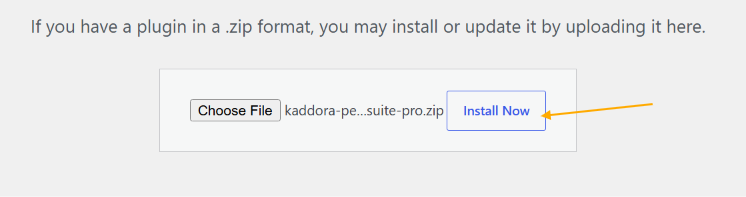
- Upload Plugin > Choose the kaddora-performance-suite-pro plugin file and click Install Now.
- After successfully Installation & Activation of plugin, you will see ‘Kaddora Performance Suite Pro’ in your installed plugin section, here you can check version and description about the plugin.

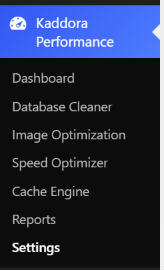
- In the WordPress dashboard, you will find the Kaddora Performance option . Click on it to access the plugin features.
4. Dashboard 🛠️
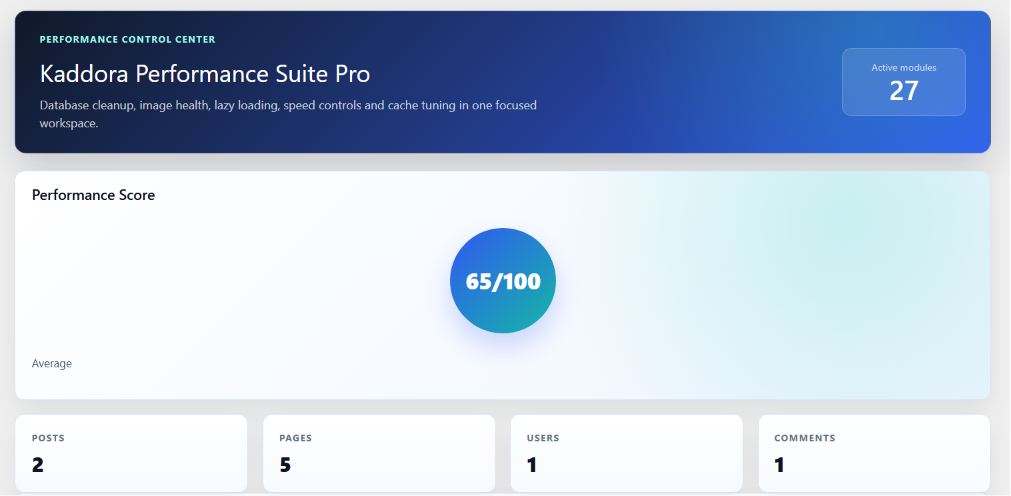
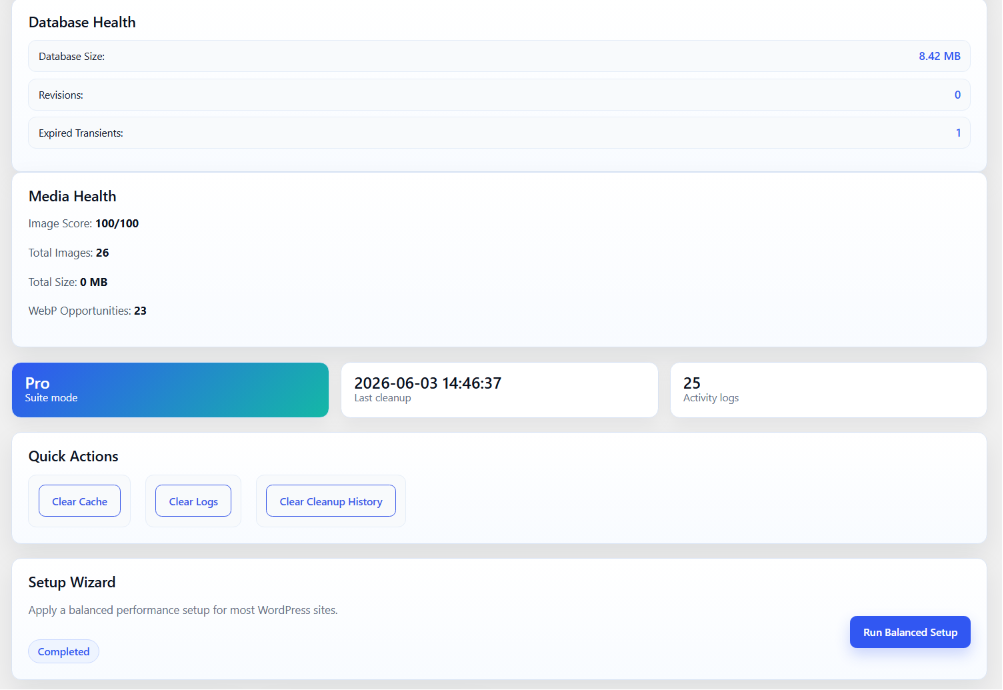
The dashboard serves as the central control center for all optimization modules.
Dashboard Components
- Performance Score
- System Information
- Database Health
- Media Health
- Optimization Recommendations
- Recent Activity Logs
- Cleanup Statistics
- Performance Reports
Dashboard Benefits
- Quick website health monitoring
- Optimization insights
- Maintenance tracking
- Performance visibility
5.Image Optimization
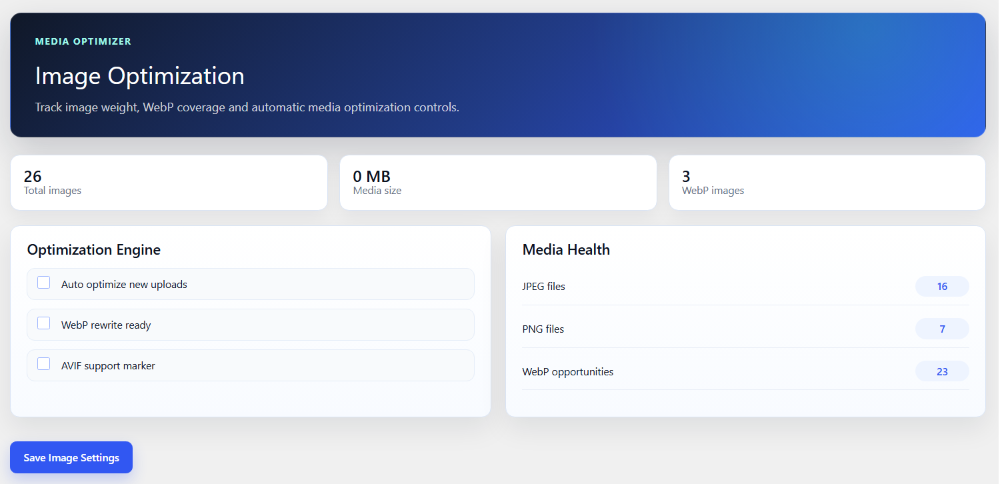
The Image Optimization module analyzes and optimizes media files.
Features
- Media Library Analysis
- JPEG Detection
- PNG Detection
- GIF Detection
- WebP Detection
- WebP Opportunity Analysis
- Image Health Score
Benefits
- Reduced image size
- Improved page speed
- Better user experience
- Lower bandwidth usage
6.Settings
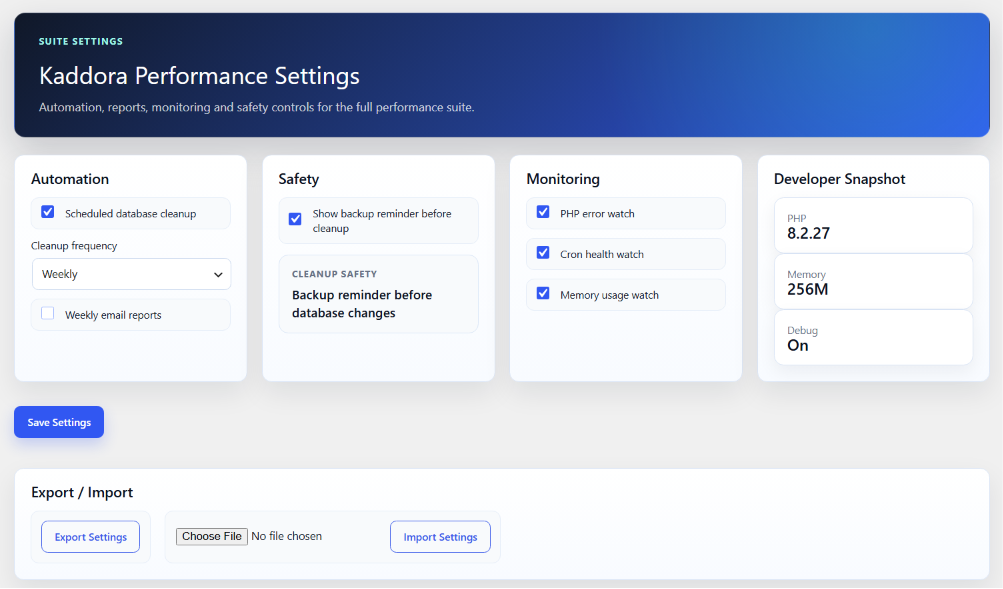
This module allows easy migration of plugin settings between websites.
Export
- Export settings as JSON
- Backup current configuration
Import
- Restore saved configuration
- Apply settings across multiple websites
Benefits
- Time-saving configuration management
- Easy migration
- Consistent settings deployment
7. Database Cleaner
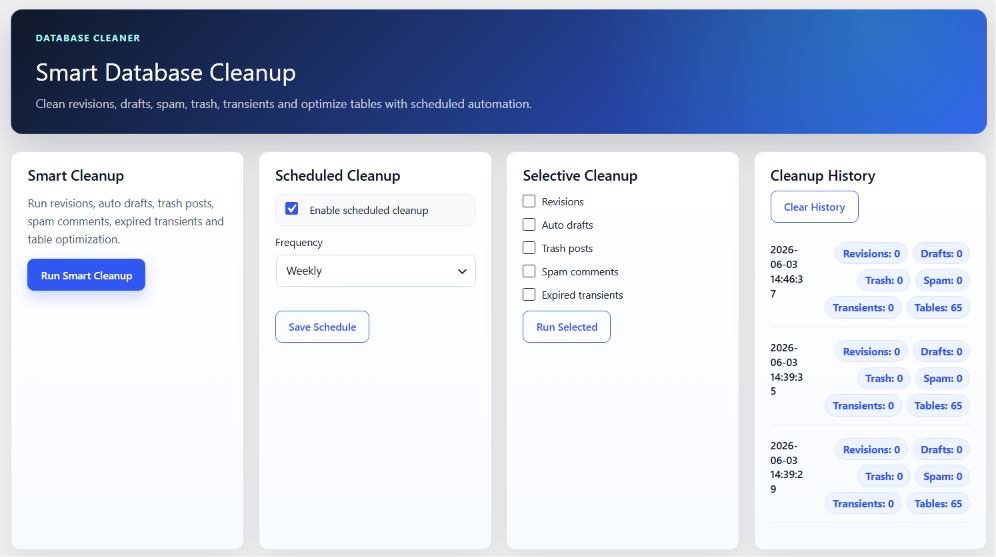
The Database Cleaner module removes unnecessary data that accumulates over time.
Cleanup Options
- Post Revisions
- Auto Drafts
- Trash Posts
- Spam Comments
- Expired Transients
- Database Table Optimization
Features
- One-click Cleanup
- Selective Cleanup
- Scheduled Cleanup
- Cleanup History
- Cleanup Statistics
- Activity Logging
Available Schedules
- Daily
- Weekly
- Monthly
8.Reports
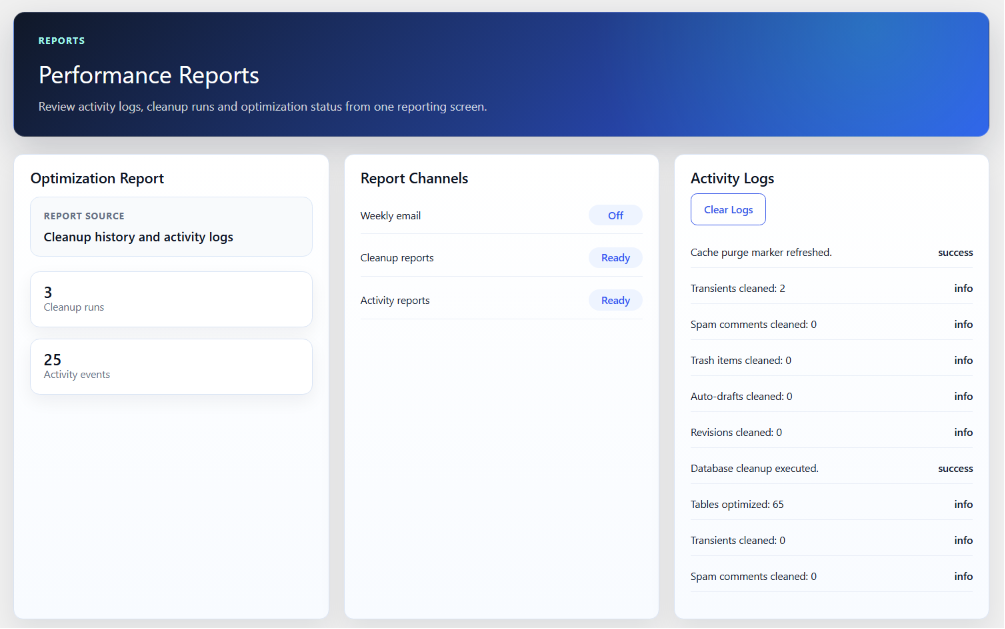
Performance Reports provide visibility into website optimization status.
Available Reports
- Performance Score Reports
- Database Reports
- Media Reports
- Cleanup Reports
- Activity Reports
Report Benefits
- Performance tracking
- Maintenance monitoring
- Optimization insights
- Historical records
9. Cache & Compression
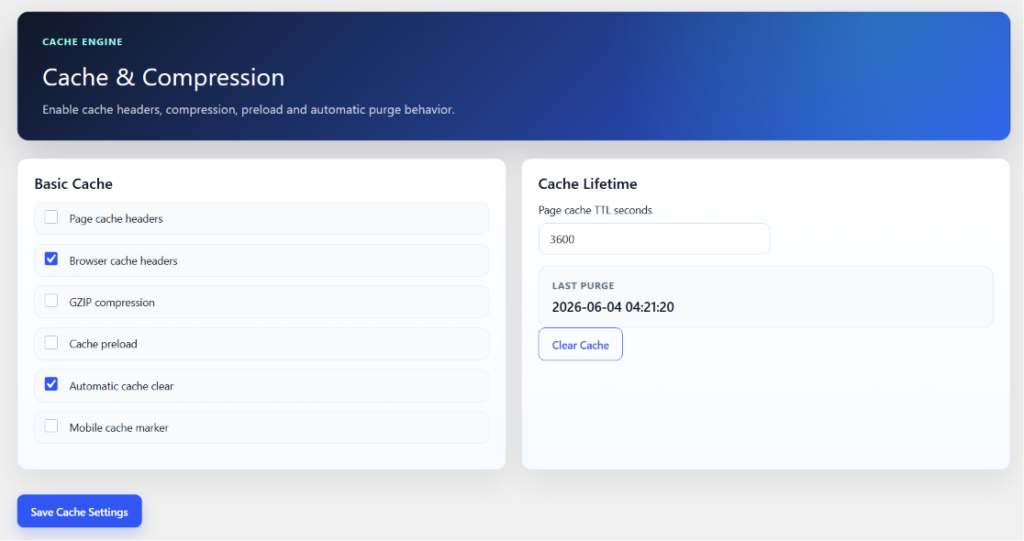
This module improves delivery speed through caching and compression mechanisms.
Features
- Browser Cache
- GZIP Compression
- Cache Preloading
- Automatic Cache Clearing
- Manual Cache Purge
Benefits
- Faster page delivery
- Reduced server load
- Improved repeat visits
- Better performance metrics
10. Frontend Performance
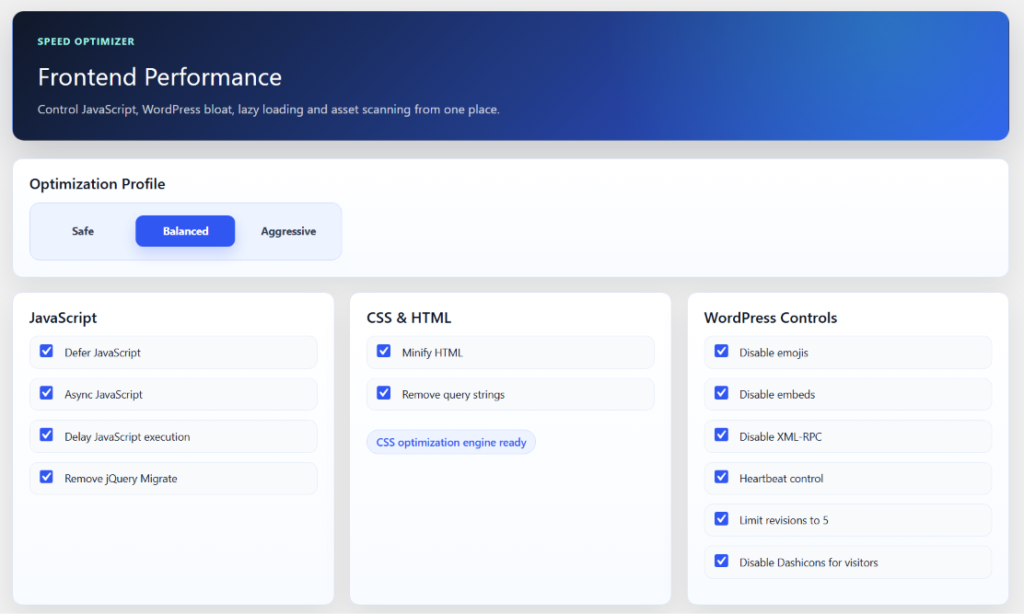
The Performance Optimizer module provides advanced controls for improving frontend performance, reducing unnecessary resource usage, and optimizing the delivery of website assets. It allows administrators to apply recommended optimization settings through predefined profiles or configure each feature individually.
Optimization Profiles
Choose a predefined optimization strategy based on your website requirements:
Safe
- Applies basic optimizations
- Maximum compatibility with themes and plugins
- Recommended for production websites
Balanced
- Applies moderate performance improvements
- Balanced speed and compatibility
- Recommended for most websites
Aggressive
- Applies advanced optimization settings
- Maximum performance improvements
- Recommended for testing before deployment
JavaScript Optimization
Improve frontend script loading performance using:
- Defer JavaScript
- Async JavaScript
- Delay JavaScript Execution
- Remove jQuery Migrate
Benefits
- Faster page rendering
- Reduced render-blocking resources
- Improved Core Web Vitals
- Better frontend performance
CSS & HTML Optimization
Optimize page output and reduce unnecessary markup.
Available Features
- Minify HTML
- Remove Query Strings
- CSS Optimization Engine
Benefits
- Reduced page size
- Faster browser processing
- Improved loading performance
WordPress Controls
Disable unnecessary WordPress features that may impact performance.
Available Controls
- Disable Emojis
- Disable Embeds
- Disable XML-RPC
- Heartbeat Control
- Limit Post Revisions
- Disable Dashicons for Visitors
Benefits
- Reduced HTTP requests
- Lower server resource usage
- Improved frontend efficiency
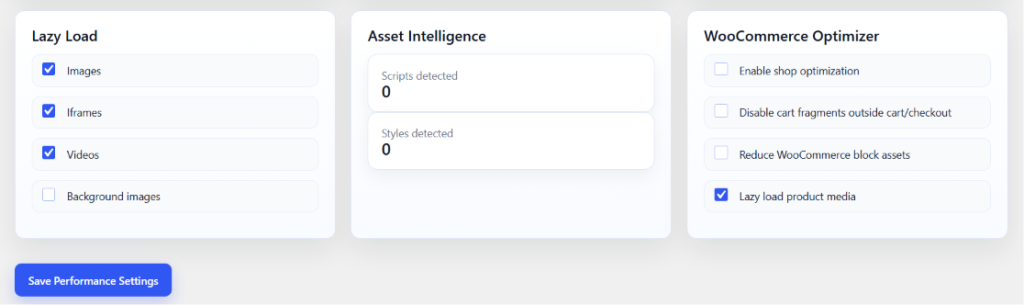
Lazy Load
Load media resources only when they enter the visitor’s viewport.
Supported Elements
- Images
- Iframes
- Videos
- Background Images
Benefits
- Reduced initial page weight
- Faster page load times
- Improved user experience
Asset Intelligence
Analyze frontend resources loaded by the website.
Information Provided
- Scripts Detected
- Styles Detected
- Asset Overview
Benefits
- Better understanding of frontend resources
- Identification of optimization opportunities
- Improved performance analysis
WooCommerce Optimizer
Additional optimization controls for WooCommerce-powered stores.
Available Features
- Enable Shop Optimization
- Disable Cart Fragments Outside Cart/Checkout
- Reduce WooCommerce Block Assets
- Lazy Load Product Media
Benefits
- Faster product pages
- Reduced WooCommerce overhead
- Improved shopping experience
- Better store performance
Saving Settings
After selecting the desired optimization options:
- Configure the required settings.
- Review selected optimizations.
- Click Save Performance Settings.
- The plugin will apply the selected optimizations automatically.
Recommended Configuration
For most websites, the Balanced Profile combined with:
- Defer JavaScript
- Async JavaScript
- Disable Emojis
- Disable Embeds
- Heartbeat Control
- Image Lazy Loading
- WooCommerce Asset Optimization
provides the best balance between performance and compatibility.
11. Troubleshooting 🛠️
1. Performance Optimizations Not Applying
- Ensure the desired optimization settings are enabled.
- Save the settings after making changes.
- Clear all website and browser caches.
- Refresh the frontend and test again.
2. Scheduled Cleanup Is Not Running
- Verify that WordPress Cron is enabled.
- Check if a cleanup schedule has been configured.
- Ensure the website receives regular traffic to trigger WP-Cron.
- Review activity logs for scheduled task execution.
3. Performance Score Is Not Updating
- Run a fresh performance analysis.
- Clear plugin cache and browser cache.
- Save the current settings again.
- Refresh the dashboard to load updated statistics.
4. WooCommerce Optimization Features Not Available
- Confirm that WooCommerce is installed and activated.
- Refresh the plugin dashboard after activating WooCommerce.
- Verify that WooCommerce-specific options are enabled.
- Check compatibility with other optimization plugins.
5. Lazy Loading Is Not Working
- Ensure Lazy Load is enabled in the settings.
- Clear all caching layers after enabling the feature.
- Verify that theme or plugin conflicts are not overriding image attributes.
- Test the website in an incognito/private browser window.
12. FAQ ❓
Does this plugin work with WooCommerce?
Yes. WooCommerce optimization features are included.
Does the plugin support scheduled cleanup?
Yes. Daily, weekly, and monthly cleanup schedules are available.
Is coding knowledge required?
No. The plugin is designed for both beginners and advanced users.
Can I export plugin settings?
Yes. Settings can be exported and imported using JSON files.
Will the plugin improve website speed?
The plugin provides multiple optimization tools that can help improve overall website performance and efficiency.
Is the plugin compatible with modern WordPress versions?
Yes. It is designed to work with current WordPress releases.
13. Support & Updates 🛎️
- Regular plugin updates for performance improvements and feature enhancements.
- Bug fixes and compatibility updates for supported WordPress versions.
- Technical support for installation, configuration, and troubleshooting.
- Ongoing maintenance to ensure stability and reliability.
- Documentation updates and guidance for new features and improvements.
© Kaddora Tech