
Kaddora Ominichannel Marketing Hub 🎀
User Documentation📜:
Kaddora Omnichannel Marketing Hub helps WordPress sites manage marketing from one dashboard. Run email and SMS campaigns, organize customer data, track engagement, and streamline multichannel communication.
📑 Table of Contents
- 1. Introduction
- 2. Requirements & Compatibility
- 3. Plugin Installation
- 4. Dashboard (Admin Panel)
- 5. Campaign Management (Email & SMS)
- 6. Customer Management
- 7. Automation Workflows
- 8. Analytics & Reports
- 9. Integrations (API & Services)
- 10. Performance & Optimization
- 11. Troubleshooting
- 12. FAQ
- 13. Support & Updates
1. Introduction 🎗️
Kaddora Omnichannel Marketing Hub is a powerful WordPress plugin designed to help businesses manage and automate their marketing efforts from a single, centralized dashboard. It enables seamless communication across multiple channels such as Email and SMS, helping you engage customers, increase conversions, and grow your business efficiently.
With an easy-to-use interface and smart automation features, Kaddora simplifies campaign creation, customer management, and performance tracking—making it ideal for marketers, eCommerce stores, and agencies.
- 📧 Run Email marketing campaigns directly from your WordPress dashboard
- 📱 Send SMS notifications and promotional messages to customers
- 👥 Manage and organize customer data in one place
- ⚙️ Create automated workflows for marketing actions and follow-ups
- 📊 Track campaign performance with built-in analytics and reports
- 🔗 Integrate with third-party APIs and marketing services
- 🚀 Improve engagement, retention, and conversion rates
- 🎯 Designed for WooCommerce stores, businesses, and digital marketers
2. Requirements & Compatibility ⚙️
- 💻 WordPress Version: Requires WordPress 5.8 or higher
- 🐘 PHP Version: PHP 7.4 or higher recommended
- 🛢️ Database: MySQL 5.6+ or MariaDB equivalent
- 🌐 Browser Support: Compatible with Chrome, Firefox, Edge, and Safari
- 📦 WooCommerce Support: Fully compatible with WooCommerce for customer and order data
- 📧 Email Functionality: Requires proper SMTP configuration for reliable email delivery
- 📱 SMS Integration: Requires third-party SMS API (e.g., Twilio, MSG91)
- 🔗 API Access: Supports REST API integration for external services
- 🔐 User Roles: Works with WordPress admin and custom user roles
- ⚡ Performance: Optimized for most modern themes and hosting environments
- 🧩 Plugin Compatibility: Compatible with most popular WordPress plugins
- ☁️ Hosting: Works on shared, VPS, and cloud hosting environments
3.Plugin Installation 📌
- Go to the WordPress Dashboard -:
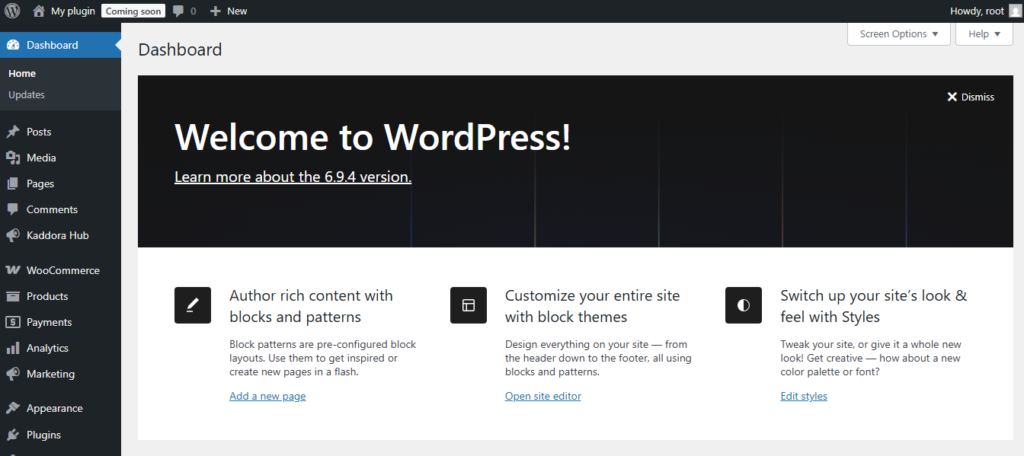
- Plugins → Add New →
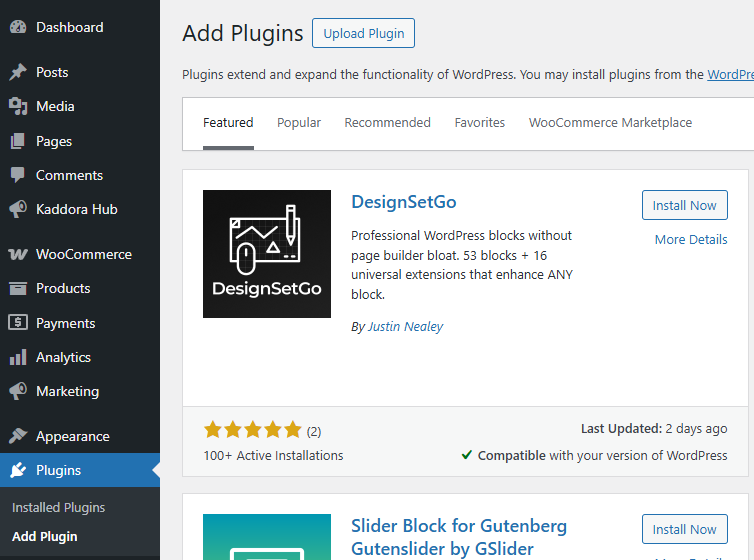
- Upload Plugin > Choose the image-alt-text-auto-generator-kdr.zip plugin file and click Install Now.

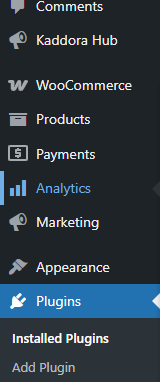
- After successfully Installation & Activation of plugin, you will see ‘kaddora ominichannel marketing hub’ in your installed plugin section, here you can check version and description about the plugin.

- In WordPress dashboard, you can see ‘kaddora ominichannel marketing hub’’ option available, click on it and access the setting part of the Plugin.
4. Dashboard (Admin Panel) 🛠️
- Dashboard
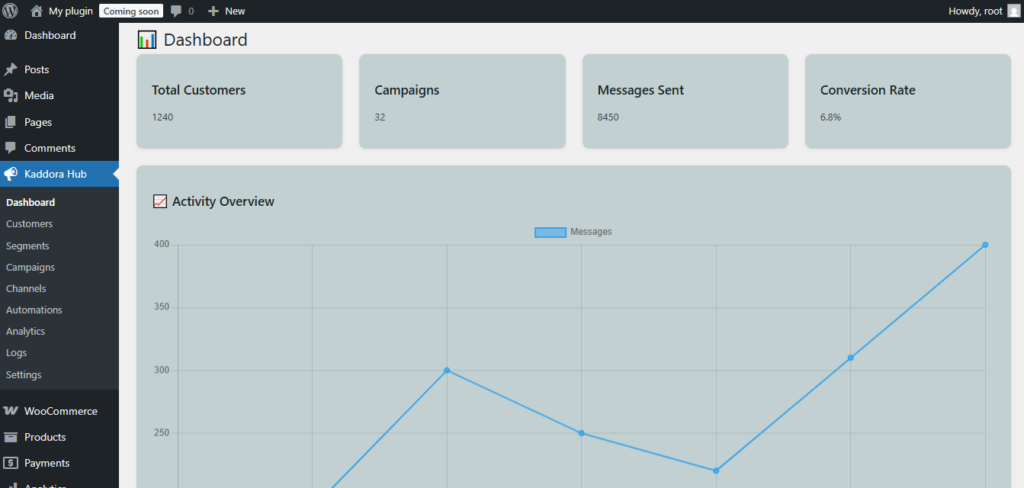
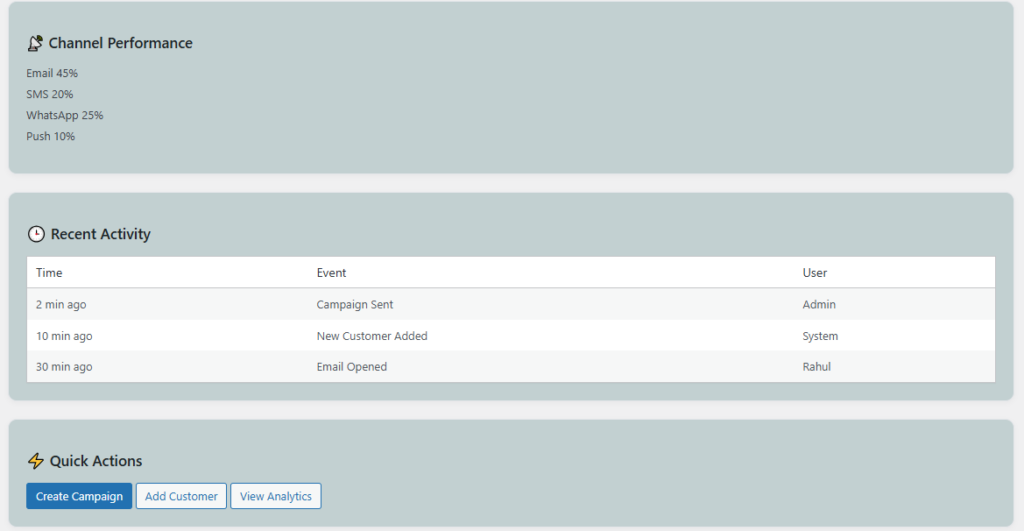
The Kaddora Omnichannel Marketing Hub dashboard provides a centralized control panel where administrators can manage campaigns, customer data, settings, and marketing activity from one place. It is designed with a clean and user-friendly layout so you can quickly access the most important tools without complexity.
From the dashboard, you can monitor overall marketing performance, view recent activity, manage customer communication channels, and configure plugin settings. This helps save time and keeps your marketing workflow organized inside WordPress.
- Access all major marketing tools from one admin dashboard
- Create and manage Email and SMS campaigns easily
- View customer lists and engagement details in one place
- Monitor recent campaign activity and communication history
- Configure API settings for email and SMS service providers
- Track reports, campaign results, and performance metrics
- Manage automation workflows and marketing actions
- Use a simple and organized interface built for WordPress admins
- Quickly navigate between customers, campaigns, analytics, and settings
- Designed to support business owners, marketers, and WooCommerce stores
5.Campaign Management (Email & SMS)
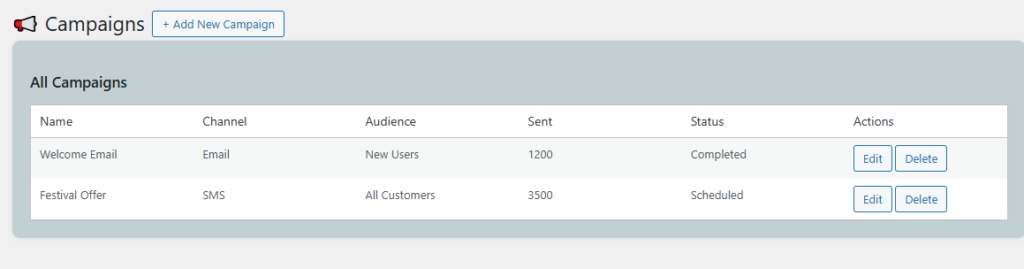
Kaddora Omnichannel Marketing Hub provides a complete campaign management system that allows you to create, manage, and track both Email and SMS campaigns directly from your WordPress dashboard. It is designed to help businesses communicate effectively with their audience, promote products, send updates, and build long-term customer relationships.
With an intuitive interface and flexible targeting options, you can reach the right audience at the right time. Whether you are running promotional campaigns, transactional alerts, or automated follow-ups, Kaddora simplifies the entire process.
📧 Email Campaign Management
Create professional email campaigns with ease using customizable templates and audience targeting features. You can design newsletters, promotional offers, or announcements and send them to selected customer groups.
- Create and send bulk email campaigns from WordPress
- Use customizable templates for professional email design
- Target specific customer groups or segments
- Schedule emails for future delivery
- Track email performance (opens, clicks, engagement)
- Send transactional emails such as order updates or notifications
📱 SMS Campaign Management
Reach your customers instantly with SMS campaigns. This feature is ideal for sending time-sensitive messages such as offers, reminders, alerts, and confirmations.
- Send bulk SMS messages to customers
- Integrate with SMS gateways (e.g., Twilio, MSG91)
- Schedule SMS campaigns for specific dates and times
- Send transactional SMS like OTPs, order alerts, and reminders
- Personalize messages using customer data
- Ensure fast and reliable message delivery
🎯 Campaign Targeting & Segmentation
Kaddora allows you to segment your audience based on various criteria, ensuring your campaigns reach the most relevant users.
- Segment customers by purchase history, activity, or status
- Create targeted campaigns for specific user groups
- Improve engagement with personalized communication
📊 Campaign Tracking & Analytics
Measure the success of your campaigns with built-in analytics and reporting tools. This helps you understand user behavior and optimize future campaigns.
- Track delivery status for emails and SMS
- Analyze open rates, click rates, and conversions
- View detailed campaign reports
- Optimize campaigns based on performance insights
Overall, the Campaign Management feature in Kaddora helps you streamline communication, improve customer engagement, and maximize your marketing results across multiple channels.
6.Customer Management 👥
Kaddora Omnichannel Marketing Hub includes a detailed customer management system that helps you organize, monitor, and interact with your audience directly from the WordPress dashboard. Instead of handling customer details across multiple tools, the plugin brings important customer information into one centralized location for easier access and better marketing decisions.
This feature is especially useful for businesses, WooCommerce stores, and marketing teams that want to maintain a structured customer database, understand customer behavior, and create more personalized communication strategies.
Centralized Customer Records
The customer management section stores essential customer details in one place, making it easier to view and manage contact information, activity, and engagement history.
- Store customer names, email addresses, phone numbers, and account details
- Maintain organized customer records from a single dashboard
- Access customer profiles quickly without switching between tools
- Keep communication data structured for better workflow management
Customer Segmentation
Segmentation helps you divide customers into meaningful groups so you can send more relevant campaigns and offers. This improves engagement and helps businesses reach the right audience with the right message.
- Group customers by activity, purchase behavior, or status
- Create customer segments for targeted Email and SMS campaigns
- Identify active, inactive, or returning customers easily
- Improve campaign performance through better audience targeting
Engagement and Activity Tracking
Understanding customer interaction is important for effective marketing. Kaddora helps track how customers engage with campaigns and store activity so businesses can make informed decisions.
- Monitor campaign engagement such as opens, clicks, and responses
- Track customer activity related to orders, subscriptions, or interactions
- Review communication history for better follow-up planning
- Use customer behavior insights to refine future campaigns
Personalized Communication
Customer data can be used to personalize messages, making marketing more relevant and effective. Personalized communication often leads to stronger customer relationships and better conversion rates.
- Use customer details to personalize Email and SMS content
- Send targeted offers, updates, and reminders
- Create better customer experiences through relevant messaging
- Strengthen retention and engagement with personalized outreach
WooCommerce and Business Use
For WooCommerce-powered websites, customer management becomes even more valuable by connecting customer profiles with order-related information and shopping behavior.
- Manage WooCommerce customer data more efficiently
- Use order-related insights for targeted campaigns
- Identify loyal customers and repeat buyers
- Support sales, promotions, and retention strategies with real customer data
Easy Administration
The customer management interface is designed to be simple and practical for WordPress administrators. It allows businesses to handle customer records without technical complexity.
- Simple and user-friendly dashboard layout
- Quick access to important customer information
- Organized data structure for smooth administration
- Built to support business owners, marketers, and administrators
Overall, the Customer Management feature in Kaddora Omnichannel Marketing Hub helps businesses build stronger relationships with their audience by keeping customer data organized, improving communication, and supporting smarter marketing decisions.

7. Automation Workflows ⚙️
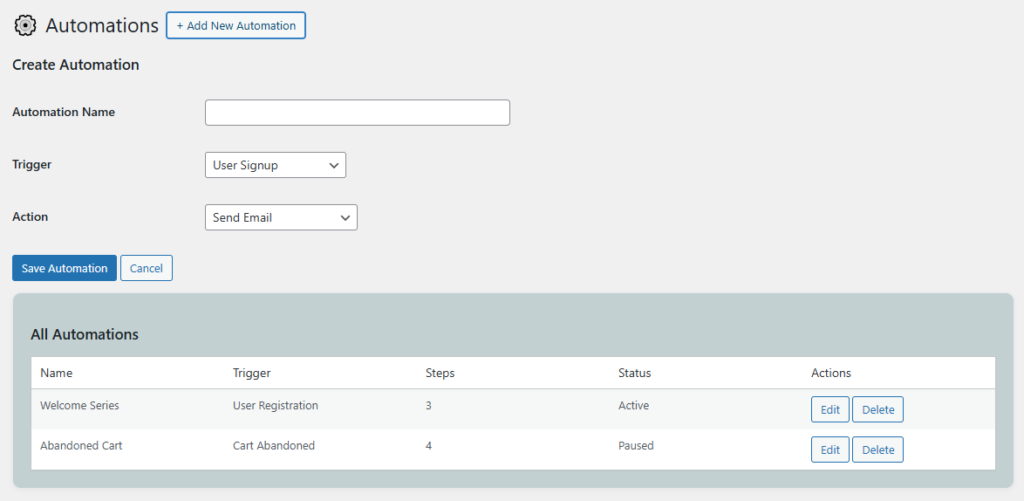
Kaddora Omnichannel Marketing Hub provides powerful automation workflows that allow you to streamline your marketing processes and reduce manual effort. With automation, you can trigger actions such as Email and SMS messages based on customer behavior, events, or predefined conditions—ensuring timely and relevant communication with your audience.
Automation workflows help businesses deliver the right message at the right time without constant manual intervention. Whether it’s welcoming new users, sending order updates, or re-engaging inactive customers, Kaddora makes it simple to build and manage automated marketing sequences.
🔄 Workflow Builder
The workflow system allows you to create automated sequences using triggers and actions. You can define when a workflow should start and what actions should follow.
- Create automated workflows using simple logic and conditions
- Define triggers such as user registration, purchase, or inactivity
- Add multiple steps including Email and SMS actions
- Control workflow timing with delays and scheduling options
🎯 Trigger-Based Automation
Workflows can be triggered automatically based on user activity or system events, helping you respond instantly to customer actions.
- Trigger workflows on user signup or account creation
- Send automated messages after a purchase or order update
- Re-engage inactive users with targeted campaigns
- Send reminders for abandoned carts or pending actions
📧📱 Multi-Channel Automation
Kaddora supports omnichannel communication by allowing you to combine Email and SMS within the same workflow. This ensures better reach and engagement across different communication channels.
- Send Email and SMS messages within a single workflow
- Choose communication channels based on campaign needs
- Improve message delivery and engagement rates
⏱️ Scheduling and Delays
You can control when messages are sent using delays and scheduling features. This helps in creating well-timed marketing sequences.
- Add time delays between workflow steps
- Schedule messages for specific dates and times
- Avoid sending multiple messages at once
- Optimize timing for better user engagement
👤 Personalization in Automation
Automation workflows can use customer data to send personalized messages, improving user experience and conversion rates.
- Insert customer details like name or purchase info in messages
- Send tailored offers and recommendations
- Create more meaningful and relevant communication
📊 Workflow Monitoring & Optimization
Track the performance of your automation workflows to understand how they are performing and make improvements where needed.
- Monitor workflow activity and message delivery status
- Track engagement metrics such as opens and clicks
- Identify high-performing workflows and optimize others
- Improve marketing strategies using data insights
🚀 Business Benefits
Automation workflows are essential for scaling your marketing efforts and improving efficiency. They help businesses stay connected with customers without increasing workload.
- Save time by automating repetitive marketing tasks
- Improve customer engagement with timely communication
- Increase conversions through targeted automation
- Ensure consistent communication across all channels
Overall, the Automation Workflows feature in Kaddora Omnichannel Marketing Hub empowers businesses to create intelligent, automated marketing systems that enhance customer experience and drive better results.
8. Analytics & Reports ⚙️
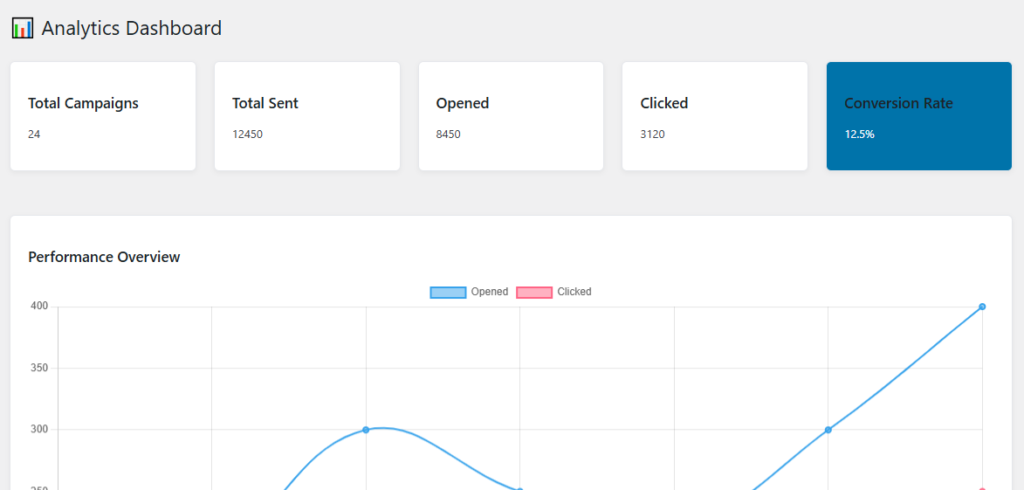
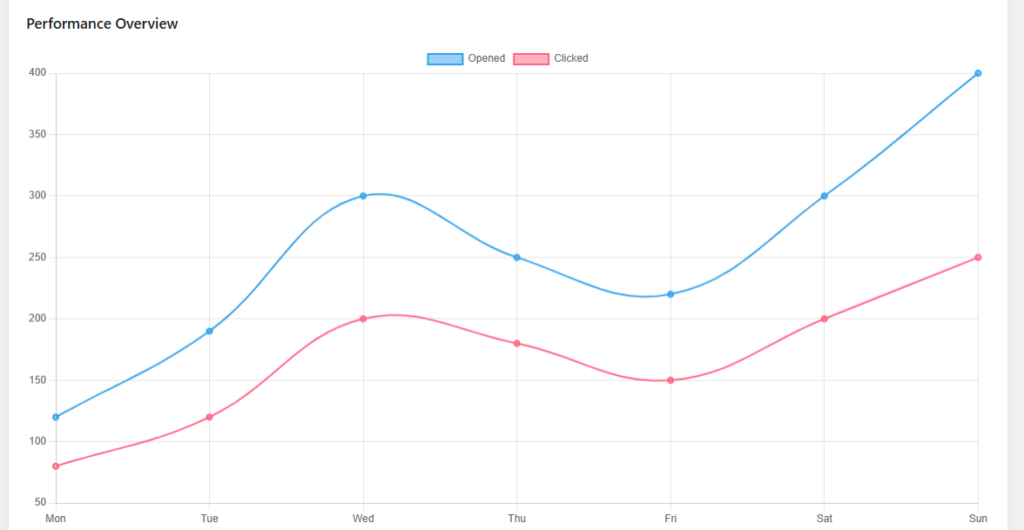
Kaddora Omnichannel Marketing Hub includes a powerful analytics and reporting system that helps you measure the performance of your marketing campaigns and make data-driven decisions. By tracking key metrics across Email and SMS channels, you can understand customer behavior, evaluate campaign success, and continuously improve your marketing strategies.
The analytics dashboard provides clear insights into how your campaigns are performing in real time. Whether you are monitoring engagement, conversions, or delivery rates, Kaddora gives you the tools to analyze results effectively without relying on external platforms.
📊 Campaign Performance Metrics
Track important metrics for both Email and SMS campaigns to evaluate how well your marketing efforts are performing.
- Monitor email open rates, click-through rates, and engagement
- Track SMS delivery status and response rates
- Analyze campaign reach and audience interaction
- Measure conversions and goal completions
📈 Real-Time Reporting
Get instant access to campaign data as it happens, allowing you to quickly respond and optimize your strategies.
- View real-time updates on campaign performance
- Track user activity and engagement as it occurs
- Identify trends and patterns in customer behavior
- Make quick adjustments to active campaigns
👥 Customer Insights
Gain deeper understanding of your audience by analyzing their interactions and behavior across campaigns.
- Identify active, inactive, and highly engaged users
- Understand customer preferences and response patterns
- Track customer journey and engagement history
- Use insights to improve targeting and personalization
📅 Historical Data & Reports
Access historical data to compare past and present campaign performance, helping you refine long-term strategies.
- View past campaign reports and performance summaries
- Compare different campaigns over time
- Analyze growth trends and engagement improvements
- Maintain records for reporting and business analysis
📤 Export & Reporting Options
Kaddora allows you to export analytics data for external use, making it easier to share reports or integrate with other tools.
- Export reports in standard formats for offline analysis
- Share performance data with teams or clients
- Use exported data for presentations and documentation
⚡ Optimization & Decision Making
Analytics play a key role in improving your marketing performance. With Kaddora’s reporting tools, you can make smarter decisions and optimize campaigns effectively.
- Identify high-performing campaigns and replicate success
- Detect underperforming campaigns and improve them
- Optimize timing, content, and audience targeting
- Increase ROI with data-driven marketing strategies
Overall, the Analytics & Reports feature in Kaddora Omnichannel Marketing Hub helps you transform raw data into meaningful insights, enabling better planning, improved performance, and more successful marketing campaigns.
9. Integrations (API & Services) 🔗
Kaddora Omnichannel Marketing Hub is built to seamlessly integrate with external APIs and third-party services, allowing you to extend its functionality and connect your marketing system with other platforms. These integrations enable smooth communication, reliable message delivery, and efficient data exchange across multiple services.
With flexible API support, you can connect Email providers, SMS gateways, CRM systems, and other tools to create a complete marketing ecosystem within your WordPress website.
📧 Email Service Integrations
Kaddora supports integration with popular email service providers to ensure reliable and scalable email delivery.
- Connect SMTP services for secure and stable email sending
- Integrate with third-party email providers (e.g., SendGrid, Mailgun, Amazon SES)
- Improve email deliverability and avoid spam issues
- Handle bulk email campaigns efficiently
📱 SMS Gateway Integrations
The plugin allows you to connect SMS gateway services to send transactional and promotional messages directly to customer devices.
- Integrate with SMS APIs such as Twilio, MSG91, or other providers
- Send real-time alerts, OTPs, and marketing messages
- Ensure fast and reliable SMS delivery worldwide
- Manage SMS configurations from the admin dashboard
🔌 REST API Support
Kaddora provides REST API support, allowing developers to connect external applications and automate data exchange between systems.
- Access plugin data through REST API endpoints
- Send and receive customer or campaign data programmatically
- Integrate with mobile apps or external dashboards
- Extend plugin functionality with custom integrations
🛒 WooCommerce Integration
For WooCommerce-powered websites, Kaddora integrates seamlessly to enhance marketing capabilities using real customer and order data.
- Sync customer data and order information automatically
- Trigger campaigns based on purchase activity
- Send order confirmations, updates, and promotional messages
- Improve customer retention and sales performance
🔗 Third-Party Services
Kaddora can be extended to work with various third-party tools and services to improve marketing efficiency and automation.
- Connect with CRM systems for advanced customer management
- Integrate analytics tools for deeper performance insights
- Use webhook support for real-time data exchange
- Combine multiple services into a unified marketing workflow
🔐 Secure API Configuration
Security is an important aspect of integrations. Kaddora ensures safe handling of API keys and external connections.
- Store API keys securely within plugin settings
- Use authentication methods for secure communication
- Protect sensitive data during API transactions
- Follow best practices for integration security
⚙️ Easy Setup & Management
All integrations can be managed directly from the plugin’s admin panel, making setup simple even for non-technical users.
- Configure API keys and settings from a centralized interface
- Enable or disable integrations as needed
- Test connections to ensure proper functionality
- Manage all services without leaving the WordPress dashboard
Overall, the Integrations (API & Services) feature in Kaddora Omnichannel Marketing Hub allows you to connect multiple tools and services into a single platform, improving efficiency, automation, and the overall effectiveness of your marketing system.
10. Performance & Optimization ⚡
Kaddora Omnichannel Marketing Hub is designed with performance and efficiency in mind, ensuring that your website remains fast and responsive while handling marketing operations such as campaigns, automation, and customer data management. The plugin follows optimized coding practices and smart resource handling to minimize impact on your website’s speed and server load.
Performance optimization is essential for user experience, SEO rankings, and conversion rates. Kaddora helps maintain a balance between powerful marketing features and smooth frontend performance.
⚡ Optimized Asset Loading
The plugin ensures that scripts and styles are loaded only when required, reducing unnecessary load on the website.
- Load CSS and JavaScript only on relevant pages
- Avoid unnecessary asset loading across the entire site
- Improve page load speed and performance scores
🚀 Efficient Database Usage
Kaddora is built to handle data efficiently, even when managing large customer lists and campaign records.
- Optimized database queries for faster data retrieval
- Efficient storage of campaign and customer data
- Reduced database overhead for better performance
📦 Caching Compatibility
The plugin is fully compatible with popular WordPress caching plugins and server-level caching systems.
- Works with caching plugins like WP Rocket, W3 Total Cache, and LiteSpeed Cache
- Supports browser and server-side caching mechanisms
- Ensures smooth performance without conflicts
⏱️ Background Processing
Heavy tasks such as sending bulk emails or SMS campaigns are handled in the background to avoid slowing down the website.
- Process campaigns in batches to reduce server load
- Use scheduled tasks (cron jobs) for automation workflows
- Prevent timeouts during large campaign execution
📉 Reduced Server Load
Kaddora minimizes resource usage by optimizing how tasks are executed and how data is processed.
- Avoid overloading the server during bulk operations
- Distribute tasks efficiently across processes
- Ensure stable performance on shared and VPS hosting
📱 Frontend Performance
The plugin is designed to have minimal impact on frontend performance, ensuring a smooth experience for website visitors.
- No unnecessary scripts affecting page rendering
- Optimized code for faster page response times
- Maintain Core Web Vitals and SEO performance
⚙️ Performance Best Practices
Kaddora follows WordPress coding standards and best practices to ensure compatibility and performance across different environments.
- Clean and optimized code structure
- Compatibility with most themes and plugins
- Regular updates to improve performance and stability
📊 Scalability
The plugin is built to scale with your business as your customer base and marketing activities grow.
- Handles increasing customer data and campaigns efficiently
- Suitable for small businesses as well as large-scale operations
- Maintains performance even with high traffic and usage
Overall, the Performance & Optimization features in Kaddora Omnichannel Marketing Hub ensure that your marketing operations run smoothly without compromising your website’s speed, stability, or user experience.
11. Troubleshooting 🛠️
Kaddora Omnichannel Marketing Hub is designed to work smoothly across most WordPress environments. However, in some cases, you may encounter issues related to configuration, server settings, or third-party integrations. This section provides guidance to identify and resolve common problems quickly.
Before troubleshooting, ensure that your WordPress installation, plugins, and theme are up to date. Most issues can be resolved by checking settings, verifying integrations, or clearing cache.
⚠️ Plugin Not Working or Not Visible
- Ensure the plugin is properly installed and activated
- Check if there are any PHP errors in your server logs
- Verify that your WordPress version meets plugin requirements
- Deactivate other plugins temporarily to check for conflicts
- Switch to a default theme (like Twenty Twenty-Three) to test compatibility
📧 Email Sending Issues
- Verify SMTP settings and credentials
- Ensure your hosting allows outgoing emails
- Check spam/junk folders for missing emails
- Use trusted email services like SMTP, SendGrid, or Mailgun
- Test email functionality using a test message
📱 SMS Delivery Problems
- Confirm SMS API key and credentials are correct
- Check account balance or credits with your SMS provider
- Ensure phone numbers are in the correct format (with country code)
- Review API response logs for delivery errors
- Verify that your SMS gateway service is active
⚙️ Automation Not Triggering
- Check if workflow triggers are correctly configured
- Ensure WordPress cron jobs are running properly
- Verify that required conditions for automation are met
- Review automation logs for errors or missed triggers
🐢 Slow Performance or Delays
- Enable caching using a caching plugin
- Check server resources (CPU, memory, hosting limits)
- Reduce batch size for campaigns if server is slow
- Optimize database and remove unnecessary data
🔌 API & Integration Errors
- Re-check API keys and endpoint URLs
- Ensure third-party services are active and reachable
- Test API connections from plugin settings
- Check firewall or hosting restrictions blocking API calls
🧩 Plugin Conflict Issues
- Deactivate other plugins one by one to find conflicts
- Check for JavaScript errors in browser console
- Ensure all plugins are updated to latest versions
- Contact plugin developers if a conflict is identified
🔐 Permission & Access Issues
- Ensure you are logged in as an administrator
- Check user roles and capabilities
- Verify file and folder permissions on the server
🧹 General Fixes
- Clear website cache and browser cache
- Update WordPress core, theme, and plugins
- Reinstall the plugin if necessary
- Enable debug mode to identify issues
If the issue persists after trying the above steps, you can contact support with detailed information such as error messages, screenshots, and server environment details. This will help in resolving the issue faster.
12. FAQ ❓
This section answers the most commonly asked questions about Kaddora Omnichannel Marketing Hub. It helps users quickly understand how the plugin works and how to resolve basic queries without technical support.
❓ What is Kaddora Omnichannel Marketing Hub?
Kaddora is a WordPress plugin that allows you to manage Email and SMS marketing campaigns, customer data, and automation workflows from a single dashboard.
❓ Do I need coding knowledge to use this plugin?
No, the plugin is designed with a user-friendly interface. You can manage campaigns, customers, and settings without any coding knowledge.
❓ Is this plugin compatible with WooCommerce?
Yes, Kaddora integrates with WooCommerce and allows you to use customer and order data for targeted marketing campaigns.
❓ How do I send emails from the plugin?
You need to configure SMTP or connect a third-party email service (such as SendGrid or Mailgun) from the plugin settings to send emails successfully.
❓ How does SMS functionality work?
You must integrate an SMS gateway (such as Twilio or MSG91) using API credentials. Once configured, you can send SMS campaigns and notifications.
❓ Can I automate marketing tasks?
Yes, the plugin includes automation workflows that allow you to send emails and SMS automatically based on triggers like user signup, purchase, or inactivity.
❓ Can I schedule campaigns?
Yes, both Email and SMS campaigns can be scheduled for future delivery based on your preferred date and time.
❓ Does the plugin provide analytics?
Yes, Kaddora includes built-in analytics and reporting tools to track campaign performance, engagement, and user activity.
❓ Is the plugin optimized for performance?
Yes, the plugin is optimized to ensure minimal impact on website speed. It uses efficient database queries and background processing for heavy tasks.
❓ What should I do if emails or SMS are not sending?
Check your SMTP or SMS API configuration, verify credentials, and ensure your hosting environment allows external connections.
❓ Can I use this plugin on shared hosting?
Yes, the plugin works on shared, VPS, and cloud hosting. However, for large campaigns, better hosting is recommended for optimal performance.
❓ Is customer data secure?
Yes, the plugin follows WordPress security standards and stores data securely. API keys and sensitive information are protected within the admin panel.
❓ Can I export reports?
Yes, you can export analytics and campaign reports for external use, sharing, or documentation purposes.
❓ Where can I get support?
You can contact the support team through the official website or plugin marketplace where you purchased the plugin.
If your question is not listed here, please refer to the documentation or contact support for further assistance.
13. Support & Updates 🛎️
Kaddora Omnichannel Marketing Hub is backed by dedicated support and regular updates to ensure smooth performance, security, and compatibility with the latest WordPress standards. Whether you need help with setup, troubleshooting, or advanced configurations, our support system is designed to assist you efficiently.
We continuously improve the plugin by adding new features, fixing bugs, and enhancing performance to meet evolving business and marketing needs.
🧑💻 Customer Support
Our support team is available to help you resolve issues and guide you through plugin usage.
- Get assistance with installation and setup
- Resolve technical issues and errors
- Guidance on using features like campaigns and automation
- Support for API integrations and configuration
- Help with troubleshooting and performance optimization
📩 Support Channels
You can reach support through multiple channels depending on your purchase platform.
- Submit support tickets via the plugin marketplace
- Contact through official website or support portal
- Email-based support for direct communication
- Access documentation and guides for self-help
⏱️ Response Time
We aim to provide timely and efficient responses to all support requests.
- Typical response time within 24–48 business hours
- Priority handling for critical issues
- Detailed solutions and step-by-step guidance
🔄 Regular Updates
Kaddora receives regular updates to improve functionality, compatibility, and security.
- Bug fixes and performance improvements
- New features and enhancements
- Compatibility updates with latest WordPress and WooCommerce versions
- Security patches to protect your data and system
⚙️ Update Process
Updating the plugin is simple and can be done directly from the WordPress dashboard.
- Receive update notifications in WordPress admin
- One-click update process for quick upgrades
- Backup recommended before major updates
- Changelog provided for each update release
📚 Documentation & Resources
Comprehensive documentation is available to help you understand and use the plugin effectively.
- Step-by-step setup guides
- Feature explanations and usage instructions
- Troubleshooting and FAQs
- Best practices for marketing and automation
🔐 Long-Term Reliability
Kaddora is built with long-term usability in mind, ensuring continuous improvements and support for growing businesses.
- Regular maintenance and feature updates
- Scalable solution for growing websites
- Reliable performance across different hosting environments
Overall, the Support & Updates system in Kaddora Omnichannel Marketing Hub ensures that you always have access to help, improvements, and the latest features—allowing you to focus on growing your business without technical concerns.