
Kaddora MailFlow SMTP 🎀
User Documentation:📜
Kaddora MailFlow SMTP is a professional WordPress email delivery and monitoring plugin designed to improve email reliability, deliverability, and management across WordPress websites. The plugin replaces the default WordPress mail system with secure SMTP-based delivery and supports multiple email providers including Gmail, Outlook, SendGrid, Mailgun, Brevo, Postmark, and Custom SMTP servers.
The plugin provides advanced email logging capabilities, allowing administrators to track sent and failed emails, resend messages, export logs, and monitor email activity through detailed debug events. Built-in alert systems support Email, Slack, Discord, Microsoft Teams, and Webhook notifications to ensure administrators are informed about delivery failures and system issues.
Kaddora MailFlow SMTP includes enterprise-level features such as Smart Email Routing, Backup Mailers, Rate Limiting, Email Queue Processing, Retry Engine, and Dead Letter Queue management to maximize email delivery success. Comprehensive reporting tools provide dashboard statistics, health monitoring, weekly summaries, and performance analytics.
The plugin also includes SMTP testing and diagnostics tools for troubleshooting email issues, along with compatibility support for WooCommerce, Contact Form 7, and WPForms. For agencies and enterprise environments, full WordPress Multisite support provides centralized network management, analytics, and reporting.
Built using WordPress coding standards and an object-oriented architecture, Kaddora MailFlow SMTP delivers a scalable, secure, and production-ready email infrastructure for modern WordPress websites.
📑 Table of Contents
1. Introduction 🎗️
Kaddora MailFlow SMTP is a powerful WordPress SMTP and email management plugin designed to improve email deliverability, monitoring, and reliability. It replaces the default WordPress mail system with secure SMTP providers and provides advanced tools for email tracking, diagnostics, reporting, and delivery optimization.
Key Highlights
- Multiple SMTP Providers Support
- Gmail, Outlook, SendGrid, Mailgun, Brevo & Postmark Integration
- Custom SMTP Configuration
- Email Logs, Resend & Export
- Smart Routing & Backup Mailers
- Rate Limiting & Queue Processing
- Retry Engine & Dead Letter Queue
- Email Alerts & Notifications
- Weekly Reports & Health Dashboard
- SMTP Testing & Diagnostics
- WooCommerce Compatibility
- Contact Form 7 & WPForms Support
- Multisite Network Support
- Enterprise-Level Monitoring & Analytics
2. Requirements & Compatibility 📌
| WordPress: 6.0 or higher. |
| PHP: 7.4 or higher (PHP 8.2+ recommended). |
| MySQL: 5.7 or higher / MariaDB 10.3 or higher. |
| SMTP Providers: Gmail, Outlook, SendGrid, Mailgun, Brevo, Postmark, and Custom SMTP. |
| SSL/TLS: Required for secure email transmission. |
| WP-Cron: Enabled for Queue Processing, Retry Engine, Alerts, and Weekly Reports. |
| WooCommerce: Compatible with WooCommerce 6.0 or higher. |
| Contact Forms: Compatible with Contact Form 7 and WPForms. |
| Multisite: Fully compatible with WordPress Multisite installations. |
| Browser: Latest versions of Chrome, Firefox, Edge, and Safari. |
| Permissions: Administrator access required to configure SMTP settings and reports. |
3. Plugin Installation 🦚
Method — Upload ZIP
- Go to the WordPress Dashboard –

- Plugins → Add New →
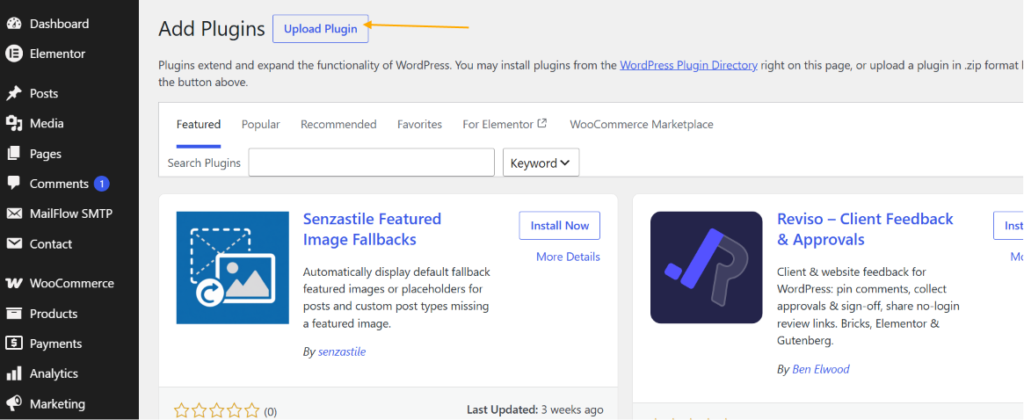
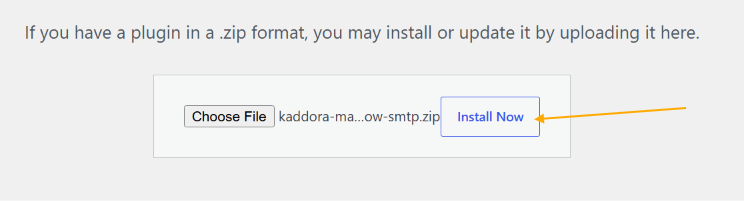
- Upload Plugin > Choose the kaddora-mailflow-smtp.zip plugin file and click Install Now.
- After successfully Installation & Activation of plugin, you will see ‘Kaddora MailFlow SMTP’ in your installed plugin section, here you can check version and description about the plugin.

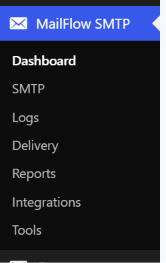
- In WordPress dashboard, you can see ‘MailFlow SMTP’ option available, click on it and access the setting part of the Plugin-
4. Dashboard (Admin Panel)
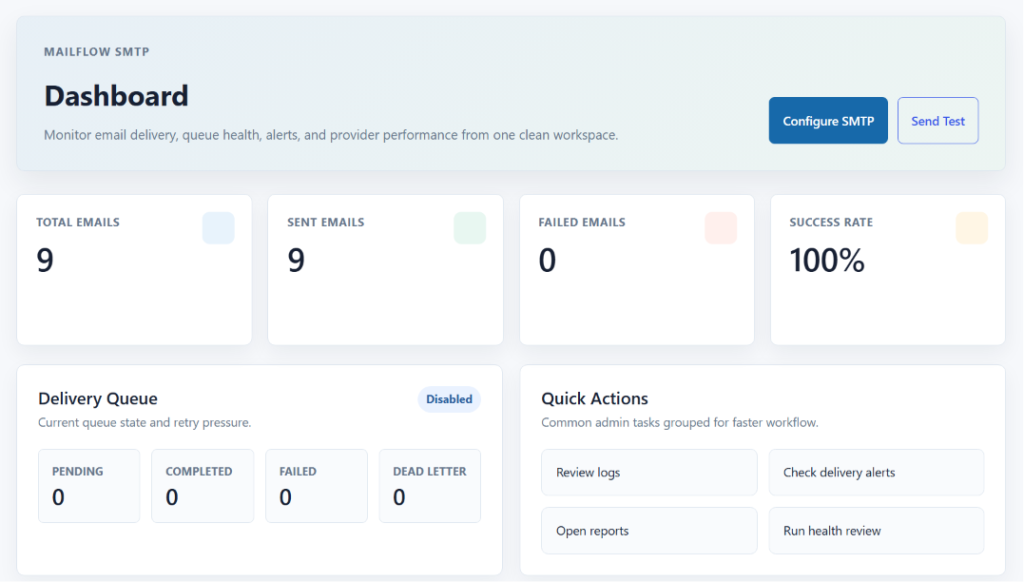
The Dashboard serves as the central monitoring hub for Kaddora MailFlow SMTP. It provides a real-time overview of email delivery performance, queue status, failed email tracking, and overall system health. Administrators can quickly monitor email activity, identify delivery issues, review queue statistics, and access important actions from a single interface.
Highlights
- Centralized email monitoring dashboard
- Real-time email delivery statistics
- Total, Sent, and Failed email tracking
- Email Success Rate monitoring
- Delivery Queue status overview
- Pending, Completed, Failed, and Dead Letter Queue statistics
- Quick access to SMTP configuration
- One-click Test Email functionality
- Fast access to Logs, Reports, and Alerts
- Queue health and retry monitoring
- Provider performance visibility
- Clean and responsive enterprise-style interface
- Designed for administrators and support teams
- Supports large-scale email operations
- Helps identify delivery issues before they impact users
5. SMTP
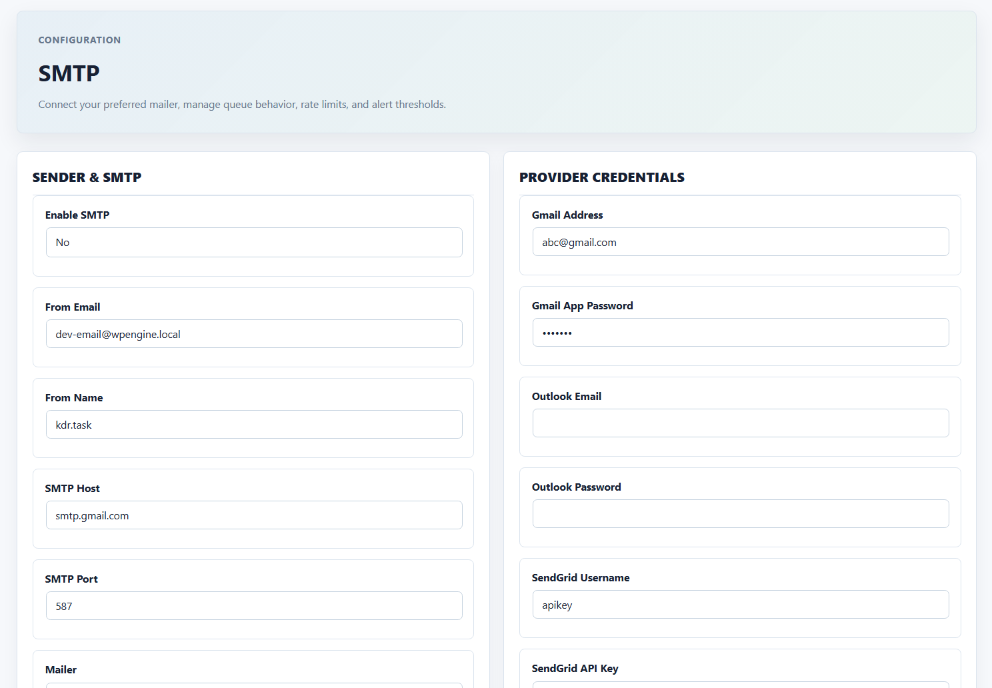
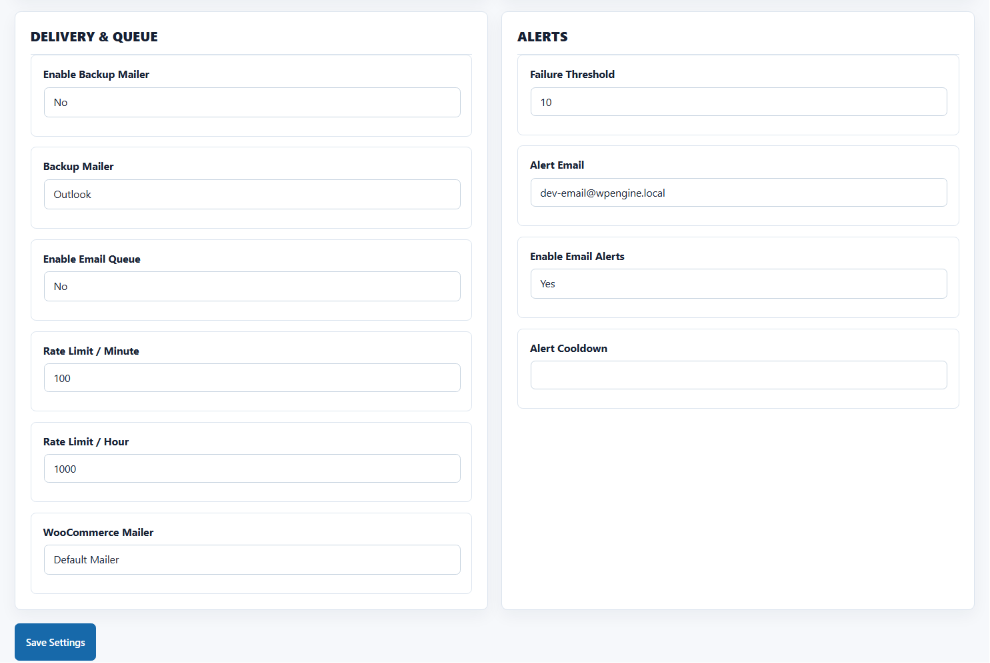
The SMTP Configuration section allows administrators to manage email delivery settings, provider credentials, queue behavior, backup mailers, rate limits, and alert preferences. This area acts as the control center for configuring how emails are sent, monitored, and protected against delivery failures.
Configuration Features
- Configure primary SMTP provider
- Manage sender email and sender name
- Configure SMTP host, port, and encryption
- Enable or disable SMTP delivery
- Store provider credentials securely
- Support multiple email providers
- Configure backup mailer failover
- Enable or disable email queue processing
- Control email sending rate limits
- Configure WooCommerce-specific mail routing
- Set email failure thresholds
- Configure alert recipients
- Enable email delivery notifications
- Manage alert cooldown periods
- Centralized email delivery management
- Enterprise-grade delivery controls
Supported SMTP Providers
- Gmail SMTP
- Outlook SMTP
- SendGrid SMTP
- Mailgun SMTP
- Brevo SMTP
- Postmark SMTP
- Custom SMTP Servers
Sender & SMTP Settings
- Enable or disable SMTP functionality
- Configure From Email address
- Configure From Name
- Set SMTP Host
- Set SMTP Port
- Select Mailer Provider
- Configure Encryption Method (TLS/SSL)
Provider Credentials
- Gmail Address & App Password
- Outlook Email & Password
- SendGrid API Key
- Mailgun API Key & Domain
- Brevo API Key
- Postmark Server Token
- Custom SMTP Authentication
Delivery & Queue Settings
- Enable Backup Mailer
- Configure Backup SMTP Provider
- Enable Email Queue Processing
- Configure Rate Limit Per Minute
- Configure Rate Limit Per Hour
- WooCommerce Mailer Assignment
- Retry and Failover Management
Alert Settings
- Configure Failure Threshold
- Alert Notification Email
- Enable Email Alerts
- Configure Alert Cooldown Period
- Delivery Failure Monitoring
- Automated Administrative Notifications
6. Logs
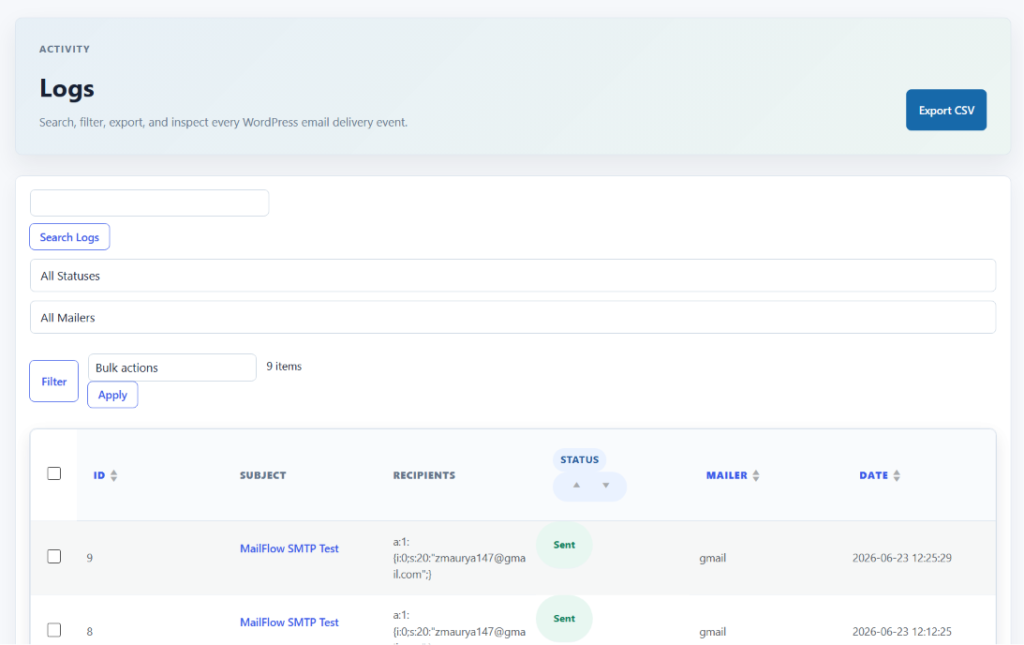
The Email Logs section provides a centralized view of all outgoing email activity generated through Kaddora MailFlow SMTP. It enables administrators to monitor email delivery status, inspect recipients, review delivery events, export records, and troubleshoot email-related issues from a single interface.
Email Log Features
- Complete email delivery history
- Track sent and failed emails
- View email subject and recipient details
- Monitor SMTP provider usage
- Search email logs instantly
- Filter logs by status
- Filter logs by mailer provider
- Sort log entries by column
- Bulk action support
- Export logs to CSV format
- Email delivery auditing
- Delivery troubleshooting tools
- Fast access to email details
- Real-time delivery monitoring
- Administrative reporting support
Log Information Displayed
- Log ID
- Email Subject
- Recipient Address(es)
- Delivery Status
- SMTP Provider / Mailer
- Date and Time Sent
Available Actions
- Search email records
- Filter by Sent or Failed status
- Filter by SMTP provider
- Export logs to CSV
- View email details
- Perform bulk operations
- Review delivery history
Delivery Status Types
- Sent – Email was successfully delivered.
- Failed – Email delivery failed and requires review.
- Queued – Email is waiting for processing.
- Retrying – Email is being retried by the retry engine.
- Dead Letter – Email exceeded retry limits and was moved to the Dead Letter Queue.
Benefits
- Improves email visibility and monitoring
- Simplifies troubleshooting and diagnostics
- Helps identify delivery failures quickly
- Provides audit-ready email records
- Supports reporting and compliance requirements
7. Tools
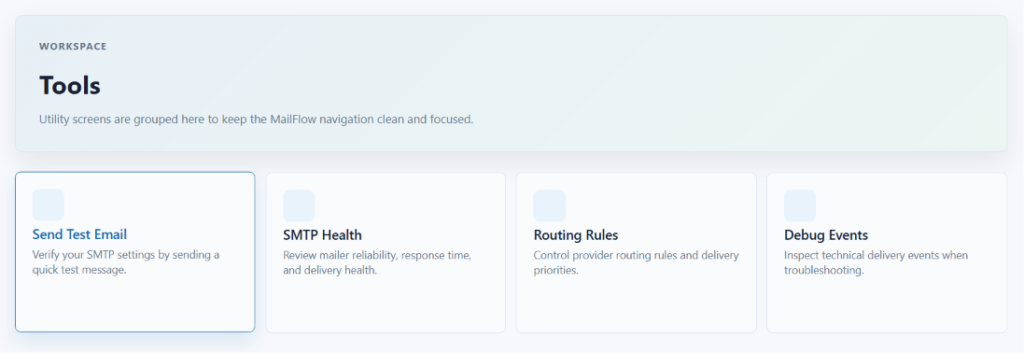
The Tools section provides quick access to utility features, diagnostics, and administrative tools required for monitoring, troubleshooting, and managing email delivery operations. It serves as a centralized workspace where administrators can perform testing, review system health, manage routing rules, and inspect delivery events without navigating through multiple plugin pages.
Features
- Centralized administrative workspace
- Quick access to SMTP testing
- SMTP health and diagnostics tools
- Routing rule management
- Delivery troubleshooting utilities
- Debug event monitoring
- System verification tools
- Provider health checks
- Delivery workflow management
- Faster access to maintenance tasks
- Streamlined navigation experience
- Enterprise-grade monitoring utilities
Available Tools
Send Test Email
Verify SMTP configuration by sending a test email.
Features:
- SMTP connection validation
- Email delivery testing
- Provider verification
- Delivery confirmation
SMTP Health
Review the overall health and performance of configured mail providers.
Features:
- Delivery health monitoring
- Response time analysis
- Provider reliability checks
- Performance diagnostics
Routing Rules
Manage email routing behavior and provider selection rules.
Features:
- Smart mail routing
- Provider assignment rules
- Delivery priority configuration
- Routing management
Debug Events
Review technical events and delivery-related system activity.
Features:
- Debug event logging
- Delivery troubleshooting
- Error investigation
- System activity tracking
Benefits
- Simplifies email troubleshooting
- Improves system visibility
- Reduces diagnostic time
- Centralizes maintenance tasks
- Supports enterprise email management workflows
8. Supports
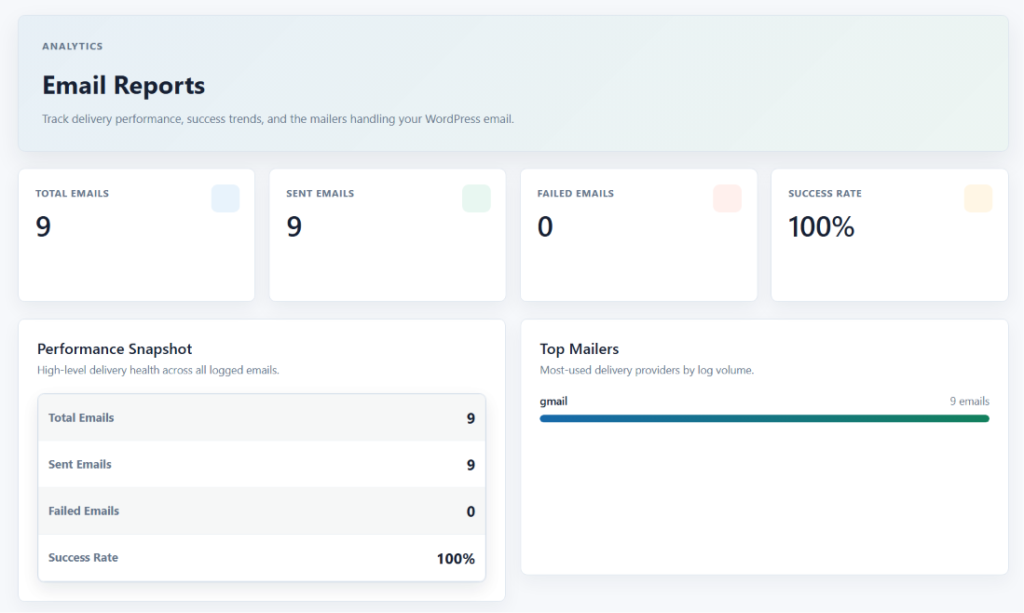
The Reports section provides a comprehensive overview of email delivery performance, provider usage, and system reliability. It helps administrators monitor delivery success rates, identify failed emails, evaluate provider performance, and gain valuable insights into overall email activity through centralized analytics and reporting tools.
Features
- Email Delivery Analytics
- Total Email Statistics
- Sent Email Tracking
- Failed Email Monitoring
- Success Rate Reporting
- Performance Snapshot Dashboard
- Top Mailer Analytics
- Provider Usage Reports
- Delivery Health Monitoring
- Real-Time Statistics
- Email Performance Insights
- Delivery Trend Analysis
- Reliability Monitoring
- Centralized Reporting Dashboard
- Enterprise-Level Analytics
9. Delivery
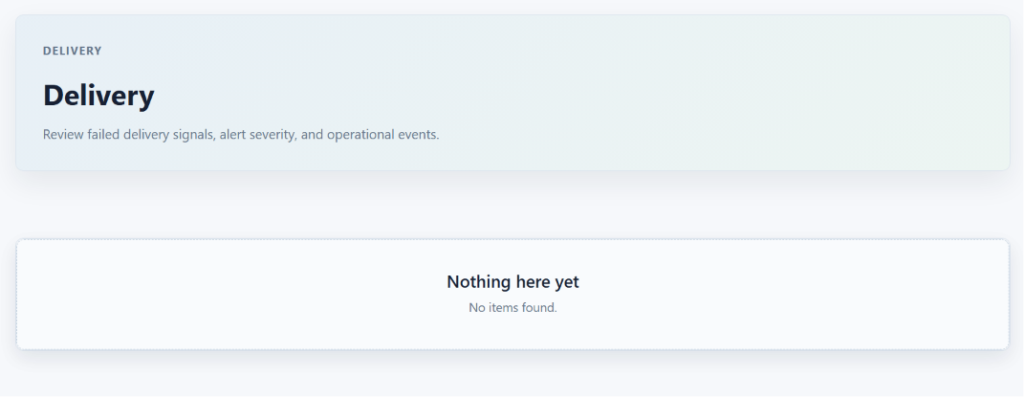
The Delivery section provides centralized monitoring and management of email delivery operations. It helps administrators track delivery events, monitor alerts, review operational issues, and manage delivery-related activities such as queue processing, routing behavior, failover handling, and notification systems to ensure reliable email delivery across the website.
Features
- Email Delivery Monitoring
- Delivery Event Tracking
- Queue Management
- Retry Engine Monitoring
- Dead Letter Queue Management
- Smart Routing Management
- Backup Mailer Monitoring
- Delivery Failure Tracking
- Alert Management
- Email Alert Notifications
- Slack Alert Integration
- Discord Alert Integration
- Teams Alert Integration
- Webhook Alert Integration
- Failure Threshold Monitoring
- Alert Severity Tracking
- Operational Event Logging
- Delivery Health Monitoring
- Delivery Diagnostics
- Enterprise-Level Delivery Management
10. Integrations
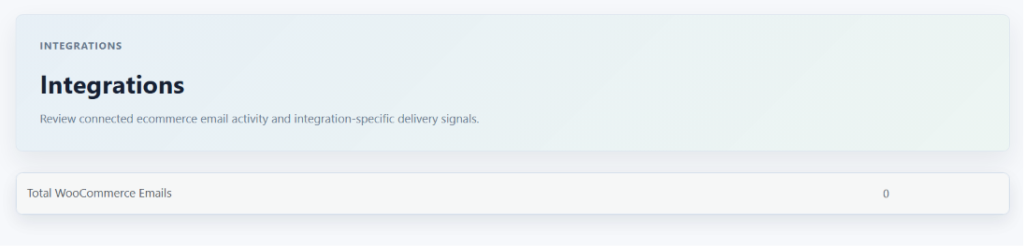
The Integrations section provides visibility into email activity generated by connected WordPress plugins and third-party services. It helps administrators monitor integration-specific email delivery, track transactional emails, review integration performance, and ensure reliable communication across connected systems such as eCommerce platforms, contact forms, and other email-enabled applications.
Features
- WooCommerce Email Tracking
- Transactional Email Monitoring
- Integration Activity Dashboard
- Connected Plugin Analytics
- Integration-Specific Delivery Insights
- Email Performance Monitoring
- Delivery Event Tracking
- Integration Health Monitoring
- Email Volume Statistics
- Provider Usage Analysis
- Delivery Reliability Monitoring
- Integration Reporting
- Email Activity Auditing
- WooCommerce Compatibility
- Contact Form 7 Compatibility
- WPForms Compatibility
- Multisite Integration Support
- Centralized Integration Management
- Enterprise-Level Email Visibility
11. Performance & Optimization
- Optimized SMTP Delivery Engine
- Smart Email Routing
- Backup Mailer Failover
- Email Queue Processing
- Retry Engine
- Dead Letter Queue Management
- Rate Limiting Controls
- Optimized Database Queries
- Indexed Database Tables
- Efficient Log Storage
- Lightweight Admin Interface
- Cached Dashboard Statistics
- Optimized Report Generation
- Scheduled Background Processing
- WP-Cron Integration
- Reduced Server Load
- Fast Email Log Search
- Bulk Action Optimization
- Network-Wide Analytics Optimization
- Scalable Architecture for High Email Volumes
- Resource-Efficient Monitoring
- Performance-Focused Reporting
- Enterprise-Level Email Processing
- Minimal Frontend Impact
- Optimized Multisite Support
12. FAQ 🌐
1. Which SMTP providers are supported by Kaddora MailFlow SMTP?
Kaddora MailFlow SMTP supports Gmail, Outlook, SendGrid, Mailgun, Brevo, Postmark, and Custom SMTP servers.
2. Can I view and track all outgoing emails?
Yes. The plugin includes a complete Email Logs system that allows you to monitor sent, failed, queued, and retried emails.
3. Does the plugin support WooCommerce email delivery?
Yes. Kaddora MailFlow SMTP is fully compatible with WooCommerce and can track transactional emails generated by WooCommerce stores.
4. What happens if my primary SMTP provider fails?
The Backup Mailer feature automatically switches email delivery to a secondary provider to help maintain email reliability.
5. Can I receive notifications when email delivery issues occur?
Yes. The plugin supports Email, Slack, Discord, Microsoft Teams, and Webhook alerts for delivery failures and operational events.
6. Is the plugin compatible with WordPress Multisite?
Yes. Kaddora MailFlow SMTP includes Multisite support with network-wide settings, reporting, monitoring, and analytics.
13. Support & Updates 🚒
For technical support, feature requests, bug reports, or plugin-related assistance, please contact the Kaddora Tech Support Team.
Support Includes:
- Installation Assistance
- SMTP Configuration Help
- Email Delivery Troubleshooting
- WooCommerce Compatibility Support
- Multisite Configuration Assistance
- Bug Reporting & Fixes
- Performance Optimization Guidance
- Feature Update Notifications
Current Version: 1.0.0
Update Policy:
- Regular Feature Updates
- Security Enhancements
- Performance Improvements
- Compatibility Updates
- Bug Fix Releases
Thanks for choosing Kaddora MailFlow SMTP ❤️