
Kaddora Insights for WooCommerce Plugin 🎀
User Documentation📜:
Kaddora Insights for WooCommerce is an all-in-one analytics and business intelligence plugin designed specifically for WooCommerce stores. It helps store owners, marketers, agencies, and eCommerce managers understand their business performance from a single centralized dashboard.
The plugin combines WooCommerce analytics, customer intelligence, product insights, Google integrations, website performance monitoring, business forecasting, and automated reporting into one powerful solution. Instead of switching between multiple tools and dashboards, users can access critical business metrics and actionable insights directly from their WordPress admin area.
Key Features
- Revenue Analytics and Sales Performance Tracking
- Order and Average Order Value Monitoring
- Product Intelligence and Best Seller Analysis
- Low Stock and Inventory Health Monitoring
- Customer Intelligence and Lifetime Value Tracking
- Customer Growth and Segmentation Analytics
- Google Analytics 4 Integration
- Google Search Console Integration
- PageSpeed Insights and Core Web Vitals Monitoring
- Business Health Score Dashboard
- Revenue and Growth Forecasting
- Automated Alerts and Notifications
- Revenue, Product, Customer, SEO, and Performance Reports
- CSV, Excel, and JSON Export Support
- REST API Integration
- Scheduled Background Processing with WP-Cron
- Secure Role-Based Permissions and Access Control
Ideal For
- WooCommerce Store Owners
- eCommerce Managers
- Marketing Teams
- Digital Agencies
- Small and Medium Businesses
- Growing Online Stores
🎀 Kaddora Insights for WooCommerce
1. Introduction 🎗️
Kaddora Insights for WooCommerce is a comprehensive analytics and business intelligence plugin built for WooCommerce-powered online stores. It provides store owners, marketers, and agencies with a centralized dashboard to monitor revenue, orders, customers, products, website performance, and business growth. The plugin integrates WooCommerce data with Google Analytics 4, Google Search Console, and PageSpeed Insights to deliver actionable insights and performance metrics in one place. With advanced reporting, forecasting, alerts, customer intelligence, and product analytics, Kaddora Insights helps businesses make data-driven decisions, identify growth opportunities, improve operational efficiency, and optimize overall store performance without relying on multiple third-party tools.
2. Requirements & Compatibility ⚙️
- WordPress Version: Requires WordPress 6.0 or higher and is fully compatible with the latest WordPress releases.
- WooCommerce Version: Requires WooCommerce 8.0 or higher for analytics, order tracking, customer intelligence, and product insights features.
- PHP Version: Requires PHP 8.0 or higher, with PHP 8.1+ recommended for optimal performance and security.
- Database Support: Compatible with MySQL 5.7+ and MariaDB 10.4+ databases.
- Google Integrations: Requires valid Google API credentials for Google Analytics 4, Google Search Console, and PageSpeed Insights integrations.
- Browser Compatibility: Supports all modern web browsers, including Google Chrome, Mozilla Firefox, Microsoft Edge, Safari, and Brave.
- Theme & Plugin Compatibility: Works seamlessly with most well-coded WordPress themes and popular plugins such as Elementor, Rank Math, Yoast SEO, WP Rocket, LiteSpeed Cache, and Contact Form 7.
- User Permissions: Full functionality requires a user account with Administrator privileges. Custom plugin capabilities are supported for role-based access control.
3.Plugin Installation 📌
- Go to the WordPress Dashboard -:
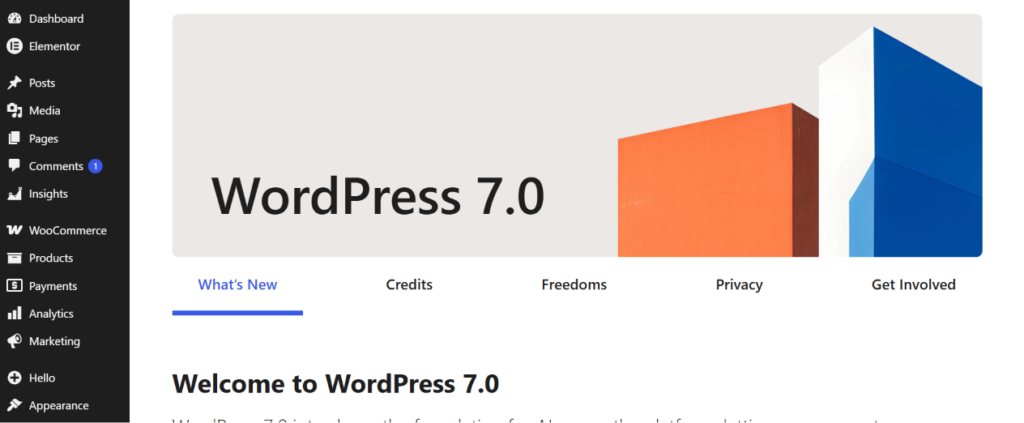
- Plugins → Add New →
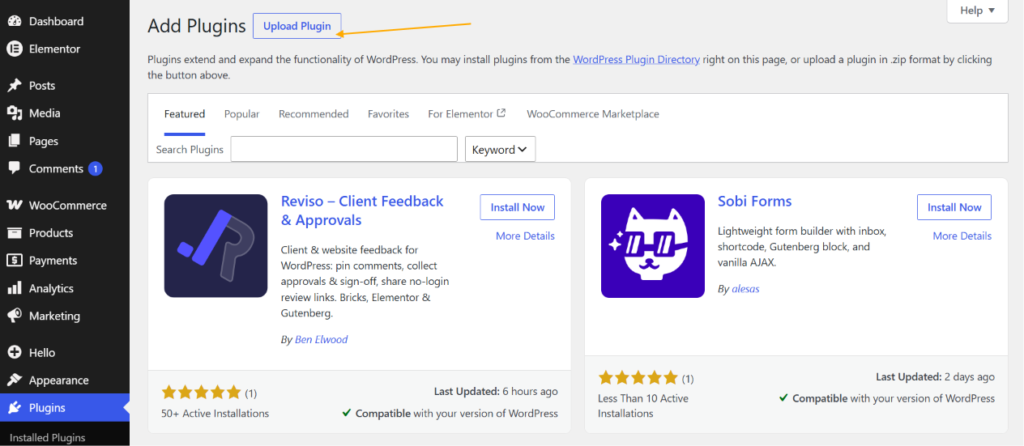
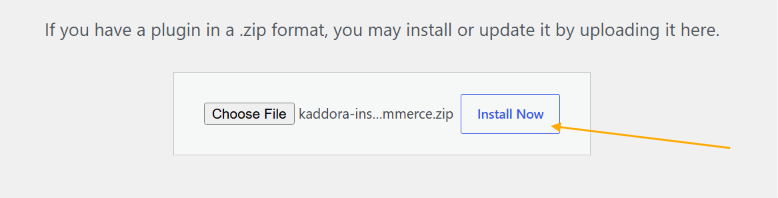
- Upload Plugin > Choose the kaddora-insights-woocommerce.zip plugin file and click Install Now.
- After successfully Installation & Activation of plugin, you will see Kaddora Insights for WooCommerce in your installed plugin section, here you can check version and description about the plugin.

- In WordPress dashboard, you can see ‘Insights ’’ option available, click on it and access the setting part of the Plugin.
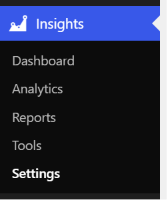
4. Dashboard (Admin Panel) 🛠️
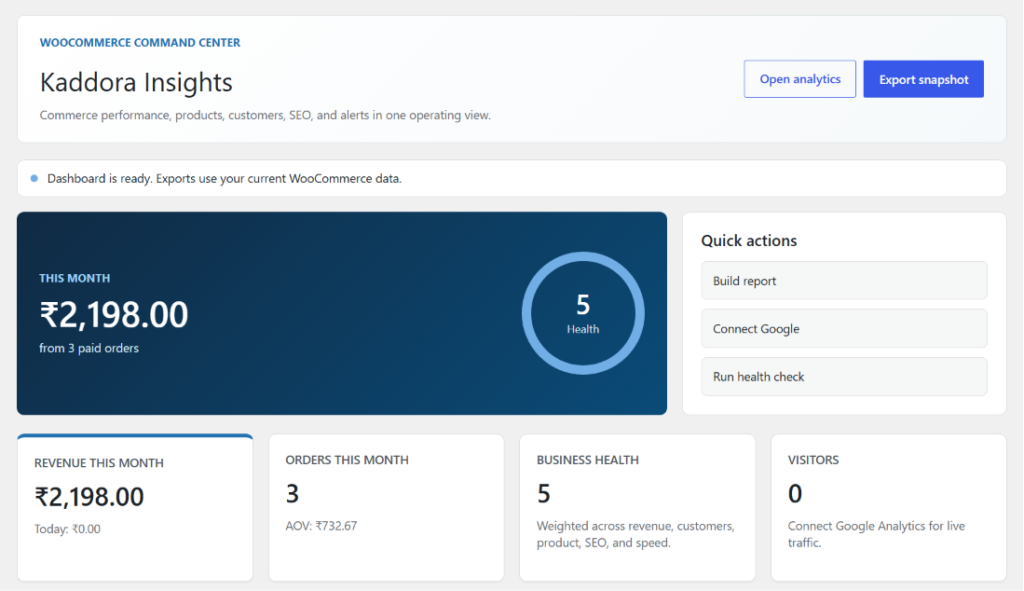
The Dashboard is the central hub of Kaddora Insights for WooCommerce, providing a complete overview of store performance, customer activity, product performance, business health, and operational insights. It combines WooCommerce analytics, customer intelligence, product intelligence, and business intelligence into a single unified interface, helping store owners monitor key metrics and make informed decisions quickly.
Dashboard Features
- Executive Summary Panel: Displays a quick overview of monthly revenue, paid orders, business health score, and overall store performance.
- Revenue Analytics: Monitor monthly revenue, daily revenue, order volume, and average order value from one location.
- Business Health Score: Provides an overall health rating based on revenue performance, customer growth, product activity, SEO metrics, and website performance.
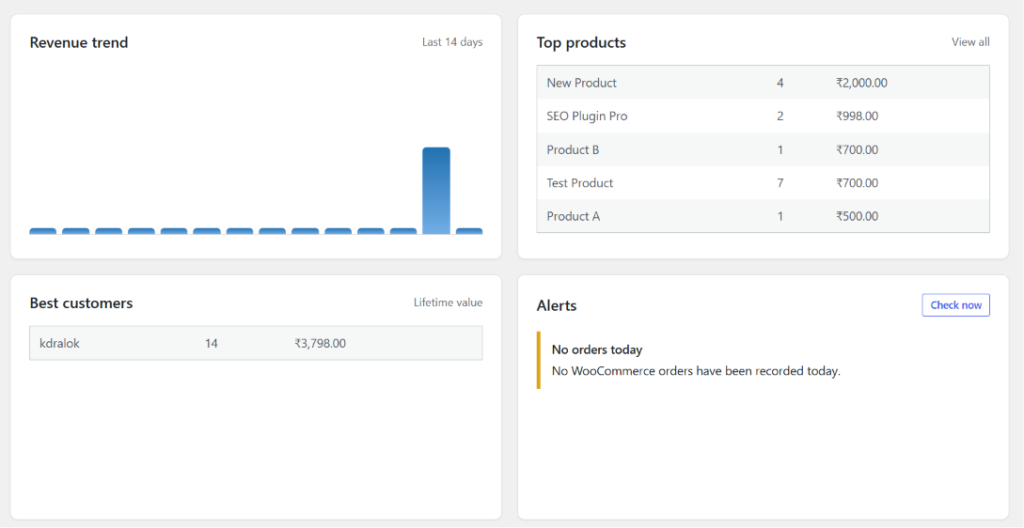
- Revenue Trend Visualization: Interactive charts help track revenue patterns and identify business growth trends over time.
- Top Products Insights: Displays best-selling products, product revenue, sales quantity, and product performance rankings.
- Customer Intelligence: Highlights top customers, customer lifetime value, repeat purchases, and customer contribution to revenue.
- Visitor Analytics: Displays website visitor statistics, sessions, and traffic data through Google Analytics integration.
- Alerts Center: Notifies administrators about low stock products, revenue drops, traffic issues, SEO concerns, and other important business events.
- Quick Actions Panel: Provides direct access to report generation, Google service connections, health checks, exports, and analytics tools.
- Business Intelligence Insights: Combines store data from multiple modules to provide actionable recommendations and performance indicators.
5. Tools🛠️
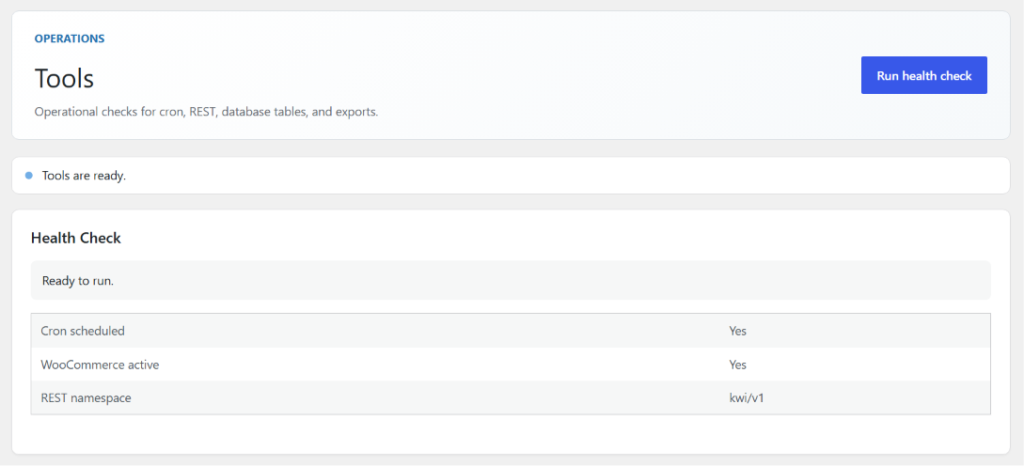
The Tools section provides administrative utilities and system diagnostics for Kaddora Insights for WooCommerce. It helps administrators verify plugin functionality, monitor system health, and troubleshoot configuration issues. The tools dashboard is designed to ensure that all critical plugin components, integrations, and background processes are operating correctly.
Tools Features
- Health Check Utility: Run a complete diagnostic scan to verify the status of plugin components and system services.
- Cron Status Monitoring: Checks whether scheduled WordPress Cron jobs are properly registered and running as expected.
- WooCommerce Integration Verification: Confirms that WooCommerce is installed, activated, and communicating correctly with the plugin.
- REST API Validation: Verifies that plugin REST API endpoints are accessible and functioning properly.
- Database Integrity Checks: Ensures required plugin database tables exist and are configured correctly.
- Export System Verification: Tests report generation and export functionality to confirm that data exports are available.
- System Status Reporting: Provides a quick overview of the operational status of key plugin services and integrations.
- Background Process Monitoring: Helps identify issues related to scheduled tasks, analytics synchronization, and automated processes.
- Troubleshooting Support: Assists administrators in diagnosing common setup, configuration, and connectivity issues.
- Operational Readiness Checks: Validates that the plugin environment is properly configured for analytics, reporting, alerts, and business intelligence features.
6. Analytics📈
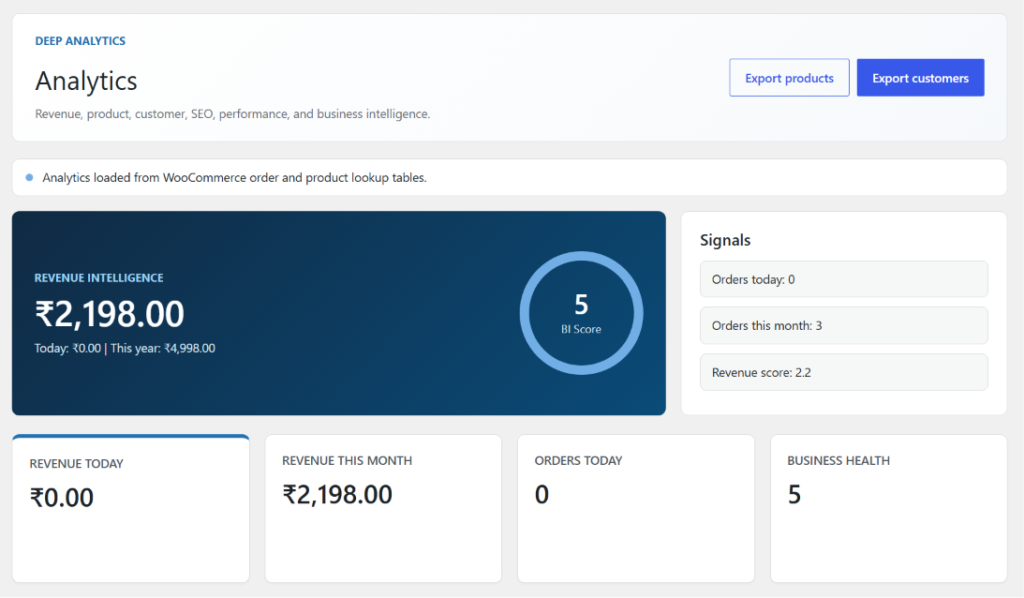
The Analytics section provides a comprehensive view of your WooCommerce store’s performance by combining revenue analytics, order statistics, customer insights, product intelligence, SEO metrics, website performance data, and business intelligence indicators. It helps store owners monitor key performance metrics, identify trends, evaluate business growth, and make data-driven decisions from a centralized analytics dashboard.
Analytics Features
- Revenue Intelligence Dashboard: Displays total revenue, daily revenue, monthly revenue, yearly revenue, and overall sales performance metrics.
- Business Intelligence Score: Provides a consolidated business score based on revenue trends, customer activity, product performance, SEO metrics, and website health indicators.
- Revenue Analytics: Track revenue growth, sales trends, transaction performance, and financial performance across different time periods.
- Order Analytics: Monitor daily orders, monthly orders, completed orders, and overall order activity.
- Business Health Monitoring: Evaluates overall business performance using combined analytics from multiple plugin modules.
- Performance Signals Panel: Displays important operational indicators such as order activity, revenue scores, business intelligence metrics, and performance signals.
- Customer Analytics: Analyze customer growth, customer lifetime value, repeat customers, and customer purchasing behavior.
- Product Analytics: Monitor product performance, top-selling products, low-performing products, inventory trends, and sales contribution.
- SEO & Performance Insights: Integrates Search Console and PageSpeed data to provide visibility into website traffic, search performance, and optimization opportunities.
- Data Export Tools: Export analytics data, product reports, and customer reports for further analysis and business reporting.
7. Reports 📑
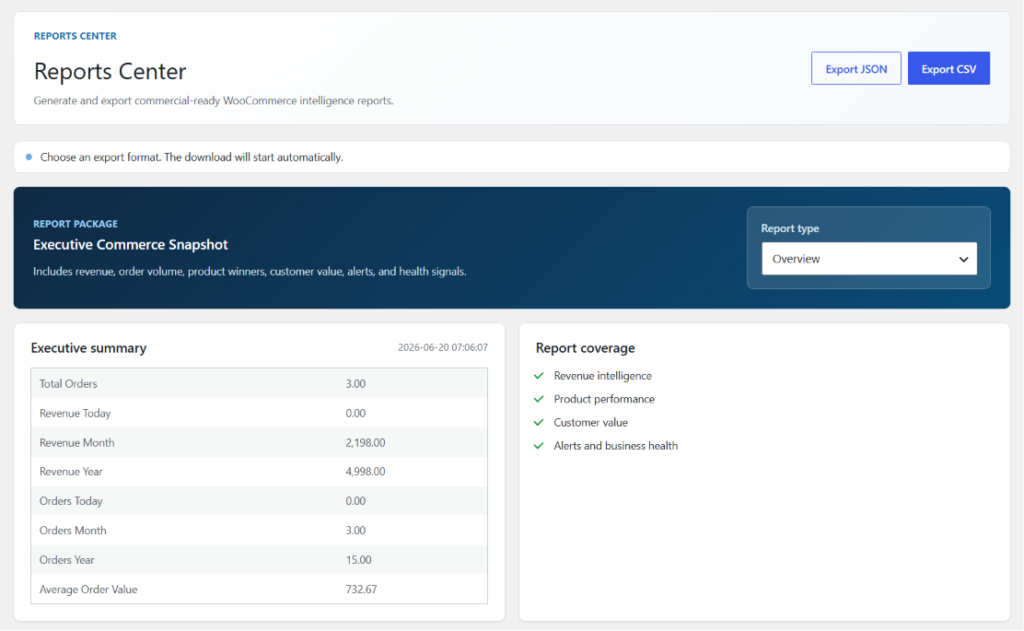
The Reports Center provides a centralized reporting system for WooCommerce business intelligence, allowing store owners and administrators to generate, review, and export comprehensive performance reports. It combines revenue analytics, order statistics, product performance, customer insights, alerts, and business health indicators into structured reports that support operational analysis and strategic decision-making.
Reports Center Features
- Executive Commerce Snapshot: Generates a complete overview of store performance, including revenue, orders, customers, product performance, and business health metrics.
- Revenue Reporting: Analyze daily, monthly, and yearly revenue trends, sales growth, average order value, and overall financial performance.
- Order Performance Reports: Track order volume, completed orders, sales activity, and purchasing trends across different reporting periods.
- Product Performance Reports: Monitor best-selling products, product revenue, sales quantity, product rankings, and inventory-related insights.
- Customer Intelligence Reports: Review customer growth, repeat purchases, customer lifetime value, and top customer performance metrics.
- Business Health Reports: Access consolidated business intelligence metrics, health scores, operational indicators, and performance evaluations.
- Alerts & Performance Monitoring: Includes alert summaries for revenue drops, traffic issues, low stock products, SEO concerns, and website performance warnings.
- Custom Report Types: Generate different report views based on business requirements, operational analysis, or executive reporting needs.
- Export Functionality: Export reports in multiple formats, including CSV and JSON, for external analysis, auditing, and record keeping.
- Executive Summary Dashboard: Provides a concise overview of key performance indicators, enabling quick review of store health and business performance.
8. Plugin Settings ⚙️
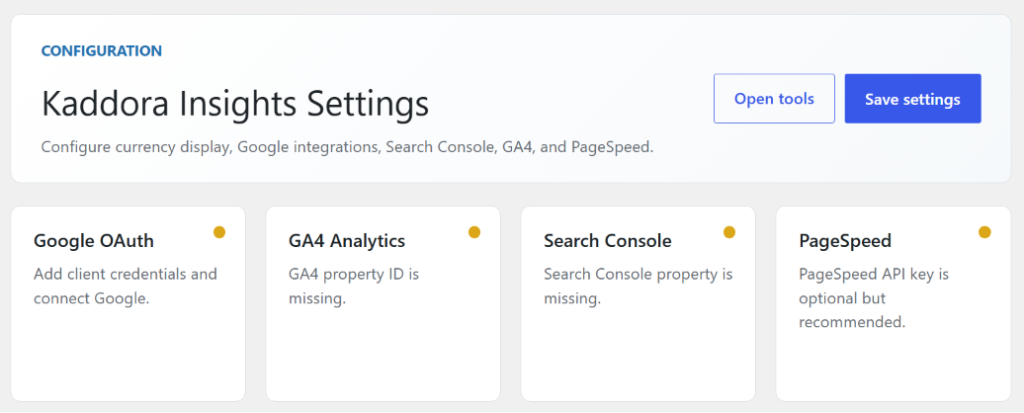
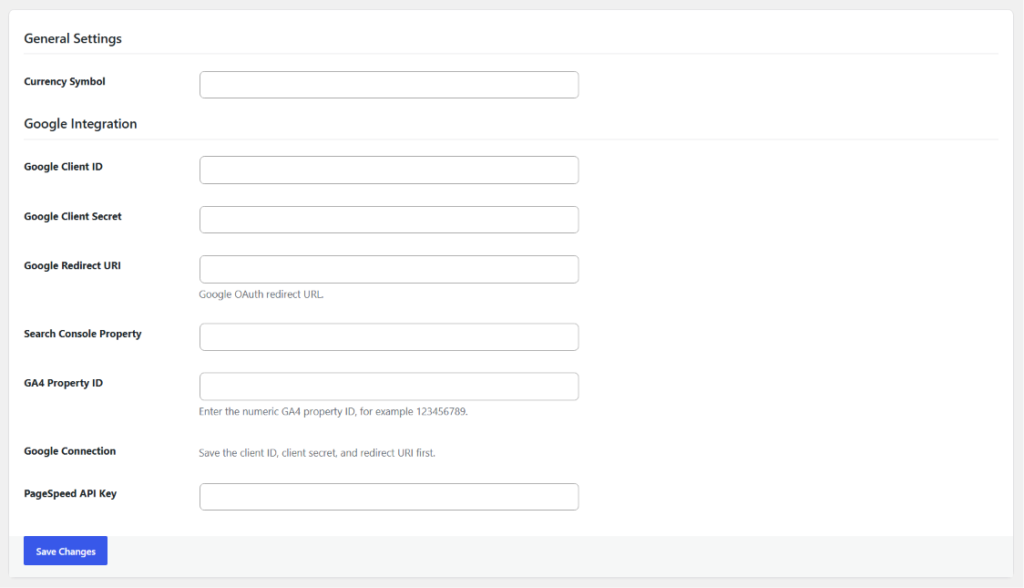
The Settings section allows administrators to configure Kaddora Insights for WooCommerce and connect external services required for advanced analytics, business intelligence, SEO monitoring, and website performance tracking. It serves as the central configuration area for plugin preferences, Google integrations, and API-based services.
Settings Features
- General Configuration: Configure core plugin settings, including currency display preferences and store-level configuration options.
- Google OAuth Integration: Connect your Google account securely using OAuth authentication to enable access to Google Analytics, Search Console, and other Google services.
- Google Analytics 4 (GA4) Setup: Configure and connect a GA4 Property ID to collect visitor analytics, traffic insights, session data, and conversion metrics.
- Google Search Console Integration: Connect a verified Search Console property to monitor search performance, clicks, impressions, CTR, keyword rankings, and SEO visibility.
- PageSpeed Insights Configuration: Add a Google PageSpeed Insights API key to enable website performance analysis, Core Web Vitals monitoring, and optimization recommendations.
- Integration Status Monitoring: View the current status of Google OAuth, GA4, Search Console, and PageSpeed connections directly from the settings dashboard.
- Credential Management: Securely manage Google Client ID, Client Secret, Redirect URI, Property IDs, and API keys required for external integrations.
- Analytics Configuration: Configure data sources and integration settings used throughout the analytics and reporting modules.
- Connection Validation: Verify that all required services are properly connected and available for data collection and synchronization.
- Centralized Plugin Management: Manage all integration and configuration settings from a single location without modifying code or external files.
9. Performance & Optimization ⚡
Kaddora Insights for WooCommerce is designed with performance, scalability, and reliability in mind. The plugin utilizes optimized database queries, caching mechanisms, background processing, and WooCommerce analytics tables to minimize server load while delivering accurate business insights. Performance optimization techniques are implemented throughout the plugin to ensure smooth operation on both small and large WooCommerce stores.
Performance & Optimization Features
- Optimized Database Queries: Uses efficient database queries and WooCommerce analytics lookup tables to reduce query execution time and improve dashboard performance.
- Caching System: Frequently accessed analytics, revenue metrics, and performance data are cached to minimize repetitive database requests.
- Background Processing: Scheduled tasks and data synchronization processes run through WordPress Cron to prevent delays during normal admin usage.
- Efficient Analytics Processing: Revenue, customer, product, and business intelligence calculations are optimized to handle large datasets efficiently.
- REST API Optimization: Lightweight REST API endpoints provide fast and secure access to analytics and dashboard data.
- Reduced Server Load: Intelligent data aggregation and optimized reporting help reduce resource consumption on high-traffic stores.
- Scalable Architecture: Built using a modular architecture that supports growing WooCommerce stores without significant performance degradation.
- PageSpeed Integration Optimization: External API requests are processed efficiently with timeout controls and error handling to prevent performance bottlenecks.
- Export Performance Improvements: Report generation and export processes are optimized for handling large volumes of analytics data.
- Security and Performance Balance: Nonce validation, capability checks, sanitization, and permission controls are implemented without compromising system performance.
Best Practices for Optimal Performance
- Use the latest version of WordPress and WooCommerce.
- Run PHP 8.1 or higher for improved performance.
- Enable object caching when available.
- Keep WooCommerce analytics tables optimized.
- Configure WordPress Cron properly.
- Use a caching plugin for improved frontend performance.
- Regularly update Google integration credentials.
- Monitor server resources on high-volume stores.
10. Troubleshooting 🛠️
Kaddora Insights for WooCommerce includes built-in diagnostic tools to help identify and resolve common configuration, integration, and performance issues. Most issues can be resolved through the plugin’s Health Check utility and proper service configuration.
Common Troubleshooting Areas
- Plugin Activation Issues: Verify WordPress, WooCommerce, and PHP version requirements are met.
- Dashboard Data Missing: Ensure WooCommerce orders and analytics data are available.
- Google Analytics Connection Issues: Verify Google OAuth credentials and GA4 Property ID configuration.
- Search Console Data Not Loading: Confirm a verified Search Console property is selected and connected.
- PageSpeed Integration Issues: Check that a valid PageSpeed Insights API key has been configured.
- Reports & Export Problems: Verify user permissions and ensure report data is available before exporting.
- Alert Notifications Not Appearing: Confirm WP-Cron is enabled and scheduled tasks are running correctly.
- REST API & Connectivity Issues: Validate plugin settings, user permissions, and server configuration.
11. FAQ ❓
1. Does Kaddora Insights require WooCommerce?
Yes. Kaddora Insights is designed specifically for WooCommerce and requires WooCommerce to be installed and activated.
2. Can I use the plugin without Google Analytics or Search Console?
Yes. Core WooCommerce analytics, reports, product intelligence, customer analytics, and business intelligence features will continue to work without Google integrations.
3. Which Google services are supported?
The plugin supports Google Analytics 4 (GA4), Google Search Console, and Google PageSpeed Insights for advanced analytics and performance monitoring.
4. Can I export analytics and reports?
Yes. The Reports Center allows you to export analytics and business reports in CSV and JSON formats for further analysis and record keeping.
5. Does the plugin impact store performance?
No. The plugin uses optimized database queries, caching mechanisms, and background processing to minimize server load and maintain efficient performance.
6. Is the plugin suitable for large WooCommerce stores?
Yes. Kaddora Insights is built with a scalable architecture and optimized analytics processing, making it suitable for small businesses, growing stores, and high-volume WooCommerce environments.
12. Support & Updates 📩
We are committed to providing reliable support and regular updates for Kaddora Insights for WooCommerce to ensure compatibility, performance, security, and long-term stability.
📞 Support
- Contact our support team for technical assistance and troubleshooting.
- Provide your WordPress version, WooCommerce version, and plugin version when reporting issues.
- Include relevant screenshots, error messages, or debug logs for faster issue resolution.
- Review the documentation and troubleshooting guide before submitting a support request.
🔄 Updates
- Regular updates with new features, enhancements, and usability improvements.
- Security updates and bug fixes to maintain a stable and secure environment.
- Performance optimizations for analytics, reporting, and business intelligence modules.
- Compatibility updates for the latest versions of WordPress, WooCommerce, and supported Google services.
💡 Recommendations
- Keep the plugin updated to the latest available version.
- Create a backup of your website before applying major updates.
- Review release notes and changelogs before upgrading.
- Periodically verify Google Analytics, Search Console, and PageSpeed integrations.
- Use the built-in Health Check utility to monitor plugin status and system readiness.
Your feedback helps improve Kaddora Insights for WooCommerce. We continuously work to enhance the platform and deliver a better analytics and business intelligence experience for WooCommerce store owners.
© Kaddora Tech