
Kaddora ERP for WooCommerce Plugin🎀
User Documentation📜:
Kaddora ERP for WooCommerce is a comprehensive WordPress-based ERP solution designed to help businesses manage inventory, purchasing, sales, customer relationships, accounting, and reporting from a single dashboard. Built with a modular architecture and deep WooCommerce integration, it provides a centralized system for managing daily business operations efficiently and accurately.
The plugin extends WooCommerce with enterprise-level management tools including stock tracking, purchase order management, sales workflows, CRM capabilities, financial transaction tracking, and business analytics. Designed using WordPress coding standards and a scalable architecture, it is suitable for small, medium, and growing eCommerce businesses that require complete operational control within WordPress.
Key Features:
Core Framework
- Modular ERP architecture
- WordPress native development
- WooCommerce integration
- REST API support
- AJAX-powered operations
- Role and capability management
- Activity logging system
- Database version management
Inventory Management
- Stock management
- Inventory dashboard
- Stock adjustments
- Stock logs and audit trail
- Batch management
- Inventory reservations
- Low stock monitoring
- Inventory reports
Purchase Management
- Vendor management
- Purchase orders
- Purchase order items
- Approval workflow
- Goods receipt management (GRN)
- Partial receiving
- Purchase returns
- Vendor analytics and reports
Sales Management
- WooCommerce order synchronization
- Sales orders
- Sales order items
- Stock reservation workflow
- Shipment management
- Inventory deduction
- Order tracking
- Sales dashboard and reports
CRM Management
- Customer management
- Customer profiles
- Customer notes
- Customer activities
- Customer sales history
- Customer analytics
- WooCommerce customer synchronization
Accounting
- Account management
- Financial transactions
- Income tracking
- Expense tracking
- Purchase-to-accounting integration
- Sales-to-accounting integration
- Accounting dashboard
Reporting & Analytics
- Centralized reports dashboard
- Inventory reports
- Purchase reports
- Sales reports
- Customer reports
- Business analytics
- Data export functionality
🎀 Kaddora ERP for WooCommerce : Documentation
- 1. Introduction
- 2. Requirements & Compatibility
- 3. Plugin Installation
- 4. Dashboard
- 5. Settings
- 6. Tools
- 7. Inventory
- 8. Inventory Warehouses
- 9. Inventory Transfers
- 10. Inventory Reports
- 11. Purchase
- 12. Purchase Orders
- 13. Purchase Vendors
- 14. Purchase Returns
- 15. Sales
- 16. Sales Orders
- 17. CRM
- 18. CRM Customers
- 19. Reports
- 20. Accounting
- 21. Accounting Accounts
- 22. Accounting Transactions
- 23. Performance & Optimization
- 24. Troubleshooting
- 25. FAQ
- 26. Support & Updates
1. Introduction 🎗️
Kaddora ERP for WooCommerce is a comprehensive enterprise resource planning (ERP) solution built specifically for WordPress and WooCommerce. It enables businesses to manage inventory, purchasing, sales operations, customer relationships, accounting processes, and business reporting from a centralized platform. The plugin is designed with a modular architecture, allowing each business function to operate independently while remaining fully integrated with the overall ERP ecosystem.
The system extends WooCommerce beyond traditional eCommerce capabilities by introducing advanced business management workflows such as stock control, purchase order processing, inventory reservations, shipment management, customer relationship management (CRM), financial transaction tracking, and operational reporting. By combining these critical business functions into a single solution, Kaddora ERP helps organizations improve efficiency, increase visibility across departments, and streamline day-to-day operations.
Built using WordPress coding standards and modern PHP object-oriented architecture, Kaddora ERP prioritizes scalability, maintainability, security, and performance. The plugin integrates seamlessly with WooCommerce while remaining fully native to the WordPress environment, making it an ideal solution for businesses seeking enterprise-level management tools without leaving their existing eCommerce platform.
Whether managing inventory across multiple products, tracking vendor purchases, processing customer orders, analyzing business performance, or maintaining financial records, Kaddora ERP provides the tools required to support business growth and operational excellence from a single unified dashboard.
2. Requirements & Compatibility ⚙️
Minimum Requirements
- WordPress 6.0 or higher
- WooCommerce 7.0 or higher
- PHP 8.0 or higher
- MySQL 5.7+ or MariaDB 10.3+
- JavaScript enabled browser
- Administrator or Shop Manager access
Recommended Environment
- WordPress 6.5+
- WooCommerce 9.0+
- PHP 8.2 or higher
- MySQL 8.0+
- HTTPS enabled website
- Minimum 256 MB PHP memory limit
Compatibility
WordPress
- Fully compatible with WordPress multisite environments
- Uses WordPress Coding Standards
- Native WordPress database architecture
- WordPress Settings API support
- WordPress REST API integration
WooCommerce
- WooCommerce product synchronization
- WooCommerce customer synchronization
- WooCommerce order synchronization
- WooCommerce inventory integration
- WooCommerce reporting integration
Supported Modules
- Inventory Management
- Warehouse Management
- Purchase Management
- Sales Management
- Customer Relationship Management (CRM)
- Accounting Management
- Reports & Analytics
Browser Compatibility
- Google Chrome (Latest Version)
- Mozilla Firefox (Latest Version)
- Microsoft Edge (Latest Version)
- Safari (Latest Version)
Server Requirements
- PHP Extensions:
- JSON
- cURL
- mbstring
- OpenSSL
- ZIP
- PDO
- Database:
- MySQL 5.7+ or MariaDB 10.3+
3.Plugin Installation 📌
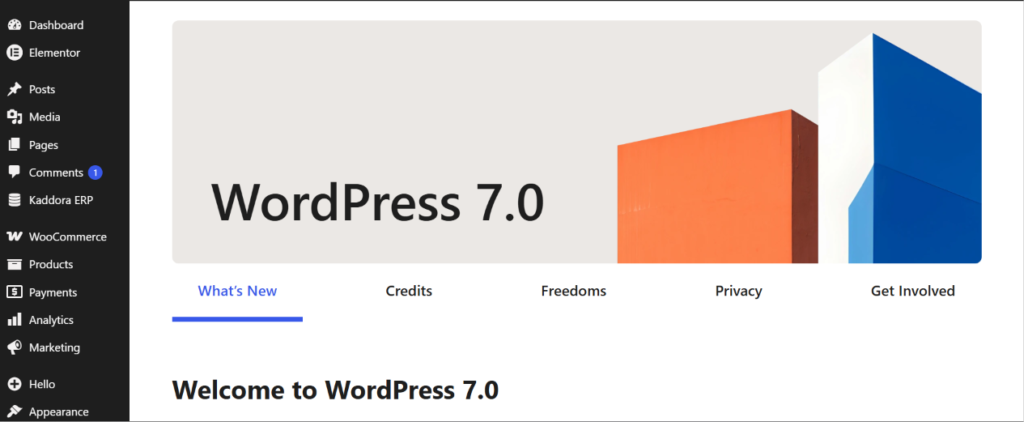
- Go to the WordPress Dashboard -:
- Plugins → Add New →
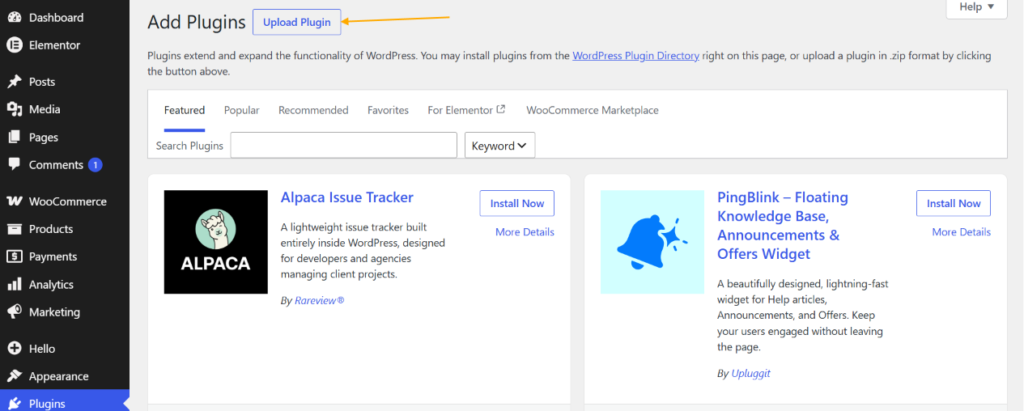
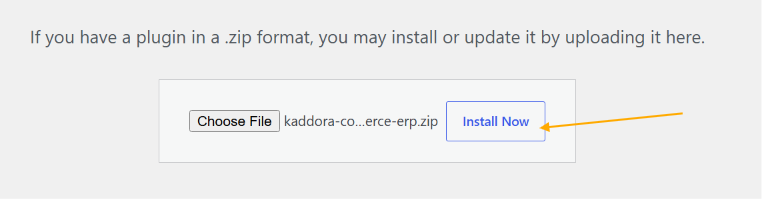
- Upload Plugin > Choose the kaddora-commerce-erp.zip plugin file and click Install Now.
- After successfully Installation & Activation of plugin, you will see Kaddora ERP for WooCommerce in your installed plugin section, here you can check version and description about the plugin.

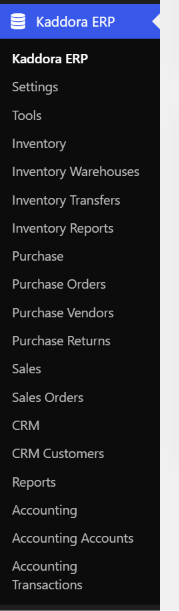
- In WordPress dashboard, you can see “Kaddora ERP” option available, click on it and access the setting part of the Plugin.
4. Dashboard (Admin Panel) 🛠️
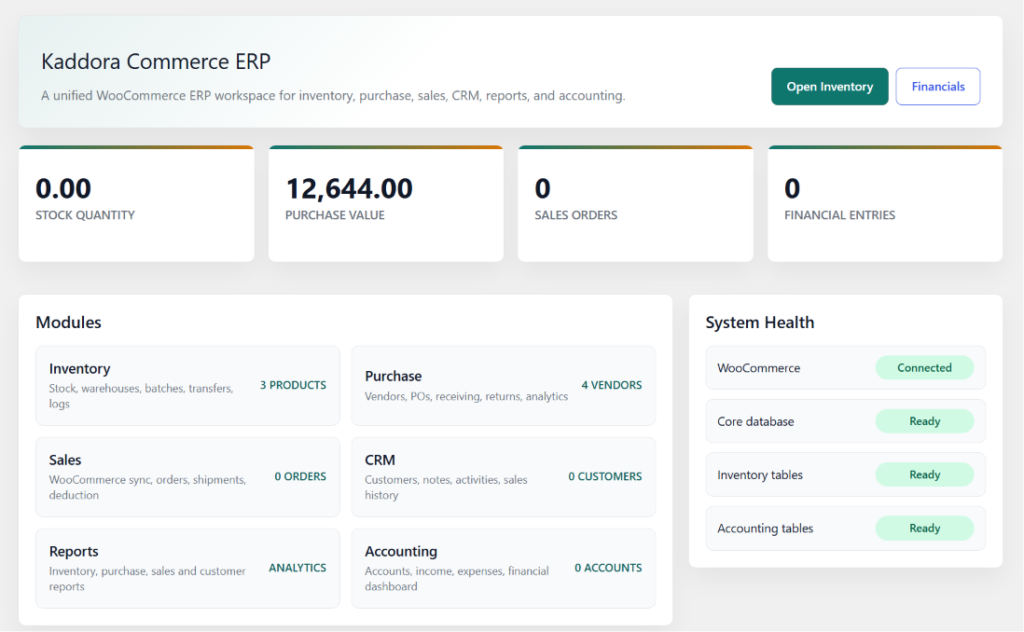
The Kaddora ERP Dashboard serves as the central command center for all business operations within the ERP system. It provides a real-time overview of inventory, purchasing, sales, customer management, accounting, and system health, enabling administrators and managers to monitor critical business metrics from a single location.
The dashboard is designed to deliver actionable insights through key performance indicators (KPIs), module summaries, and system status information. Users can quickly access important operational areas, identify potential issues, review business performance, and navigate directly to core ERP modules without leaving the dashboard.
Dashboard Components
Quick Action Buttons
- Open Inventory
- Financials
- Direct access to frequently used ERP modules
Business Metrics
The dashboard displays key operational statistics, including:
- Total Stock Quantity
- Total Purchase Value
- Total Sales Orders
- Total Financial Entries
Module Overview
A summary of all active ERP modules:
Inventory
- Stock Management
- Warehouses
- Batch Tracking
- Stock Transfers
- Inventory Logs
Purchase
- Vendor Management
- Purchase Orders
- Goods Receiving
- Purchase Returns
Sales
- WooCommerce Order Synchronization
- Sales Orders
- Shipment Tracking
- Inventory Deduction
CRM
- Customer Management
- Customer Notes
- Customer Activities
- Customer Sales History
Reports
- Inventory Reports
- Purchase Reports
- Sales Reports
- Customer Reports
- Business Analytics
Accounting
- Accounts Management
- Income Tracking
- Expense Tracking
- Financial Dashboard
System Health Monitor
The System Health panel provides a quick overview of the ERP environment status, including:
- WooCommerce Integration Status
- Core Database Status
- Inventory Tables Status
- Accounting Tables Status
Health indicators help administrators verify that critical ERP components are functioning correctly and that required database structures are available.
Benefits
- Centralized business overview
- Real-time operational visibility
- Faster decision making
- Quick access to ERP modules
- Business performance monitoring
- System integrity verification
- Improved workflow efficiency
5. Settings ⚙️
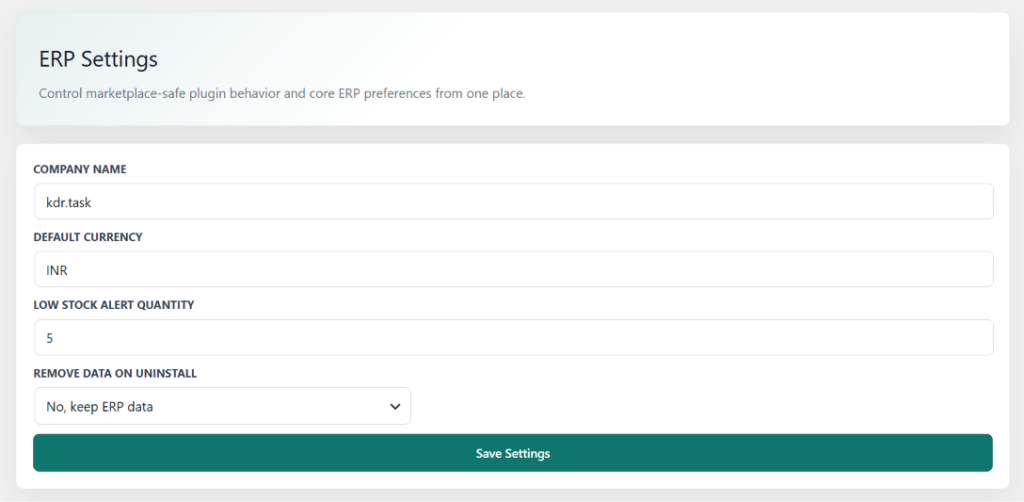
The ERP Settings page provides a centralized location for configuring core system preferences and operational defaults used throughout Kaddora ERP. These settings allow administrators to customize company information, inventory behavior, currency preferences, and data management options without modifying code or database records.
Designed for simplicity and ease of use, the Settings module ensures consistent configuration across all ERP components, including Inventory, Purchase, Sales, CRM, Reports, and Accounting. Changes made within this section are automatically applied throughout the system, helping maintain standardized business processes and operational accuracy.
Settings Components
Company Name
Defines the business or organization name used across ERP dashboards, reports, and internal records.
Default Currency
Sets the primary currency used for purchase orders, sales transactions, accounting entries, and financial reports.
Low Stock Alert Quantity
Specifies the minimum stock threshold that triggers low-stock notifications and inventory warnings.
Remove Data on Uninstall
Controls plugin data retention during uninstallation.
Options include:
- Keep ERP data after uninstall
- Remove all ERP data during uninstall
This setting helps businesses choose between preserving historical records or performing a complete cleanup when removing the plugin.
6. Tools 🛠️
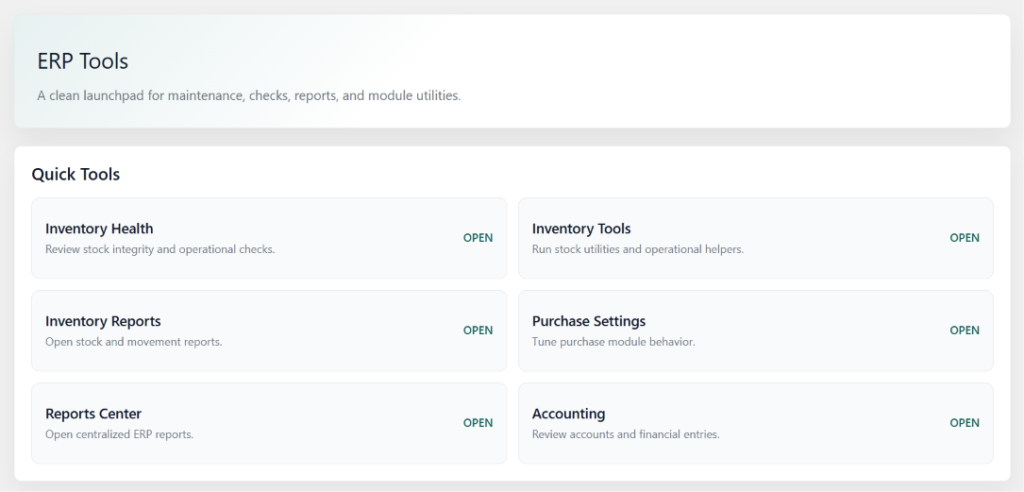
The ERP Tools page provides quick access to essential maintenance utilities, operational checks, reports, and accounting functions. It serves as a centralized workspace for administrators to monitor system health, manage inventory operations, access reports, and perform routine ERP maintenance tasks.
Available Tools
- Inventory Health – Monitor stock integrity and inventory status.
- Inventory Tools – Access stock utilities and operational helpers.
- Inventory Reports – Review inventory movement and stock reports.
- Purchase Settings – Configure purchase module preferences.
- Reports Center – Access centralized ERP reports and analytics.
- Accounting – Manage accounts, transactions, and financial records.
7. Inventory
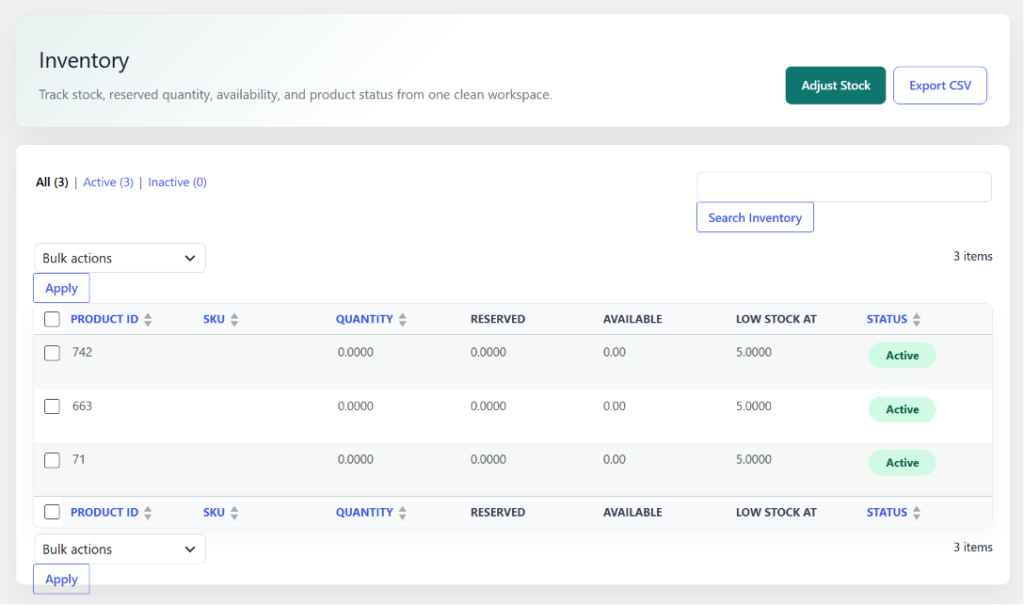
The Inventory page provides a centralized view of all stock items, quantities, reserved stock, available inventory, and product status. It enables administrators to monitor stock levels, perform inventory adjustments, manage product availability, and track low-stock items from a single interface.
Features
- Inventory stock management
- Reserved and available quantity tracking
- Low stock monitoring
- Product status management
- Inventory search and filtering
- Bulk inventory actions
- Stock adjustment tools
- Inventory data export (CSV)
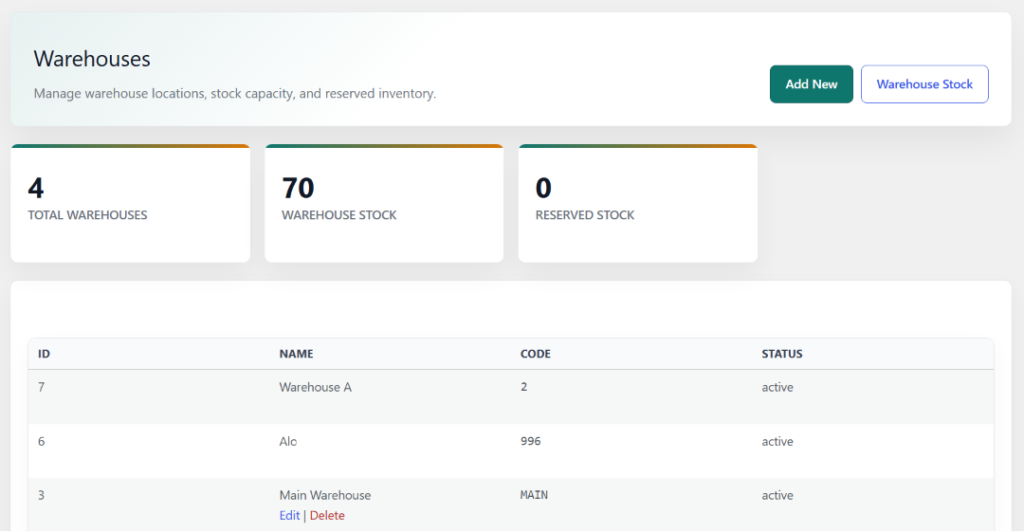
8. Inventory Warehouses
The Warehouses page allows administrators to manage warehouse locations, monitor warehouse stock levels, and track reserved inventory across multiple storage locations. It provides a centralized view of warehouse operations to improve inventory organization and stock control.
Features
- Warehouse management
- Warehouse stock tracking
- Reserved inventory monitoring
- Multiple warehouse support
- Warehouse status management
- Warehouse stock overview
- Quick warehouse creation
- Centralized inventory distribution
9. Inventory Transfers
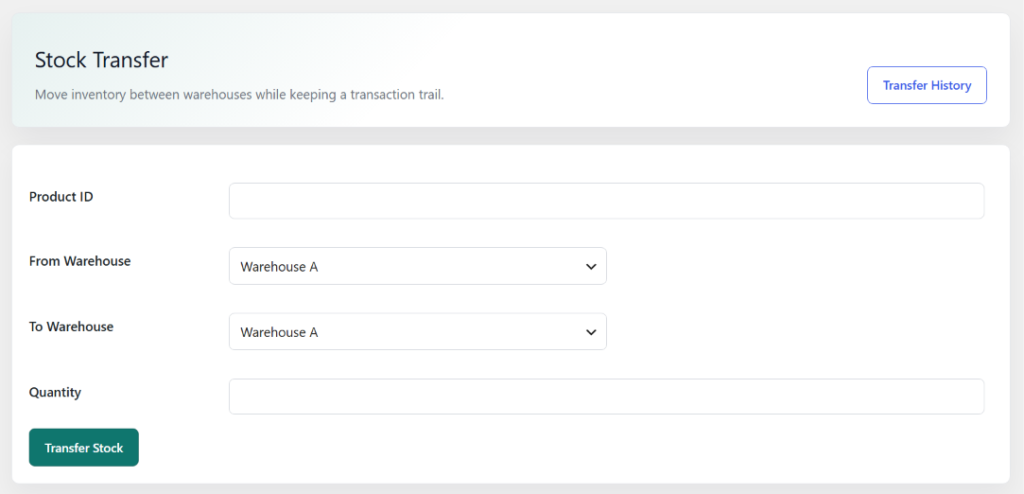
The Stock Transfer page allows administrators to move inventory between warehouses while maintaining accurate stock records and transfer history. It helps ensure efficient inventory distribution across multiple warehouse locations and provides complete traceability for stock movements.
Features
- Transfer stock between warehouses
- Warehouse-to-warehouse inventory movement
- Product quantity transfer management
- Transfer history tracking
- Inventory distribution control
- Stock movement audit trail
- Centralized warehouse operations
- Accurate inventory synchronization
10. Inventory Reports
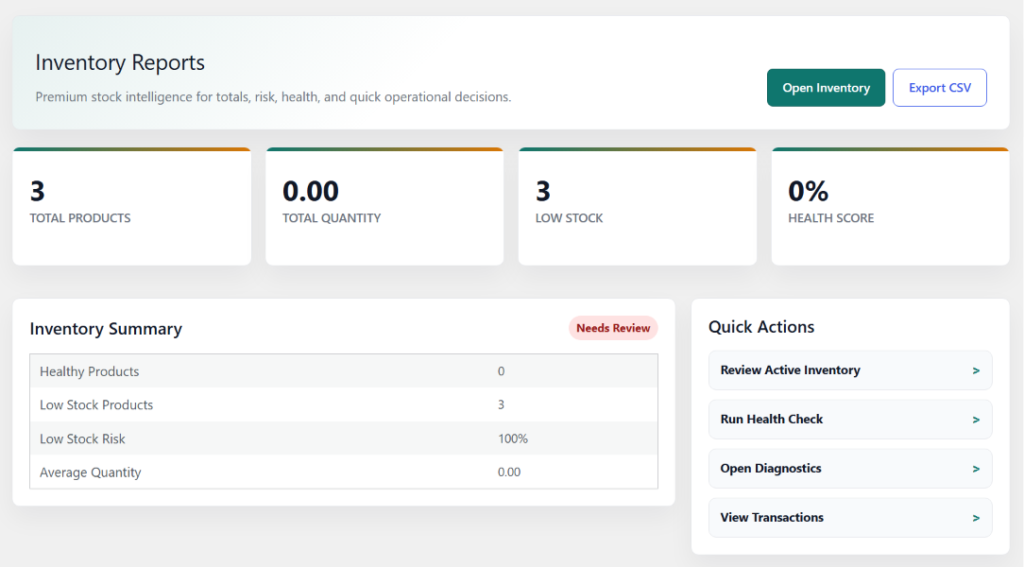
The Inventory Reports page provides detailed insights into stock performance, inventory health, product availability, and low-stock risks. It helps administrators monitor inventory status, identify potential stock issues, and make informed inventory management decisions through real-time analytics and operational reports.
Features
- Inventory performance analytics
- Stock quantity monitoring
- Low stock detection
- Inventory health scoring
- Inventory summary reports
- Quick inventory actions
- Health check and diagnostics
- CSV report export
11. Purchase 🛒
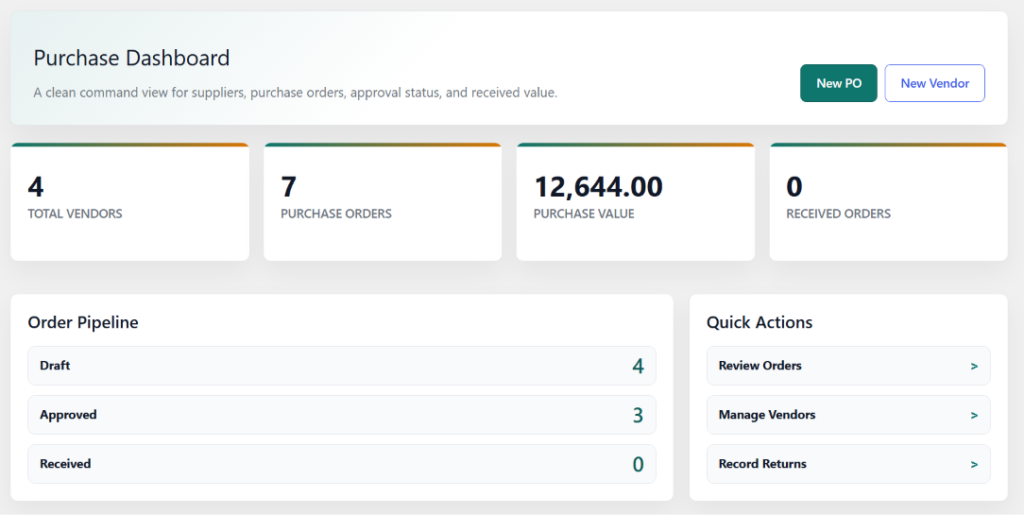
The Purchase Dashboard provides a centralized overview of vendor management, purchase orders, approval status, and procurement performance. It enables administrators to monitor purchasing activities, track order progress, manage suppliers, and review purchase metrics from a single workspace.
Features
- Vendor management overview
- Purchase order tracking
- Purchase value monitoring
- Order approval status
- Received order tracking
- Purchase pipeline management
- Quick procurement actions
- Supplier performance insights
12. Purchase Orders
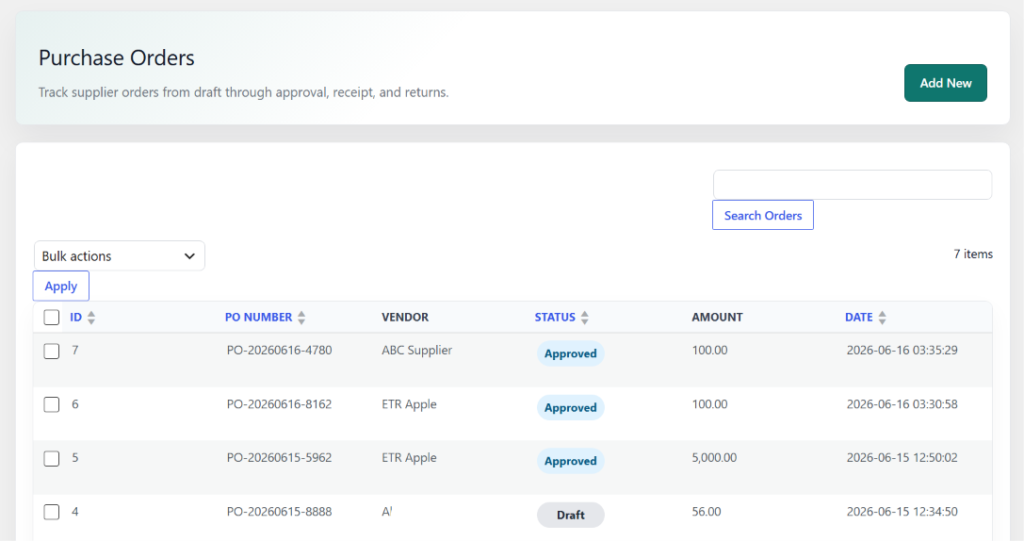
The Purchase Orders page enables administrators to create, manage, and track supplier purchase orders throughout the procurement lifecycle. It provides a centralized interface for monitoring order status, vendor information, purchase amounts, and approval workflows to ensure efficient purchasing operations.
Features
- Purchase order management
- Vendor order tracking
- Draft and approval workflow
- Purchase status monitoring
- Order amount tracking
- Search and filtering options
- Bulk order actions
- Procurement activity management
13. Purchase Vendors
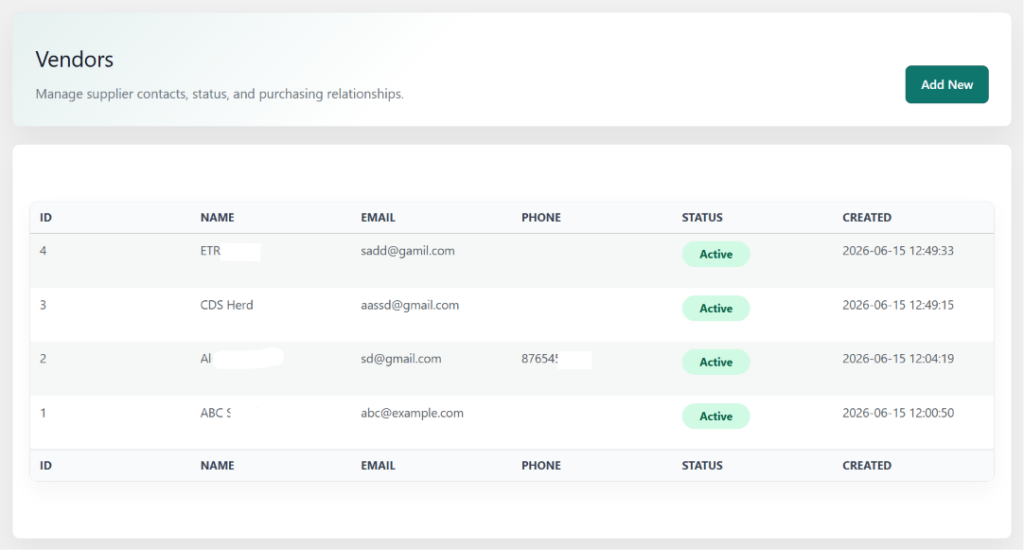
The Vendors page provides a centralized interface for managing supplier information, contact details, and vendor relationships. It enables administrators to maintain an organized supplier database, monitor vendor status, and support efficient procurement operations across the ERP system.
Features
- Vendor management
- Supplier contact information
- Vendor status tracking
- Supplier database management
- Vendor relationship management
- Quick vendor registration
- Procurement support
- Centralized supplier records
14. Purchase Returns
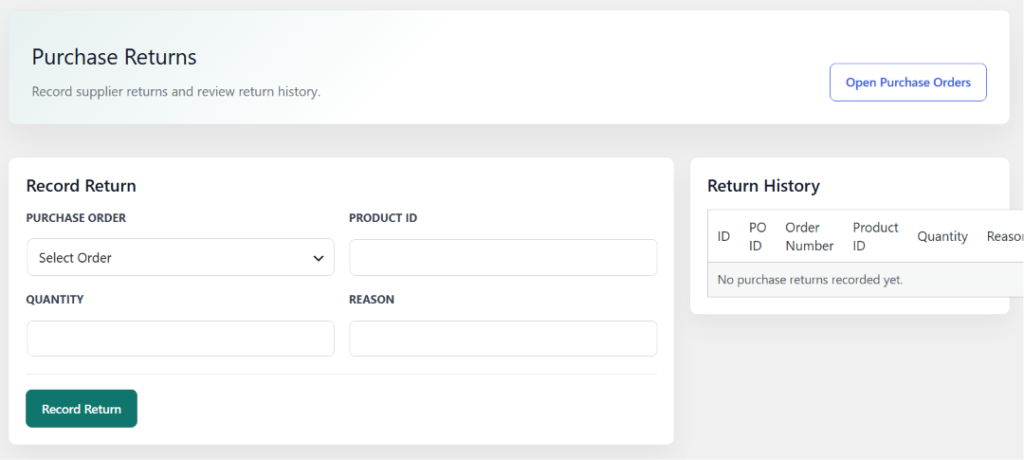
The Purchase Returns page allows administrators to record returned items, manage supplier returns, and maintain a complete return history. It helps businesses track defective, damaged, or incorrect products returned to vendors while ensuring accurate inventory and procurement records.
Features
- Purchase return management
- Supplier return recording
- Product return tracking
- Return quantity management
- Return reason documentation
- Purchase return history
- Vendor return monitoring
- Procurement record accuracy
15. Sales 🛍️
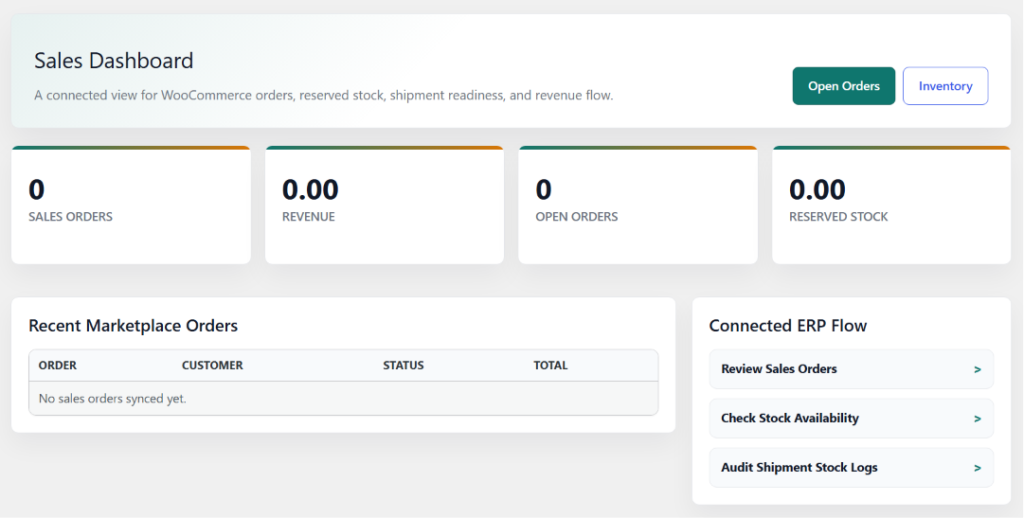
The Sales Dashboard provides a centralized view of sales operations, WooCommerce order activity, revenue performance, reserved inventory, and shipment readiness. It helps administrators monitor sales workflows, track order progress, and gain real-time visibility into business performance from a single dashboard.
Features
- Sales order monitoring
- Revenue tracking
- Open order management
- Reserved stock visibility
- WooCommerce order synchronization
- Recent sales activity overview
- Shipment readiness monitoring
- Connected sales workflow management
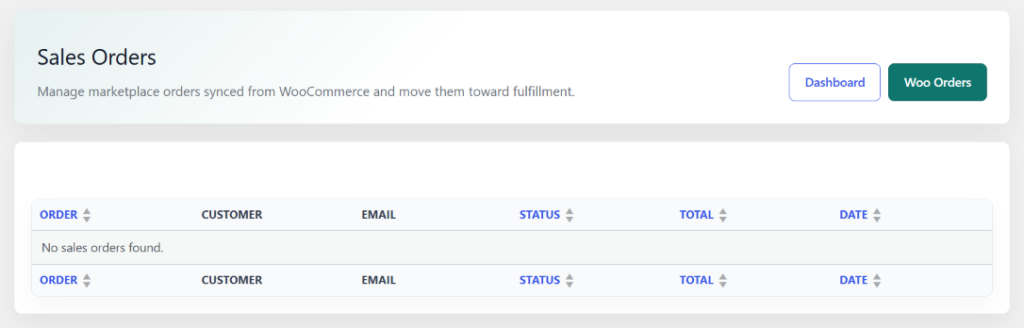
16. Sales Orders 🛒
The Sales Orders page provides a centralized interface for managing WooCommerce orders synchronized with the ERP system. It enables administrators to monitor customer orders, track order status, review sales information, and manage the fulfillment process from order creation to shipment.
Features
- WooCommerce order synchronization
- Sales order management
- Customer order tracking
- Order status monitoring
- Sales fulfillment workflow
- Customer and order details
- Sales order dashboard access
- Centralized order management
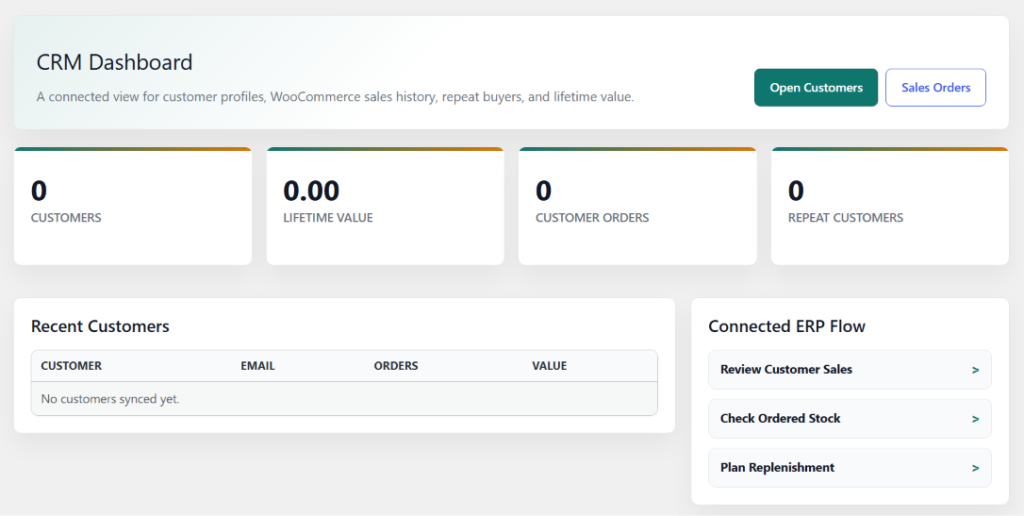
17. CRM 👥
The CRM Dashboard provides a centralized view of customer relationships, sales history, customer value, and purchasing behavior. It helps administrators monitor customer engagement, track repeat buyers, analyze customer performance, and manage customer-related activities from a single workspace.
Features
- Customer management overview
- Customer lifetime value tracking
- Customer order analytics
- Repeat customer monitoring
- WooCommerce customer synchronization
- Recent customer activity tracking
- Customer sales insights
- Connected CRM workflow management
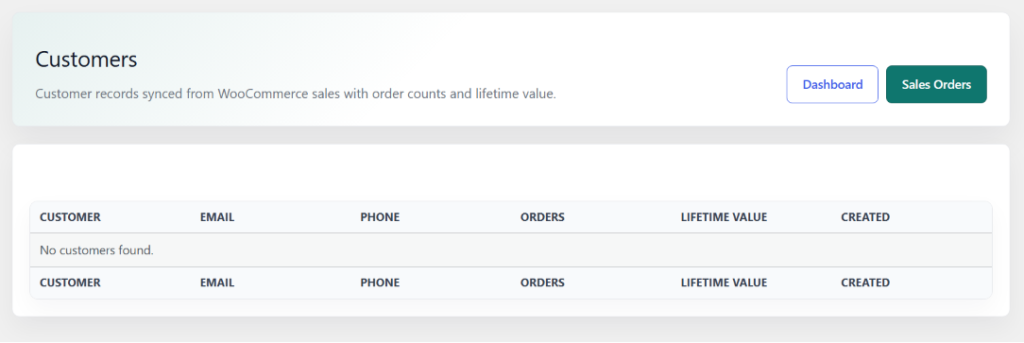
18. CRM Customers
The Customers page provides a centralized view of customer records synchronized from WooCommerce orders and sales activity. It enables administrators to manage customer information, monitor purchasing behavior, track order history, and analyze customer lifetime value within the ERP system.
Features
- Customer management
- WooCommerce customer synchronization
- Customer profile records
- Order history tracking
- Customer lifetime value monitoring
- Customer contact management
- Sales activity insights
- Centralized customer database
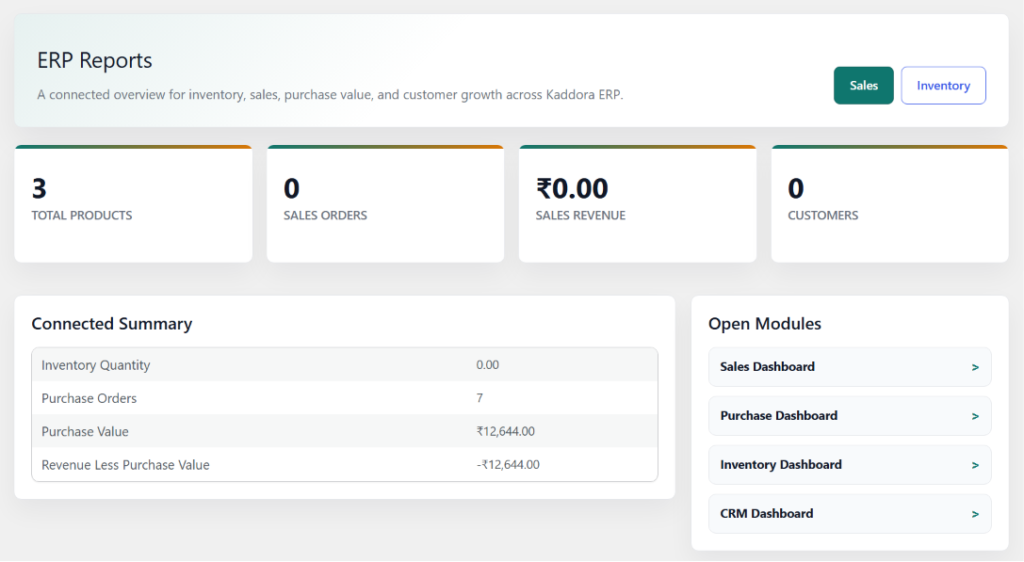
19. ERP Reports 📊
The Reports page provides a centralized overview of key business metrics across inventory, sales, purchasing, and customer management. It helps administrators analyze operational performance, monitor business growth, and make data-driven decisions using real-time ERP insights.
Features
- Centralized ERP reporting dashboard
- Inventory performance analytics
- Sales revenue monitoring
- Purchase value tracking
- Customer growth insights
- Business summary metrics
- Cross-module reporting
- Quick access to operational dashboards
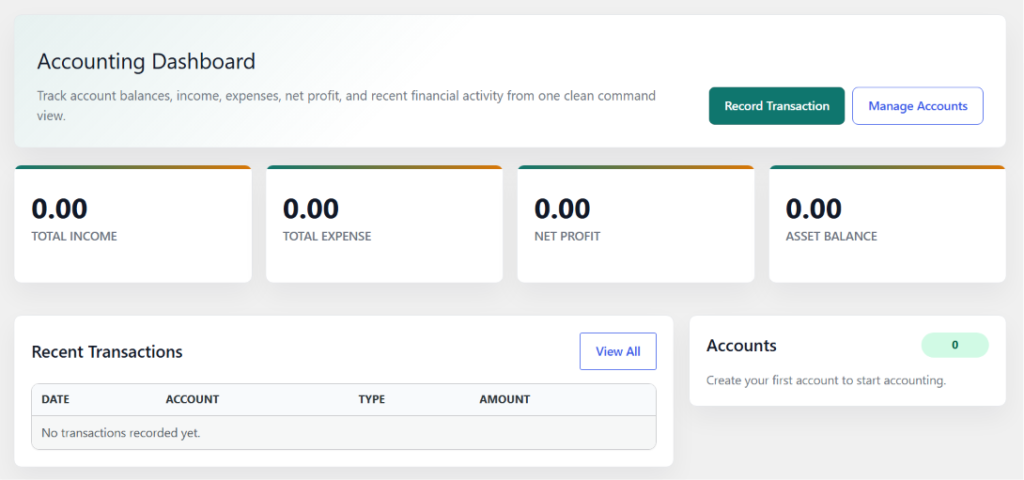
20. Accounting 💵
The Accounting Dashboard provides a centralized view of financial performance, account balances, income, expenses, and recent transactions. It helps administrators monitor financial activities, track business profitability, manage accounts, and maintain accurate financial records within the ERP system.
Features
- Financial performance overview
- Income and expense tracking
- Net profit monitoring
- Account balance management
- Recent transaction history
- Financial activity insights
- Account management tools
- Centralized accounting dashboard
21. Accounting Accounts
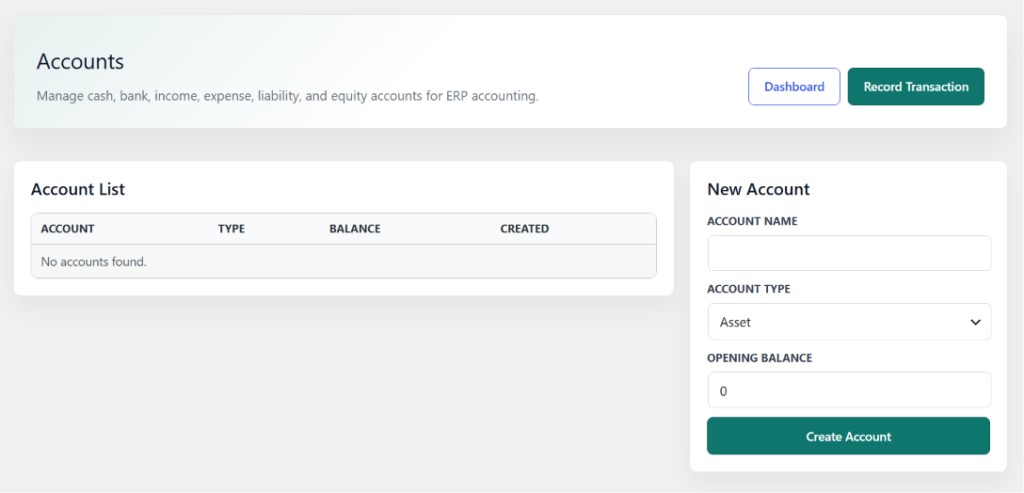
The Accounts page enables administrators to create, organize, and manage financial accounts used within the ERP accounting system. It provides a centralized interface for maintaining account records, tracking balances, and supporting accurate financial transactions across business operations.
Features
- Financial account management
- Account creation and maintenance
- Asset, liability, income, expense, and equity accounts
- Opening balance management
- Account balance tracking
- ERP accounting integration
- Centralized account records
- Financial transaction support
22. Accounting Transactions
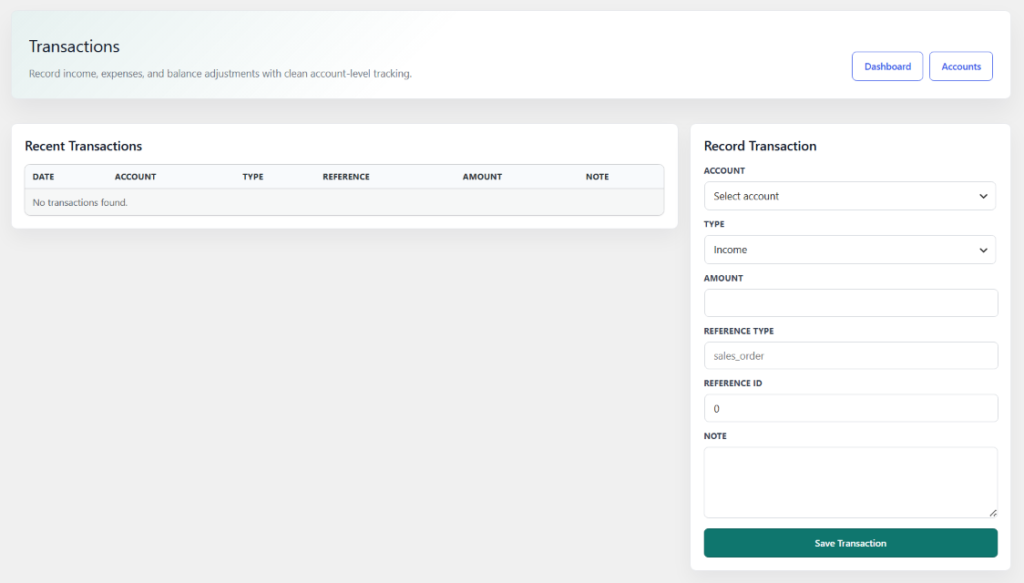
The Transactions page provides a centralized interface for recording and managing financial transactions within the ERP accounting system. It enables administrators to track income, expenses, account adjustments, and transaction references while maintaining accurate financial records and account balances.
Features
- Income and expense recording
- Financial transaction management
- Account-based transaction tracking
- Reference order linking
- Account balance adjustments
- Transaction history monitoring
- Financial audit trail
- ERP accounting integration
23. Performance & Optimization ⚡
- Optimized custom database tables for faster data retrieval.
- Efficient database indexing for inventory, sales, purchase, and accounting records.
- Modular architecture to load only required ERP components.
- Lightweight admin interface designed for improved dashboard performance.
- AJAX-powered operations to reduce page reloads and improve user experience.
- Optimized WooCommerce synchronization for orders, customers, and products.
- Scalable database structure suitable for growing business operations.
- WordPress-native coding standards for maximum compatibility and stability.
- Reduced server overhead through structured data management and reporting.
- Built to support high-volume inventory, purchase, sales, and financial transactions efficiently.
24. Troubleshooting 🛠️
If you encounter any issues while using Kaddora ERP for WooCommerce, review the following common solutions before contacting support.
- Ensure WordPress and WooCommerce are installed and updated to supported versions.
- Verify that all required ERP database tables have been created successfully.
- Confirm that your user account has the necessary ERP permissions.
- Check inventory logs if stock quantities appear incorrect.
- Verify purchase orders are received before expecting inventory updates.
- Ensure WooCommerce synchronization is enabled for products, customers, and orders.
- Review accounting accounts and transaction records if financial data is missing.
- Clear browser and website cache if dashboard statistics are not updating.
- Temporarily disable other plugins to identify potential conflicts.
- Check WordPress debug logs and server error logs for additional error details.
25. FAQ ❓
1. What is Kaddora ERP for WooCommerce?
Kaddora ERP is a complete business management solution for WooCommerce that includes Inventory, Purchase, Sales, CRM, Accounting, and Reporting modules.
2. Does Kaddora ERP require WooCommerce to work?
Yes. WooCommerce must be installed and activated because the ERP integrates with WooCommerce products, customers, and orders.
3. Can I manage inventory across multiple warehouses?
Yes. The Inventory module supports warehouse management, stock transfers, inventory tracking, and stock movement monitoring.
4. Does the plugin support purchase order management?
Yes. You can manage vendors, purchase orders, goods receipts, purchase returns, and procurement workflows from a centralized dashboard.
5. Are WooCommerce orders automatically synchronized?
Yes. WooCommerce orders can be synchronized into the ERP sales module for order processing, inventory reservation, and reporting.
6. Does Kaddora ERP include accounting features?
Yes. The Accounting module allows you to manage accounts, record transactions, track income and expenses, and monitor financial performance.
7. Can I generate reports and business analytics?
Yes. The Reports module provides inventory, purchase, sales, customer, and financial reports to help monitor business performance.
8. Is Kaddora ERP suitable for growing businesses?
Yes. The plugin is built with a modular and scalable architecture, making it suitable for small, medium, and growing WooCommerce businesses.
26. Support & Updates 📩
Kaddora ERP is actively maintained and regularly updated to ensure compatibility, performance, security, and long-term reliability. Updates may include new features, module enhancements, bug fixes, performance improvements, and compatibility updates for WordPress and WooCommerce.
Support
If you require assistance, please gather the following information before contacting support:
- WordPress version
- WooCommerce version
- Kaddora ERP version
- Screenshots of the issue
- Relevant error messages or logs
- Steps to reproduce the problem
Providing detailed information helps reduce troubleshooting time and allows issues to be resolved more efficiently.
Updates
Regular updates may include:
- New ERP features and enhancements
- Security improvements
- Bug fixes and stability updates
- Performance optimizations
- WooCommerce compatibility updates
- WordPress compatibility updates
- Reporting and analytics improvements
- User experience enhancements
We recommend keeping Kaddora ERP, WordPress, and WooCommerce updated to the latest stable versions for the best performance and security.
Thanks from Kaddora Tech ❤️