
Kaddora Affiliate Booster AI Link Automation for WordPress 🎀:
User Documentation📜:
Kaddora Affiliate Booster AI Link Automation for WordPress helps website owners manage and optimize affiliate marketing from a single dashboard. Automatically insert affiliate links, detect keywords using AI, track clicks, manage campaigns, and boost revenue with smart link automation.
🎀 Kaddora Affiliate Booster AI Link Automation for WordPress : Documentation
- 1. Introduction
- 2. Requirements & Compatibility
- 3. Plugin Installation
- 4. Affiliate Dashboard (Admin Panel)
- 5. Affiliate Link Management
- 6. AI Link Automation
- 7. Click Tracking & Analytics
- 8. Plugin Settings
- 9. Integrations (API & Services)
- 10. Performance & Optimization
- 11. Troubleshooting
- 12. FAQ
- 13. Support & Updates
1. Introduction 🎗️
Kaddora Affiliate Booster AI Link Automation for WordPress is a powerful plugin designed to simplify and enhance affiliate marketing directly within your website. It enables users to automatically create, manage, and insert affiliate links using intelligent AI-based automation.
Affiliate marketing often requires manual effort to place links, track performance, and optimize content. This plugin eliminates that complexity by providing a centralized system that handles everything from keyword-based linking to real-time click tracking.
With advanced automation tools, you can detect relevant keywords in your content and automatically insert affiliate links, ensuring better monetization without interrupting user experience. The plugin is ideal for bloggers, niche site owners, marketers, and WooCommerce store owners looking to increase affiliate revenue efficiently.
- Automate affiliate link insertion across posts and pages
- Use AI to detect keywords and suggest linking opportunities
- Track clicks and monitor affiliate performance
- Manage all affiliate links from one dashboard
- Optimize content for higher conversions and revenue
Kaddora Affiliate Booster AI Link Automation empowers you to scale your affiliate strategy while saving time and improving overall performance.
2. Requirements & Compatibility ⚙️
- WordPress Version: Requires WordPress 5.8 or higher and is compatible with the latest WordPress updates.
- PHP Version: Minimum PHP 7.4, with PHP 8.0+ recommended for better performance.
- Hosting Environment: Works on most standard hosting providers, including shared, VPS, and cloud hosting. Requires cURL enabled and HTTPS support.
- Database: Compatible with MySQL 5.6+ or the MariaDB equivalent.
- Browser Support: Supports all modern browsers, including Chrome, Firefox, Edge, and Safari.
- Theme Compatibility: Works smoothly with most well-coded WordPress themes, including both classic themes and block (Gutenberg) themes.
- Plugin Compatibility: Integrates well with popular plugins such as Yoast SEO, Rank Math, Elementor, WPBakery, WP Rocket, and W3 Total Cache.
- AI Features Requirement: May require API access for AI-based automation features and a stable internet connection for processing.
- User Permissions: Administrator or Editor access is recommended for full functionality.
- Multisite Support: Compatible with WordPress Multisite setups.
- Localization: Translation-ready and compatible with multilingual plugins like WPML and Polylang.
3.Plugin Installation 📌
- Go to the WordPress Dashboard -:
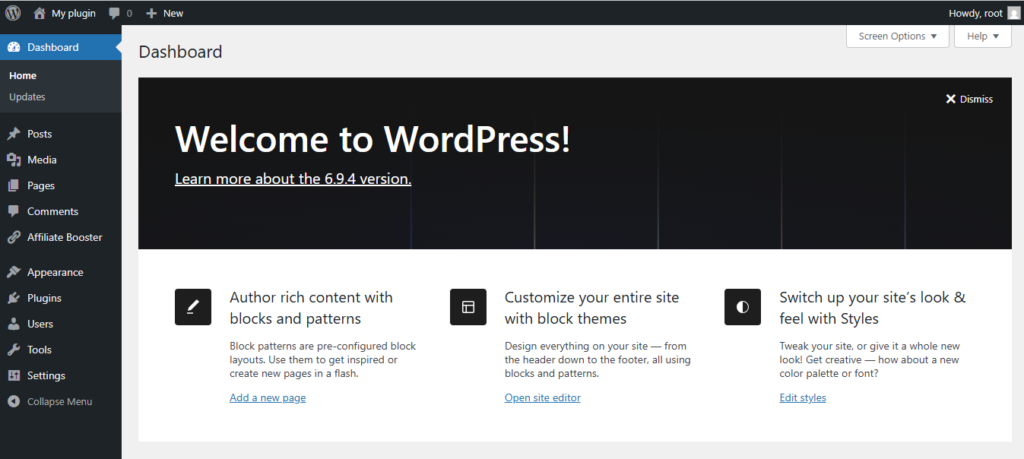
- Plugins → Add New →
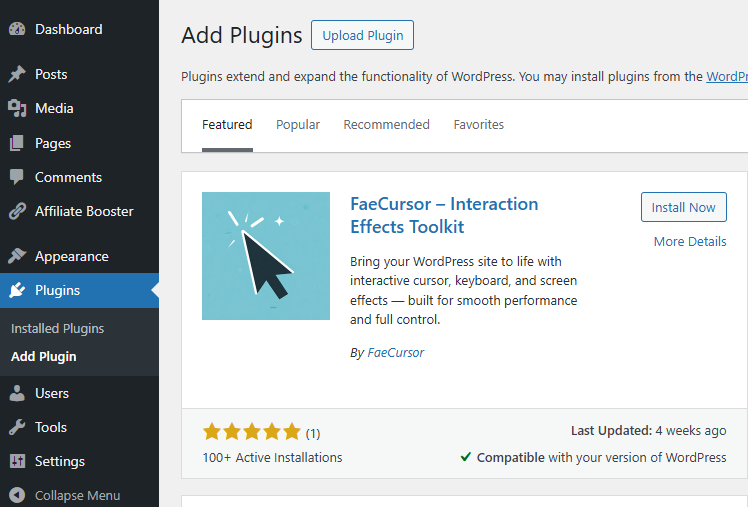
- Upload Plugin > Choose the Kaddora Affiliate Booster AI Link Automation for WordPress.zip plugin file and click Install Now.

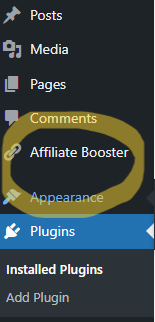
- After successfully Installation & Activation of plugin, you will see Kaddora Affiliate Booster AI Link Automation for WordPress in your installed plugin section, here you can check version and description about the plugin.

- In WordPress dashboard, you can see ‘Affiliate Booster ’’ option available, click on it and access the setting part of the Plugin.
4. Dashboard (Admin Panel) 🛠️
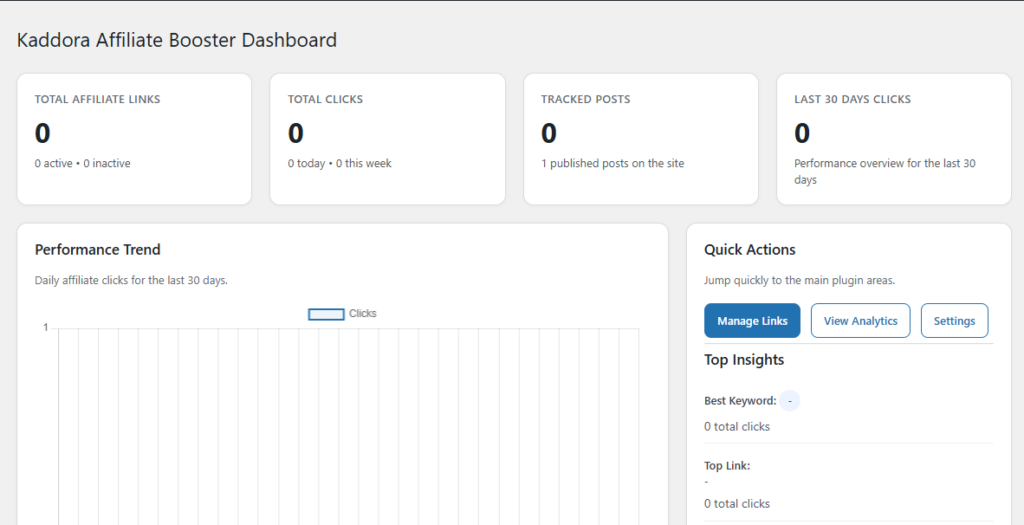
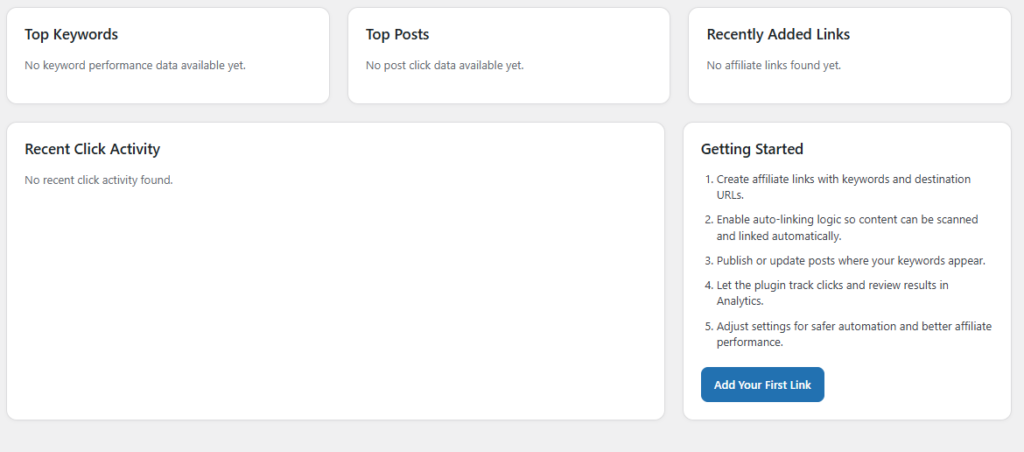
The Dashboard (Admin Panel) of Kaddora Affiliate Booster AI Link Automation for WordPress provides a centralized control system where users can manage, monitor, and optimize their affiliate marketing activities efficiently.
Designed with a clean and user-friendly interface, the dashboard gives you quick access to all important features such as affiliate links, automation rules, and performance analytics.
- View total affiliate links created and active campaigns
- Monitor total clicks and engagement statistics
- Track top-performing affiliate links and keywords
- Access recent automation activities and AI link insertions
- Quick navigation to manage links, automation, and settings
📊 Key Dashboard Sections
- Overview Panel: Displays summary of links, clicks, and performance metrics
- Recent Activity: Shows latest AI link insertions and updates
- Top Links: Highlights the best-performing affiliate URLs
- Keyword Insights: Lists keywords generating the most clicks
⚙️ Benefits
- Centralized control for all affiliate operations
- Real-time insights to improve link performance
- Easy navigation for faster workflow management
- Helps optimize content monetization strategy
The dashboard ensures that users can easily monitor their affiliate performance, make data-driven decisions, and manage automation without technical complexity.
5. Affiliate Link Management 🔗
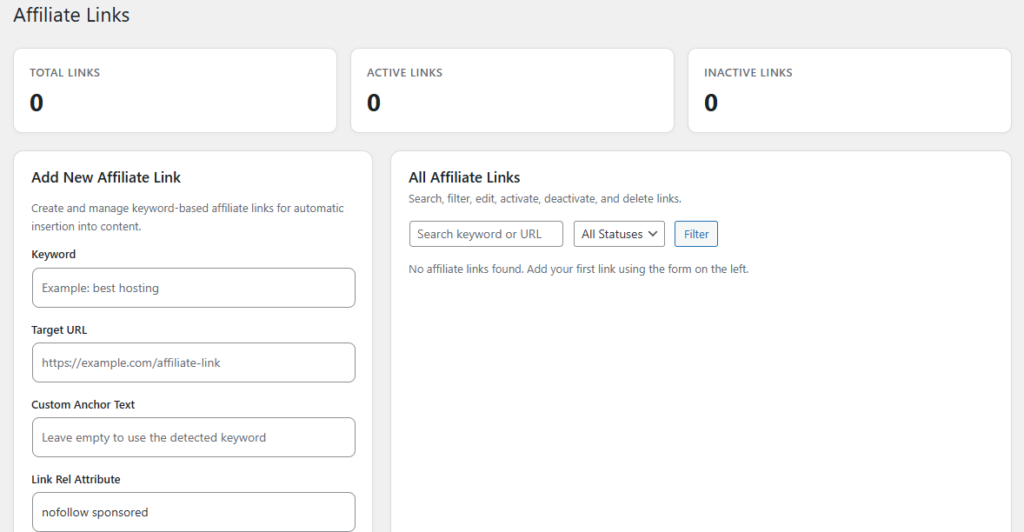
The Affiliate Link Management module is the core of Kaddora Affiliate Booster AI Link Automation for WordPress. It allows users to create, organize, edit, and monitor all affiliate links from a single centralized dashboard.
Instead of manually editing posts every time a link changes, this system enables dynamic link control, saving time and improving efficiency across your website.
- Create and manage unlimited affiliate links
- Assign keywords to each affiliate URL for automatic linking
- Edit or update links globally without modifying individual posts
- Enable or disable links anytime
- Organize links by categories, campaigns, or products
🔧 Key Features
- Add New Link: Enter title, destination URL, and target keywords
- Keyword Mapping: Define words or phrases that trigger link insertion
- Link Status Control: Activate or deactivate links instantly
- Bulk Management: Manage multiple links efficiently from one screen
📈 Benefits
- Eliminates manual linking effort across content
- Ensures consistency of affiliate URLs site-wide
- Improves scalability for large affiliate websites
- Helps maintain organized and structured campaigns
This module makes it easy to maintain a clean and efficient affiliate system, ensuring all links are up-to-date and optimized for maximum conversions.
6. AI Link Automation 🤖
The AI Link Automation feature is the most powerful component of Kaddora Affiliate Booster AI Link Automation for WordPress. It intelligently scans your website content and automatically inserts relevant affiliate links based on predefined keywords and smart AI detection.
This feature eliminates the need for manual linking by automatically identifying monetization opportunities within your posts and pages, helping you scale your affiliate strategy effortlessly.
- Automatically detect relevant keywords within content
- Insert affiliate links based on keyword mapping
- Use AI to suggest new linking opportunities
- Apply automation across posts, pages, and custom post types
- Maintain natural content flow without over-linking
⚙️ Automation Controls
- Keyword Targeting: Assign keywords to trigger automatic link insertion
- Link Limits: Set maximum number of links per post or page
- Content Scope: Choose where automation should be applied
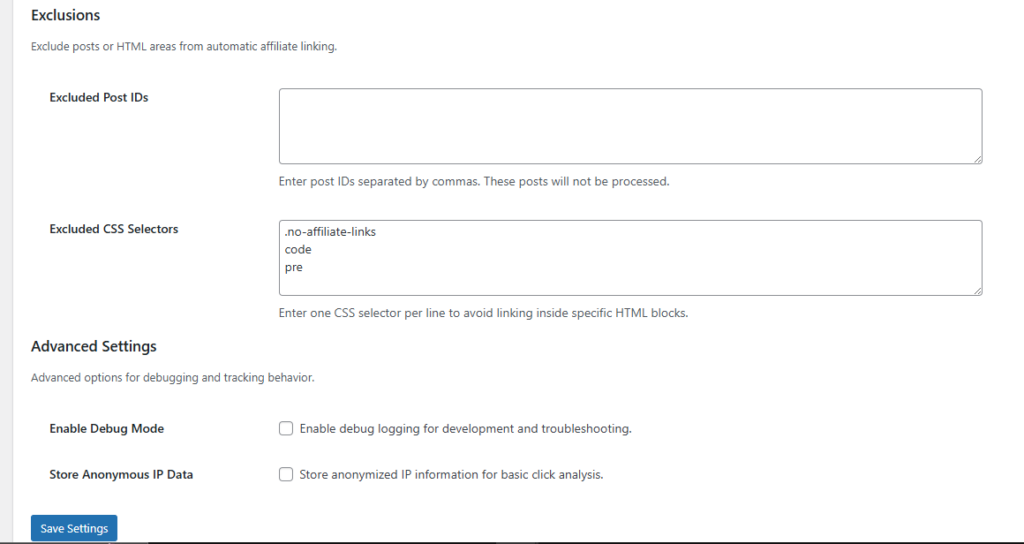
- Exclusions: Prevent linking in specific posts, categories, or tags
🧠 AI Capabilities
- Analyzes content context for better keyword matching
- Suggests high-value keywords for monetization
- Avoids duplicate or excessive link placement
- Optimizes linking strategy for improved user experience
🚀 Benefits
- Saves time by automating repetitive tasks
- Increases affiliate revenue through better link placement
- Ensures consistent linking across the entire website
- Scales affiliate marketing without manual effort
With AI Link Automation, you can transform your content into a powerful revenue-generating system while maintaining full control over how and where your affiliate links appear.
7. Click Tracking & Analytics 📊
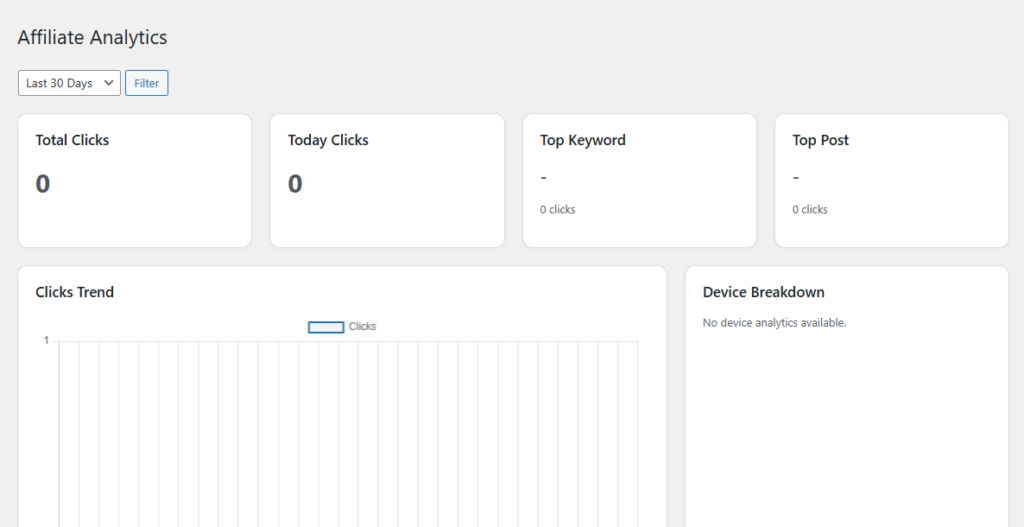
The Click Tracking & Analytics module provides detailed insights into how your affiliate links are performing across your website. It helps you monitor user interactions, measure engagement, and optimize your affiliate strategy using real-time data.
By tracking every click on your affiliate links, the plugin enables you to understand which links, keywords, and pages are generating the most conversions.
- Track total clicks on each affiliate link
- Monitor performance by keyword, post, or page
- Analyze user engagement and click behavior
- View real-time and historical data reports
- Identify top-performing affiliate campaigns
📈 Analytics Features
- Click Reports: Detailed logs of all affiliate link clicks
- Performance Insights: Track which links generate the most traffic
- Keyword Analytics: Analyze which keywords drive the highest clicks
- Time-Based Reports: View daily, weekly, or monthly performance trends
⚙️ Tracking Capabilities
- Accurate click counting with minimal performance impact
- Support for tracking across posts, pages, and custom content
- Lightweight tracking system optimized for WordPress
- Secure data handling for reliable analytics
🚀 Benefits
- Make data-driven decisions to improve affiliate performance
- Identify high-converting content and optimize accordingly
- Increase revenue by focusing on top-performing links
- Gain full visibility into your affiliate marketing results
This module ensures you always have clear and actionable insights to refine your affiliate strategies and maximize your earning potential.
8. Plugin Settings ⚙️
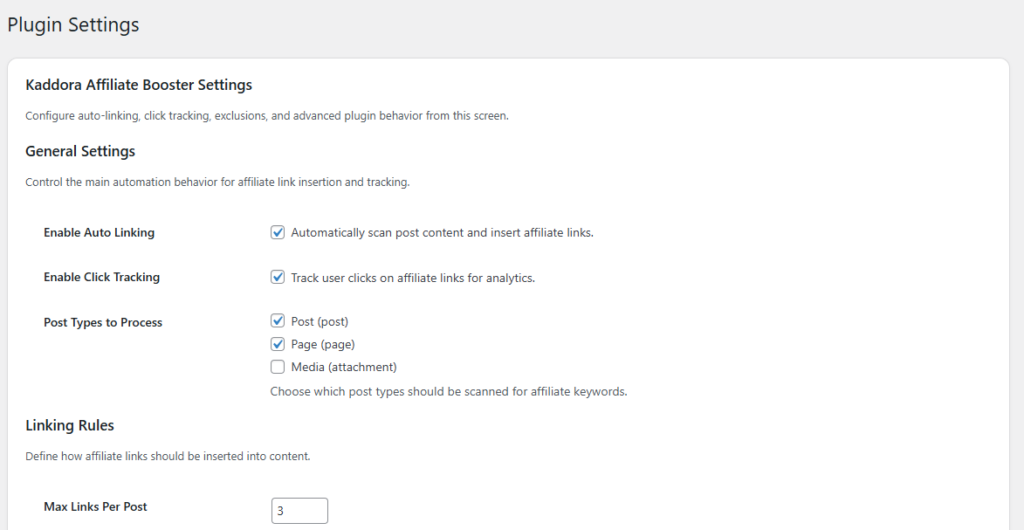
The Settings panel allows you to configure and customize how Kaddora Affiliate Booster AI Link Automation works on your website. It provides full control over link behavior, automation rules, and tracking preferences.
With flexible configuration options, you can fine-tune the plugin to match your affiliate marketing strategy and ensure optimal performance without affecting user experience.
- Enable or disable automatic affiliate link insertion
- Control maximum number of links per post or page
- Select post types for automation (posts, pages, custom types)
- Manage tracking and analytics settings
- Configure AI automation behavior and keyword matching
⚙️ General Settings
- Auto Linking: Turn automatic link insertion ON or OFF
- Max Links per Post: Limit how many links appear in content
- Post Type Selection: Choose where automation applies
🔗 Link Behavior Settings
- Open in New Tab: Enable target=”_blank” for affiliate links
- Nofollow / Sponsored: Add SEO attributes to affiliate URLs
- Link Replacement Rules: Avoid duplicate or excessive linking
📊 Tracking Settings
- Enable Click Tracking: Track user interactions with links
- Data Retention: Control how long analytics data is stored
- Exclude Roles: Ignore clicks from admins or logged-in users
🤖 AI Automation Settings
- Keyword Matching Mode: Set how strictly keywords are matched
- Auto Suggestions: Enable AI-based keyword suggestions
- Content Filters: Exclude specific pages or categories
🚀 Benefits
- Full control over affiliate link automation behavior
- Optimized user experience with controlled link placement
- Improved SEO with proper link attributes
- Flexible configuration for different affiliate strategies
The Settings panel ensures that the plugin works exactly how you need it, allowing you to balance automation, performance, and user experience effectively.
9. Integrations (API & Services) 🔌
The Integrations module allows Kaddora Affiliate Booster AI Link Automation for WordPress to connect with external APIs and third-party services, enhancing its functionality and expanding your affiliate marketing capabilities.
By integrating with various platforms, you can automate workflows, fetch affiliate data, and improve tracking accuracy while maintaining seamless communication between your website and external systems.
- Connect with affiliate networks and external APIs
- Sync affiliate links and campaign data automatically
- Enhance tracking with third-party analytics tools
- Extend plugin functionality through custom integrations
🔗 Supported Integrations
- Affiliate Networks: Integrate with platforms like Amazon Associates, CJ Affiliate, or ShareASale
- Analytics Tools: Connect with Google Analytics or similar tools for deeper insights
- URL Shorteners: Use services like Bitly for cleaner and trackable affiliate links
- Custom APIs: Integrate with your own systems or third-party APIs
⚙️ API Configuration
- API Key Management: Securely add and manage API keys
- Endpoint Settings: Configure API endpoints for data exchange
- Authentication: Support for token-based or key-based authentication
- Data Sync: Enable automatic or manual synchronization
🚀 Benefits
- Automates affiliate data and link synchronization
- Improves tracking accuracy with external tools
- Enhances scalability of affiliate operations
- Allows customization and flexibility through API access
With powerful integration support, the plugin becomes a flexible affiliate marketing solution that can adapt to your workflow and connect with the tools you already use.
10. Performance & Optimization ⚡
Performance is a key focus of Kaddora Affiliate Booster AI Link Automation for WordPress. The plugin is designed to deliver powerful automation features while maintaining fast loading times and a smooth user experience.
With optimized content processing and lightweight architecture, the plugin ensures that affiliate link automation and tracking do not negatively impact your website speed or server performance.
- Efficient content scanning for fast link insertion
- Lightweight scripts to minimize server load
- Optimized database queries for tracking and analytics
- Scalable structure for high-traffic websites
⚙️ Optimization Techniques
- Lazy Processing: Processes content only when needed
- Caching Support: Compatible with popular WordPress caching plugins
- Minimal Resource Usage: Uses optimized code to reduce CPU and memory load
- Batch Processing: Handles automation tasks in controlled batches
🚀 Performance Benefits
- Maintains fast page load speed even with automation enabled
- Ensures smooth browsing experience for users
- Handles large volumes of affiliate links efficiently
- Reduces server strain during content processing
💡 Best Practices
- Limit the number of links per post for better performance
- Use caching plugins to improve page speed
- Regularly clean up unused or inactive affiliate links
- Optimize images and scripts for faster loading
The plugin is built to balance automation power with performance efficiency, ensuring your affiliate marketing system runs smoothly without slowing down your website.
11. Troubleshooting 🛠️
If you encounter any issues while using Kaddora Affiliate Booster AI Link Automation for WordPress, the following solutions can help you quickly identify and resolve common problems.
Affiliate links are not inserting automatically
Ensure that auto-linking is enabled in the plugin settings and that keywords are properly assigned to active affiliate links. Also check if the selected post types are enabled for automation.
Click tracking is not working
Verify that click tracking is enabled in settings. Disable caching temporarily to test, and ensure no security plugins are blocking tracking scripts or redirects.
Too many links appearing in content
Adjust the “maximum links per post” setting and review keyword duplication across your affiliate links to avoid excessive insertion.
AI keyword suggestions are inaccurate
Update your keyword mapping and ensure your content clearly matches the affiliate niche. You may also refine automation settings for better accuracy.
Plugin conflicts with theme or other plugins
Temporarily deactivate other plugins to identify conflicts. Switch to a default WordPress theme and test functionality, then reactivate components one by one.
If problems persist, please contact support with full details including WordPress version, plugin version, and error logs.
12. FAQ ❓
Below are answers to some frequently asked questions about the plugin.
Can I control how many affiliate links appear per post?
Yes, you can set a maximum link limit per post from the plugin settings to maintain a natural user experience.
Does the plugin support manual link insertion?
Yes, you can manually insert affiliate links in addition to using AI automation features.
Will this plugin slow down my website?
No, the plugin is optimized for performance and uses lightweight processing to ensure minimal impact on site speed.
Can I disable automation for specific posts or pages?
Yes, you can exclude specific posts, pages, or categories from automation within the settings panel.
Is click tracking accurate?
Yes, the plugin provides reliable click tracking with optimized logging and reporting features.
Do I need coding knowledge to use this plugin?
No, the plugin is designed with a user-friendly interface and does not require any coding knowledge.
13. Support & Updates 📩
We are committed to providing reliable support and regular updates for Kaddora Affiliate Booster AI Link Automation for WordPress.
📞 Support
- Contact our support team for technical assistance
- Provide details such as WordPress version, plugin version, and issue description
- Include screenshots or error logs for faster resolution
🔄 Updates
- Regular updates with new features and improvements
- Security patches and performance enhancements
- Compatibility updates with latest WordPress versions
💡 Recommendations
- Keep the plugin updated to the latest version
- Backup your website before updating
- Review changelogs for new features and fixes
Your feedback helps us improve the plugin. Stay updated and continue optimizing your affiliate marketing with Kaddora.