
Kaddora WooCommerce Smart Fraud Detection System 🎀
User Documentation: 📜
Kaddora WooCommerce Smart Fraud Detection System helps you detect fake and high-risk orders automatically. It uses smart risk scoring based on email, IP, order value, and behavior. Easily block suspicious customers with built-in blacklist and prevent COD fraud. Lightweight, fast, and designed for real WooCommerce store protection.
📑 Table of Contents
1. Introduction 🎗️
Kaddora WooCommerce Smart Fraud Detection System is a powerful yet lightweight plugin designed to protect your store from fake and high-risk orders. It analyzes customer behavior in real-time using a smart rule-based engine and assigns a risk score to every order. This helps store owners take immediate action against suspicious activities, especially COD fraud, which is a major issue in many markets.
Built with simplicity and performance in mind, Kaddora gives you full control over fraud detection without complex setups or expensive external services.
Key Features
- Smart Risk Scoring based on email, IP, order value, and behavior
- Email & IP Blacklist to block suspicious users instantly
- COD Fraud Detection to prevent fake cash-on-delivery orders
- Real-time Order Analysis during checkout
- Fraud Logs Dashboard to track all flagged orders
- Custom Risk Threshold control for flexible security
- Lightweight & Fast performance (no heavy APIs required)
- Developer-friendly structure with extendable rules
2. Requirements & Compatibility 📌
Minimum Requirements:
| WordPress 6.0 or higher |
| WooCommerce Installed and Active |
| PHP 7.4 or higher |
| WhatsApp API Required |
Recommended Environment:
| WordPress 6.x |
| PHP 8.0+ |
| Updated WooCommerce version |
| HTTPS enabled website |
3. Plugin Installation 🦚
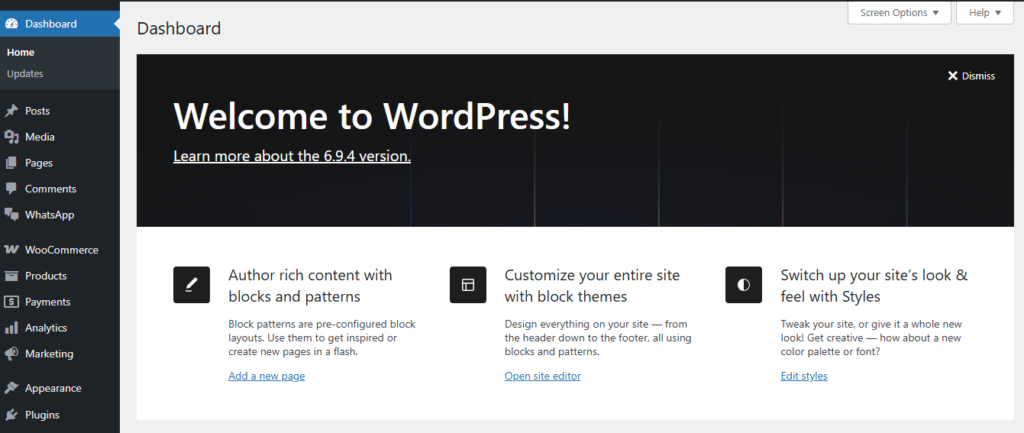
- Go to the WordPress Dashboard
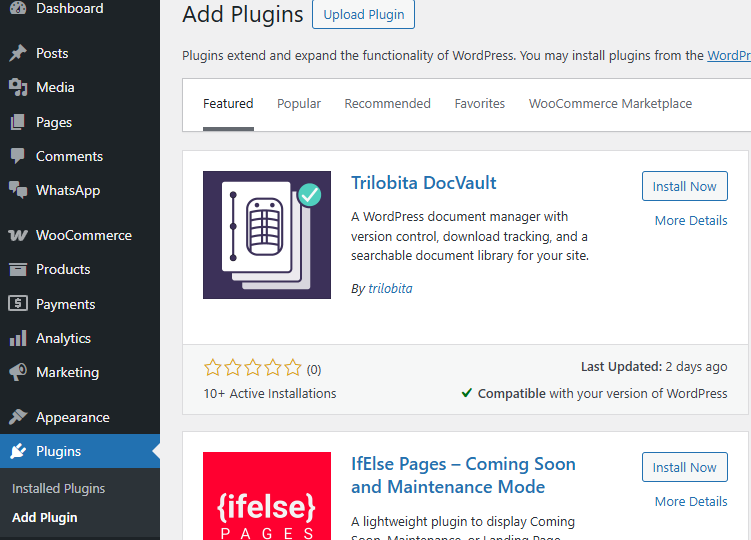
- Plugins → Add New
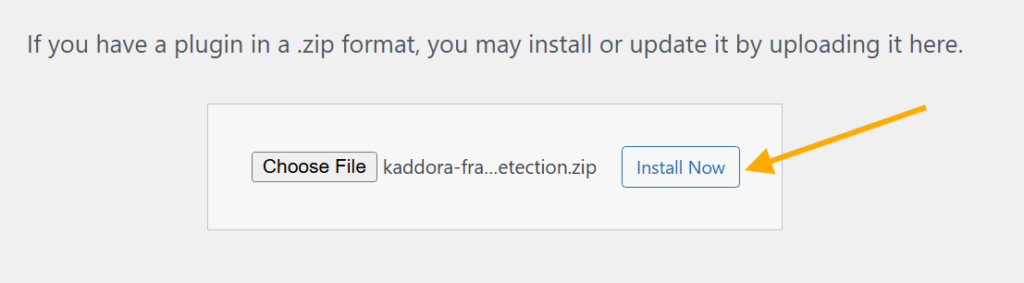
- Upload Plugin > Choose the kaddora-fraud-detection.zip plugin file and click Install Now
- After successful installation and activation of the plugin, you will see Kaddora WooCommerce Smart Fraud Detection System in your installed plugins section, where you can review the version and description of the plugin.

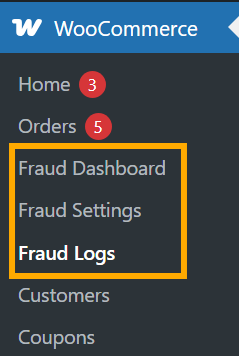
- In the WordPress dashboard
4. Dashboard 🛠️
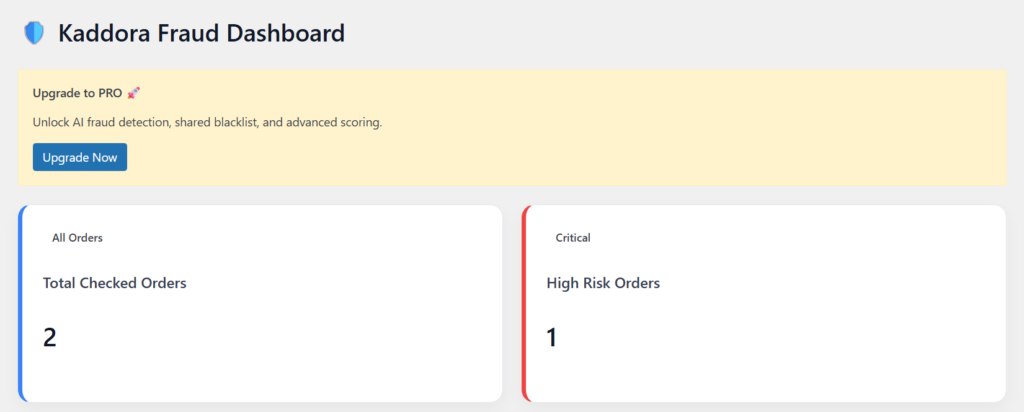
The Kaddora Fraud Dashboard gives you a quick and clear view of your store’s fraud activity. It helps you monitor how many orders have been analyzed and how many are marked as high risk. With simple metrics and a clean interface, you can instantly understand your store’s security status without digging into complex reports.
This dashboard is designed for speed and clarity, so you can take quick decisions and reduce fraud losses efficiently.
- Total Checked Orders – Shows how many orders have been analyzed by the system
- High Risk Orders – Displays orders that crossed the risk threshold
- Real-time Updates – Data updates automatically as new orders are placed
- Simple & Clean UI – Easy to understand even for non-technical users
- Quick Fraud Insights – Instantly know if your store is under risk
- Lightweight Performance – No heavy queries, fast loading dashboard
5. Settings
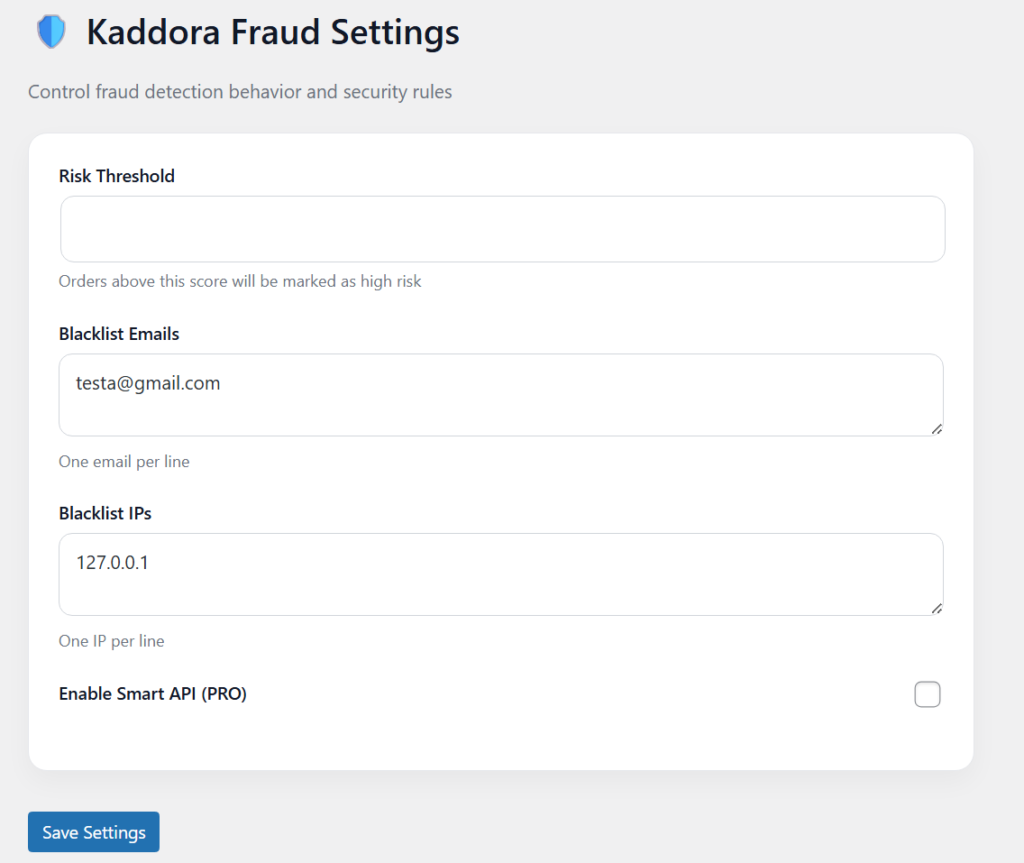
- Risk Threshold Control – Define the minimum score at which an order is marked as high risk
- Blacklist Emails – Add suspicious or fake email addresses (one per line)
- Blacklist IPs – Block specific IP addresses to prevent repeated fraud attempts
- Smart API Toggle (PRO) – Enable external fraud scoring for advanced detection
- Simple Configuration – Easy-to-use interface with no complex setup
- Real-time Impact – Changes apply instantly to new incoming orders
- Full Control – Customize fraud detection rules based on your store needs
- Lightweight & Fast – No performance impact on your WooCommerce store
6. Fraud Logs 📋
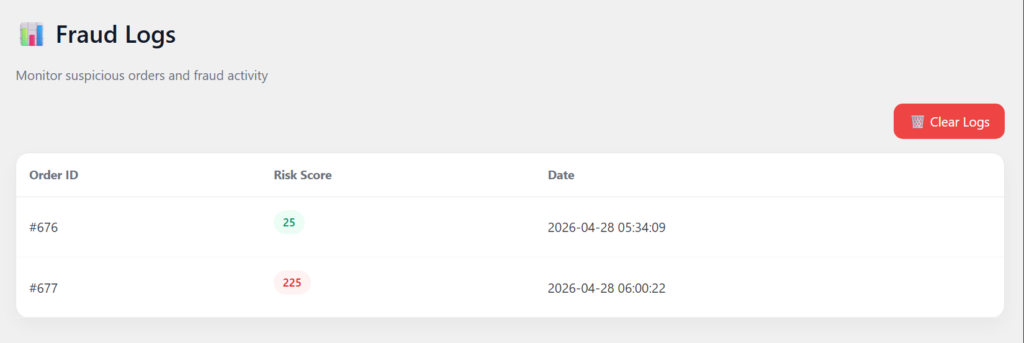
- Order Tracking – View all analyzed orders with their unique Order ID
- Risk Score Display – Each order shows its calculated fraud risk score
- Color Indicators – Low risk (green), high risk (red) for quick identification
- Date & Time – Track exactly when the order was analyzed
- Real-time Logging – Every processed order is automatically recorded
- Quick Monitoring – Instantly identify suspicious or high-risk orders
- Clear Logs Option – One-click button to delete all logs when needed
- Lightweight System – Fast loading without affecting store performance
- Organized Table View – Clean and easy-to-read layout
7. Performance & Optimization ⚡
- Lightweight Architecture – Built with clean PHP and no heavy dependencies
- Fast Execution – Fraud checks run instantly during order processing
- Minimal Database Usage – Stores only essential data (risk score & logs)
- Optimized Queries – Efficient queries ensure no slowdown in admin or checkout
- No External Load (Free Version) – Works without APIs, reducing latency
- Conditional Execution – Runs only when an order is placed, not on every page
- Secure Data Handling – Sanitized inputs and safe database operations
- Scalable Design – Works smoothly even with high order volume
- Clean Code Structure – Modular classes for better maintainability
- Optional API (PRO) – External scoring only when enabled, keeping performance stable
8. Troubleshooting 🔱
- Plugin Not Working
Ensure WooCommerce is installed and activated before using the plugin - Risk Score Not Showing
Check if the order is processed (fraud check runs after order placement) - Blacklist Not Working
Make sure emails/IPs are added correctly (one per line, no extra spaces) - Settings Not Saving
Verify you clicked “Save Settings” and refresh the page after saving - Logs Not Appearing
Confirm that orders are being placed and processed by the fraud engine - Clear Logs Not Working
Check user permissions (must be admin) and nonce validation - High Risk Not Triggering
Adjust Risk Threshold value in settings (lower value for testing) - API Not Working (PRO)
Ensure API is enabled and properly configured - Styling/UI Issues
Clear browser cache or check if admin CSS is properly loaded - Conflicts with Other Plugins
Disable other plugins temporarily to identify conflicts
9. FAQ 🌐
1. How does the fraud detection system work?
The plugin analyzes each order using multiple rules like email, IP, order value, and behavior, then assigns a risk score to identify suspicious orders.
2. Can I block specific customers?
Yes, you can blacklist emails and IP addresses. Any order from these will automatically be marked as high risk.
3. Does it support COD fraud detection?
Yes, the plugin is designed to detect and reduce fake Cash on Delivery (COD) orders effectively.
4. Will this slow down my website?
No, the plugin is lightweight and optimized. It only runs during order processing and does not affect site performance.
Thanks for Visiting Kaddora Tech 💖