


Kaddora Elementor Power Widgets🎀
User Documentation 📃:
Kaddora Elementor Power Widgets is a powerful Elementor addon designed to extend the Elementor page builder with advanced widgets, dynamic content capabilities, WooCommerce elements, template management tools, analytics, and developer-friendly architecture. The plugin helps users create professional websites faster by providing a collection of content, marketing, dynamic, and WooCommerce widgets while maintaining performance, security, and scalability.
Built with a modular architecture, the plugin includes a Widget Manager, Template Library, Cloud Template support, Dynamic Tags Engine, AJAX-powered content loading, Visibility Conditions, Analytics Dashboard, REST API foundation, and Global Styling controls. Administrators can enable or disable widgets, monitor widget usage, manage templates, and customize plugin settings from a centralized dashboard.
Key Highlights
- 20+ Elementor Widgets for content, marketing, dynamic content, and WooCommerce.
- Widget Manager to enable or disable widgets as needed.
- Dynamic Content Engine with support for Dynamic Tags and Dynamic URLs.
- Template Library System with import, export, and cloud template support.
- AJAX-Powered Widgets including Post Grid and Product Grid with Load More functionality.
- WooCommerce Integration with product-focused Elementor widgets.
- Analytics Dashboard for tracking widget usage and performance insights.
- Global Styling & Visibility Controls including typography, colors, user-role visibility, and display conditions.
📑 Table of Contents
1. Introduction 🎗️
Kaddora Elementor Power Widgets is a comprehensive Elementor addon designed to enhance website building by providing a collection of advanced widgets, dynamic content capabilities, WooCommerce elements, template management tools, and powerful customization options. The plugin enables users to create professional, responsive, and feature-rich websites without writing custom code. Built with a modular and scalable architecture, it includes content widgets, marketing widgets, dynamic post widgets, WooCommerce widgets, AJAX-powered functionality, analytics, and visibility controls. It also features a Dynamic Content Engine, Global Styling System, Template Library, and Widget Manager for improved flexibility and performance. Whether you are a developer, agency, freelancer, or store owner, Kaddora Elementor Power Widgets offers the tools needed to streamline website development while maintaining security, performance, and a user-friendly experience.
2. Requirements & Compatibility 📌
Kaddora currently targets the following environment:
| WordPress `6.4` or higher |
| PHP `7.4` or higher |
| A standard WordPress installation with plugin activation permissions |
| Administrator access for configuration and monitoring |
Compatibility notes:
| Fully compatible with Elementor and Elementor Pro |
| Supports WooCommerce stores and product-focused layouts |
| Built with WordPress REST API and AJAX architecture |
| Works seamlessly with responsive and mobile-friendly websites |
| Compatible with WordPress Multisite environments |
| Translation-ready for multilingual websites |
| Follows WordPress security, sanitization, and escaping standards |
| Optimized for performance, scalability, and future expansion |
3. Plugin Installation 🦚
Method — Upload ZIP
- Go to the WordPress Dashboard –
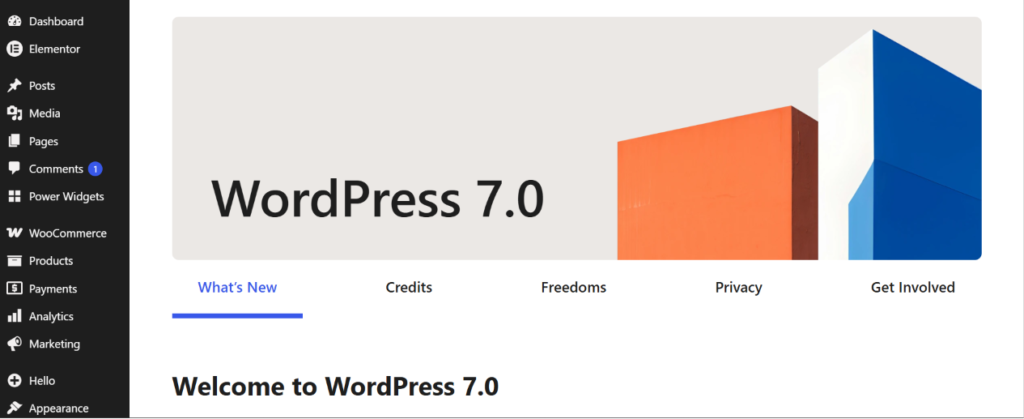
- Plugins → Add New →
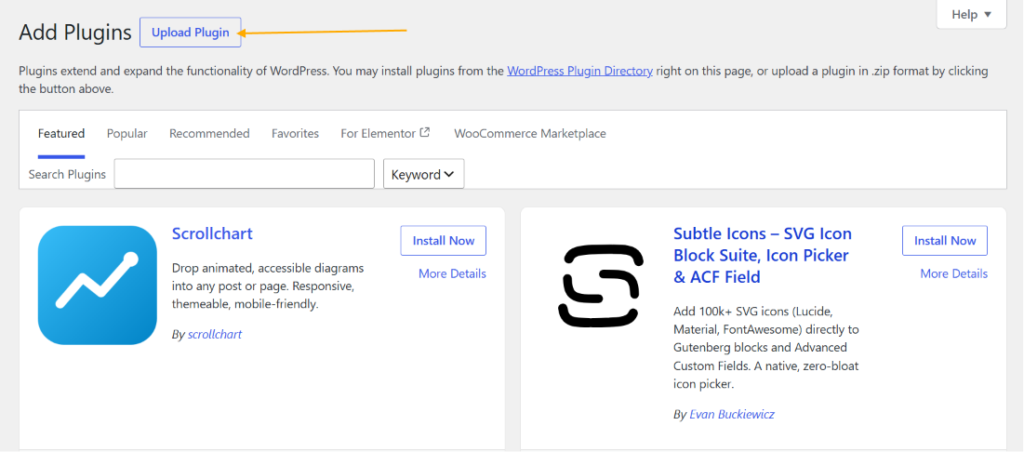
- Upload Plugin > Choose the kaddora-elementor-power-widgets plugin file and click Install Now.
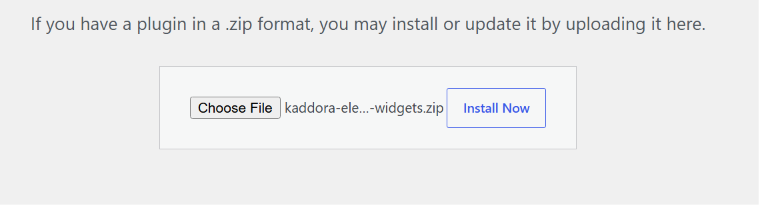
- After successfully Installation & Activation of plugin, you will see ‘Kaddora Elementor Power Widgets Plugin’ in your installed plugin section, here you can check version and description about the plugin.

- In WordPress dashboard, you can see ‘Kaddora Power Widgets ’ option available, click on it and access the setting part of the Plugin-
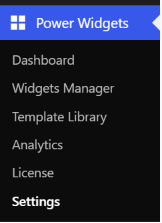
4. Settings (Admin Panel) 🛠️
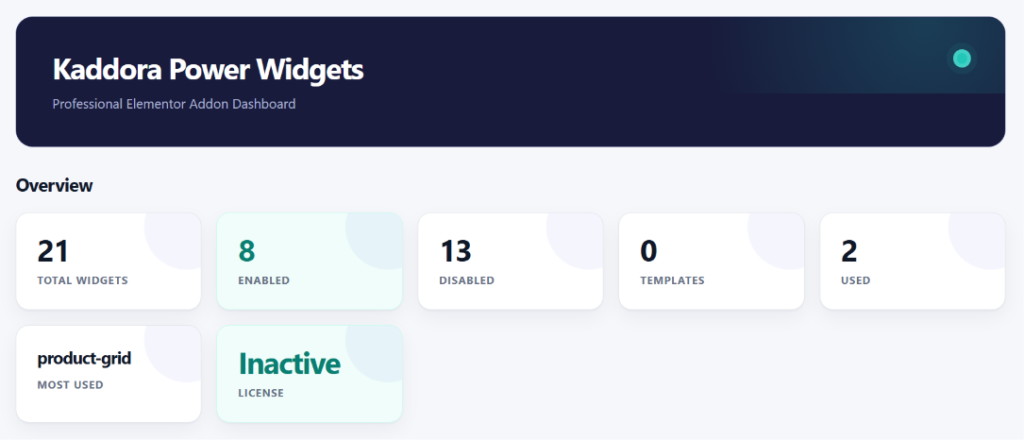
The Dashboard provides a centralized overview of your Kaddora Elementor Power Widgets installation. It displays key statistics such as total available widgets, enabled and disabled widgets, template count, widget usage data, and license status. This section helps administrators quickly monitor plugin activity, manage widget availability, review usage insights, and verify the current license state from a single location. The dashboard is designed to provide a clean and efficient management experience, allowing users to maintain control over plugin features, optimize performance, and access important plugin information without navigating through multiple settings pages.
Dashboard Metrics
- Total Widgets – Displays the total number of widgets available in the plugin.
- Enabled Widgets – Shows how many widgets are currently active.
- Disabled Widgets – Shows how many widgets are currently disabled.
- Templates – Displays the total number of available templates.
- Most Used Widget – Identifies the widget most frequently used across the site.
- License Status – Indicates whether the plugin license is active or inactive.
5. Widgets Manager 🥅
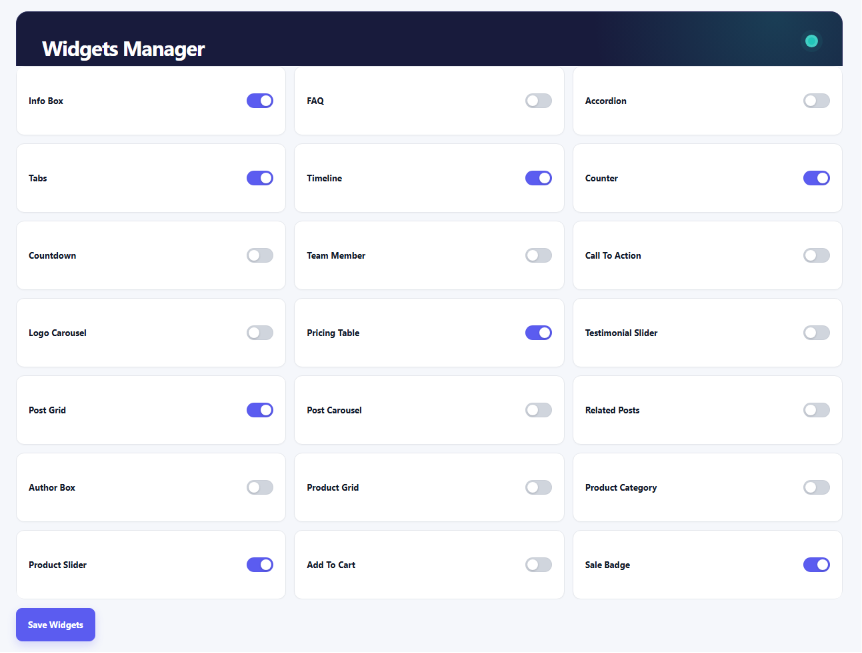
The Widgets Manager allows administrators to control which Elementor widgets are available on the website. From this screen, individual widgets can be enabled or disabled with a single click, helping reduce unnecessary resource usage and improve overall performance. Only the widgets required for a project need to remain active, creating a cleaner Elementor editor experience while optimizing frontend loading. After making changes, users can save their configuration, and the plugin will load only the selected widgets. This provides better flexibility, improved maintainability, and greater control over the website’s Elementor functionality.
Features
- Enable or disable individual Elementor widgets.
- Improve performance by loading only required widgets.
- Reduce unnecessary Elementor editor clutter.
- Centralized widget management interface.
- One-click widget activation and deactivation.
- Save widget configuration instantly.
- Supports content, marketing, dynamic, and WooCommerce widgets.
- Helps optimize frontend resource loading.
- Provides better control over plugin functionality.
- Scalable architecture for future widget additions.
6. Settings 🪼
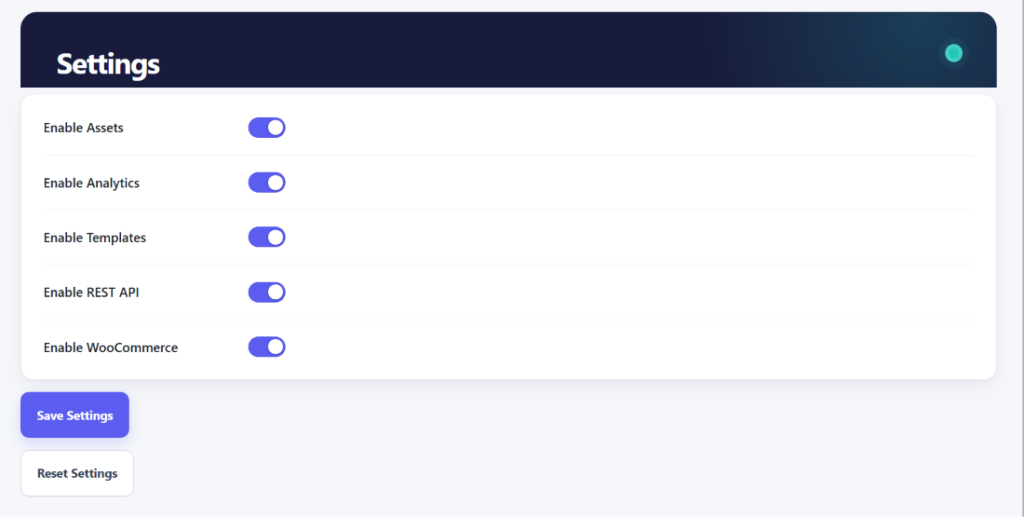
The Settings page allows administrators to control the core functionality of Kaddora Elementor Power Widgets from a single location. Users can enable or disable major plugin modules such as assets loading, analytics tracking, template management, REST API functionality, and WooCommerce integration. These settings help optimize performance, reduce unnecessary resource usage, and customize the plugin according to project requirements. Changes can be applied instantly using the Save Settings button, while the Reset Settings option restores all settings to their default values. This centralized configuration panel provides a simple and efficient way to manage the plugin’s behavior across the entire website.
Features
- Enable or disable frontend and backend asset loading.
- Control Widget Analytics functionality.
- Enable or disable the Template Library system.
- Manage REST API integration settings.
- Enable or disable WooCommerce-related features.
- Optimize plugin performance by disabling unused modules.
- Save configuration changes instantly.
- Reset all settings to default values.
- Centralized plugin configuration management.
- Easy-to-use toggle-based interface.
7. License Manager 🎯
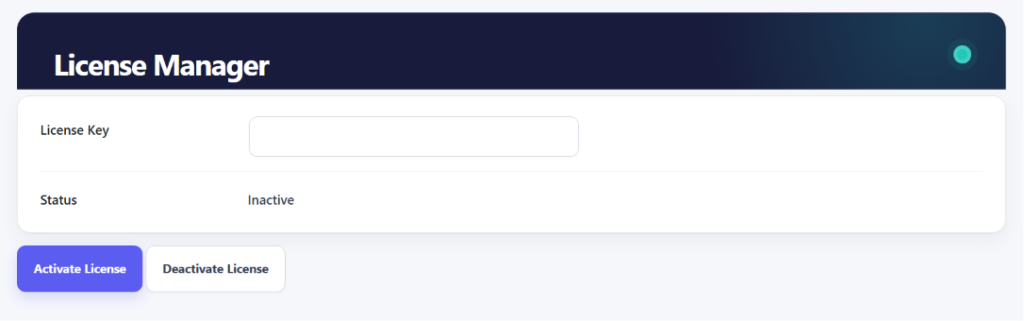
The License Manager allows administrators to activate and manage their Kaddora Elementor Power Widgets license key from a centralized interface. By entering a valid license key, users can verify their installation, unlock premium functionality, and maintain access to future updates and enhancements. The page also displays the current license status, making it easy to determine whether the license is active or inactive. Additionally, users can activate or deactivate their license directly from the dashboard, providing a simple and secure way to manage licensing without leaving the WordPress admin area.
8. Widget Analytics
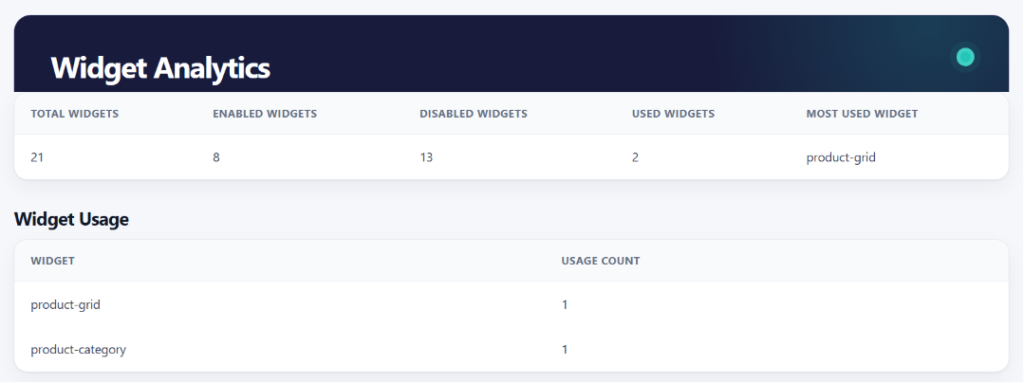
The Widget Analytics page provides detailed insights into widget usage across your website. It helps administrators monitor how widgets are being utilized by displaying key statistics such as total widgets, enabled widgets, disabled widgets, used widgets, and the most frequently used widget. The analytics system also tracks individual widget usage counts, making it easier to identify popular widgets and optimize site performance by disabling unused components. This centralized reporting interface enables data-driven decisions, improves resource management, and helps maintain an efficient Elementor environment while providing a clear overview of plugin activity and widget adoption throughout the website.
Widget Analytics Features
- View the total number of available widgets.
- Monitor enabled and disabled widget counts.
- Track how many widgets are actively used on the website.
- Identify the most frequently used widget.
- View individual widget usage statistics.
- Analyze widget adoption across pages and content.
- Gain insights for performance optimization.
- Detect unused widgets for better resource management.
- Access centralized widget usage reports.
- Make data-driven decisions for Elementor widget management.
Elementor:
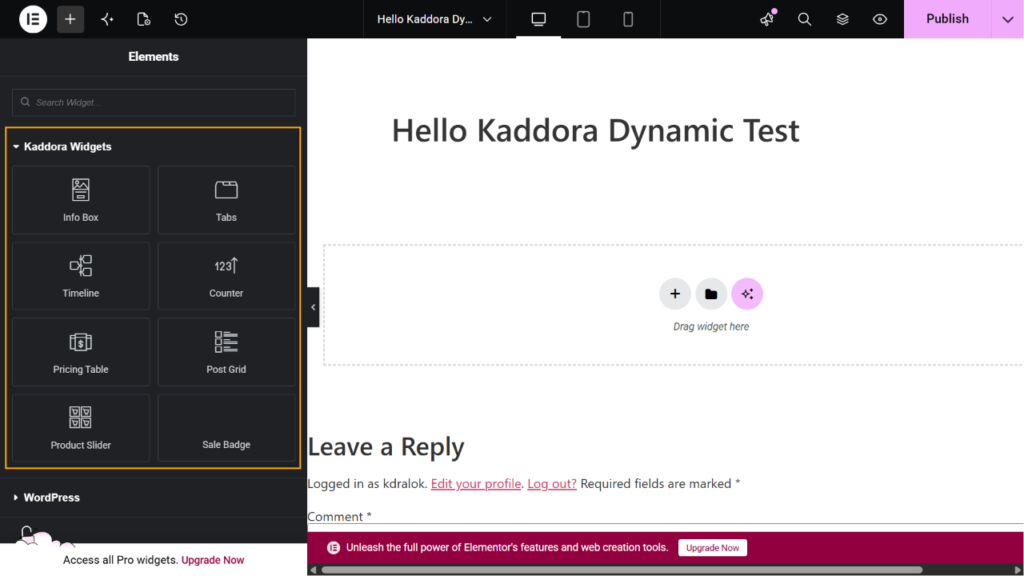
Kaddora Elementor Power Widgets integrates directly with the Elementor editor by adding a dedicated widget category named “Kaddora Widgets”. All available widgets are organized within this category, allowing users to quickly access and drag widgets into their page layouts. The integration is designed to provide a seamless editing experience while maintaining compatibility with Elementor’s native interface. Widgets can be customized using Elementor controls, dynamic content features, styling options, and visibility conditions. This centralized widget collection improves workflow efficiency, reduces development time, and enables users to build professional, responsive, and feature-rich websites directly from the Elementor editor without requiring custom code.
9. Library
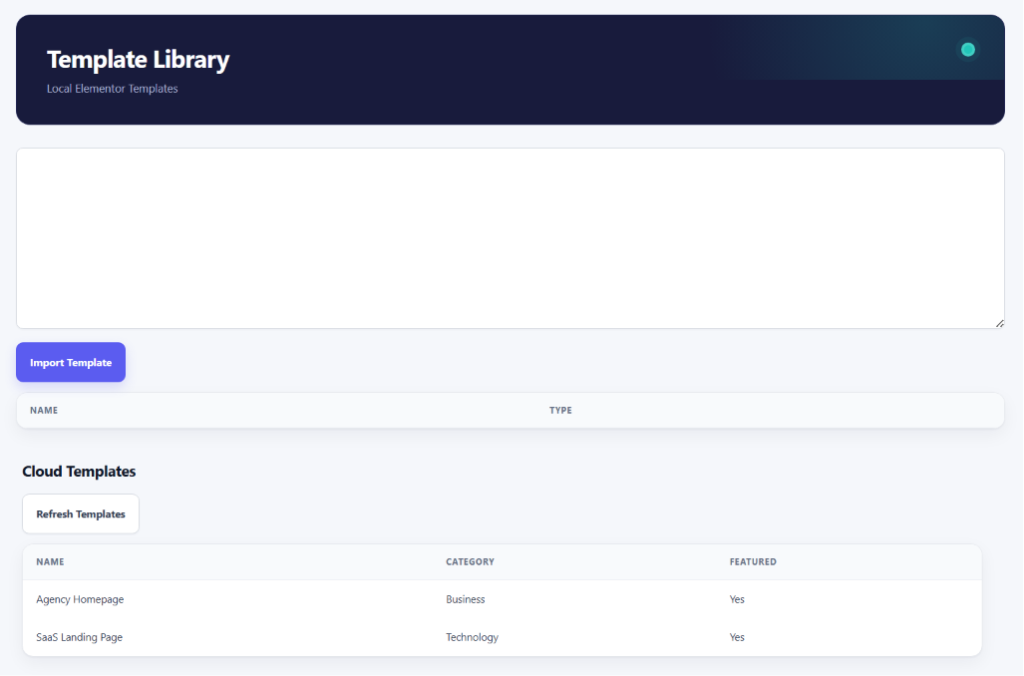
- Import Elementor templates.
- View locally saved templates.
- Manage template collections.
- Access cloud-based templates.
- Refresh cloud templates instantly.
- Browse templates by category.
- Featured template support.
- Centralized template management.
- Faster website building workflow.
- Ready-to-use page layouts.
10. How It Works (Workflow) 📶
- Install and activate Kaddora Elementor Power Widgets.
- Open the Power Widgets Dashboard from the WordPress admin menu.
- Enable or disable required widgets using the Widgets Manager.
- Configure plugin options from the Settings page.
- Create or edit a page with Elementor.
- Drag and drop widgets from the Kaddora Widgets category into your layout.
- Customize widget content, styling, dynamic tags, and visibility conditions.
- Import ready-made layouts from the Template Library if needed.
- Use WooCommerce widgets to display products and store content.
- Monitor widget usage and performance through the Analytics Dashboard.
- Manage plugin licensing from the License Manager.
- Publish the page and view the widgets on the frontend.
11. Troubleshooting 🔱
Widget Not Appearing
- Ensure Elementor is installed and activated.
- Verify the widget is enabled in Widgets Manager.
WooCommerce Widgets Not Working
- Make sure WooCommerce is installed and activated.
- Enable WooCommerce support in Settings.
Dynamic Content Not Displaying
- Verify that a valid Dynamic Tag is selected.
- Ensure the required content exists.
AJAX Features Not Working
- Clear website and browser cache.
- Check for JavaScript conflicts with other plugins.
Templates Not Loading
- Refresh templates from the Template Library page.
- Confirm cloud templates are enabled.
License Activation Issues
- Verify the license key is correct.
- Check your internet connection.
Settings Not Saving
- Ensure you have Administrator permissions.
- Refresh the page and try again.
Need Additional Help?
- Update WordPress, Elementor, and WooCommerce to the latest versions.
- Temporarily disable conflicting plugins and test again.
12. FAQ 🌐
1. Does this plugin require Elementor?
Yes. Kaddora Elementor Power Widgets is an Elementor addon and requires Elementor to be installed and activated.
2. Can I disable widgets that I do not use?
Yes. The Widgets Manager allows you to enable or disable individual widgets to improve performance and keep the Elementor editor organized.
3. Does the plugin support WooCommerce?
Yes. The plugin includes WooCommerce widgets such as Product Grid, Product Slider, Product Category, Add To Cart, and Sale Badge.
4. Can I use dynamic content with widgets?
Yes. The plugin includes a Dynamic Content Engine with support for Dynamic Tags such as Post Title, Author Name, Site Title, and more.
5. Is the plugin translation-ready?
Yes. The plugin follows WordPress internationalization standards and is ready for translation into different languages.
13. Support & Updates 🚒
- Regular plugin maintenance and improvements.
- Ongoing compatibility updates for WordPress releases.
- Elementor compatibility updates and enhancements.
- WooCommerce compatibility support.
- Bug fixes and stability improvements.
- Performance optimization updates.
- Security patches and best practice implementations.
- New features and widget enhancements in future releases.
- Documentation updates and usage guides.
- Dedicated support for installation, configuration, and troubleshooting.
Thanks from Kaddora Tech ❤️